EasyManua.ls Logo

Preen AFV-P-5000 - Name of Parts

Default Icon
123 pages
Print Icon
To Next Page IconTo Next Page
To Previous Page IconTo Previous Page
Loading...
AFV-P Series High Performance Programmable AC Power Supply
6
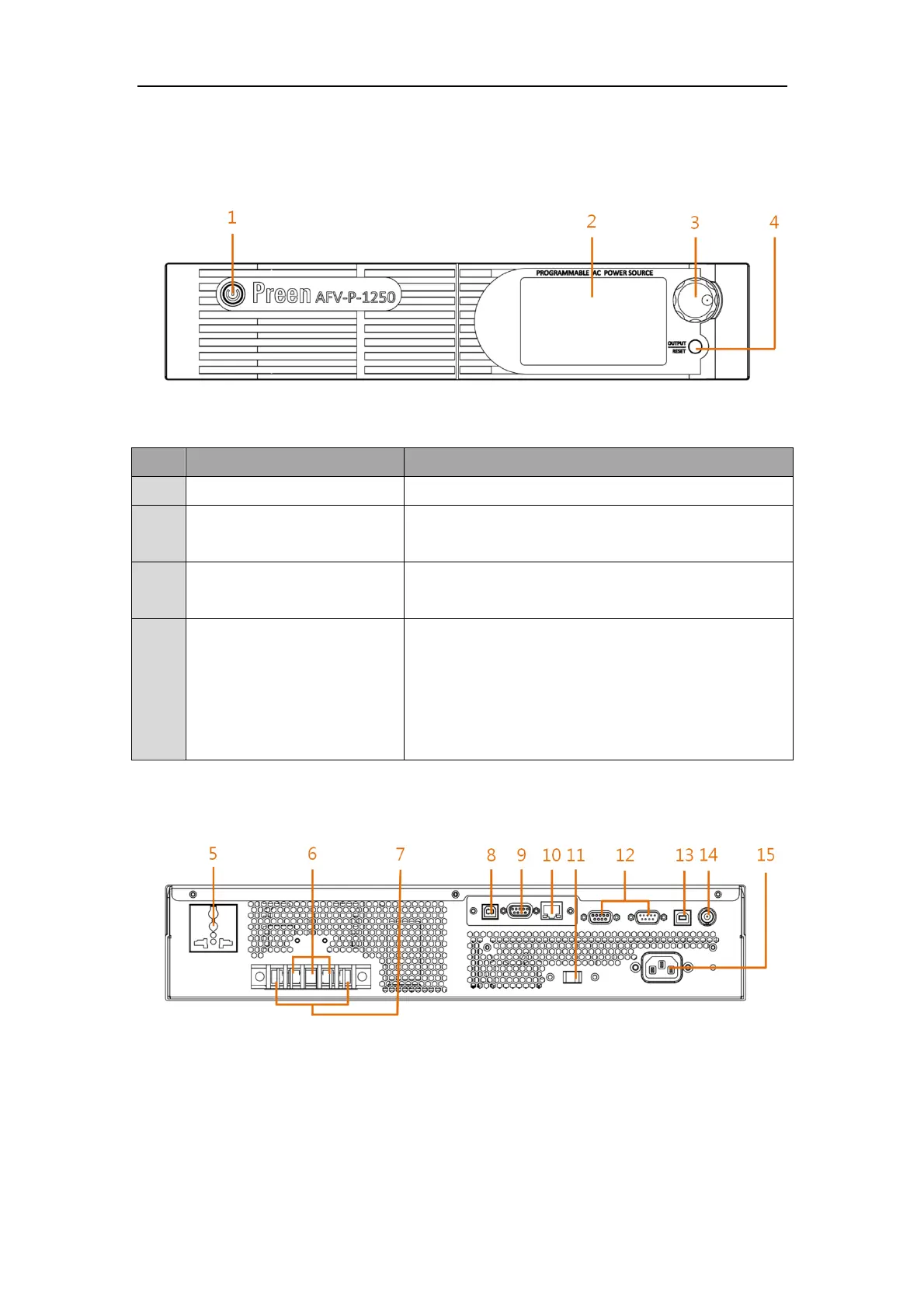
1.5 Name of Parts
A. Front Panel
Figure 1.5 Front panel
Item
Name
Description
1
Power Switch
Press this switch to turn on/ turn off the product.
2
Touch Screen
Input programming data or options by manipulating the
touch screen to the desired one.
3
Rotary Knob
Input programming data or options by turning the rotary
knob to the desired one.
4
Output & Reset Button
Press this button to enable/disable the product output.
When the output is stopped, short press 2 seconds
to restart output.
When the output is stopped, long press 2 seconds
to clear the display.
B. Rear Panel
Figure 1.6 Rear panel (for the product model of AFV-P-600)

Table of Contents

Related product manuals