AFV-P Series High Performance Programmable AC Power Supply
108
7.2 Remote Control Software: General Mode
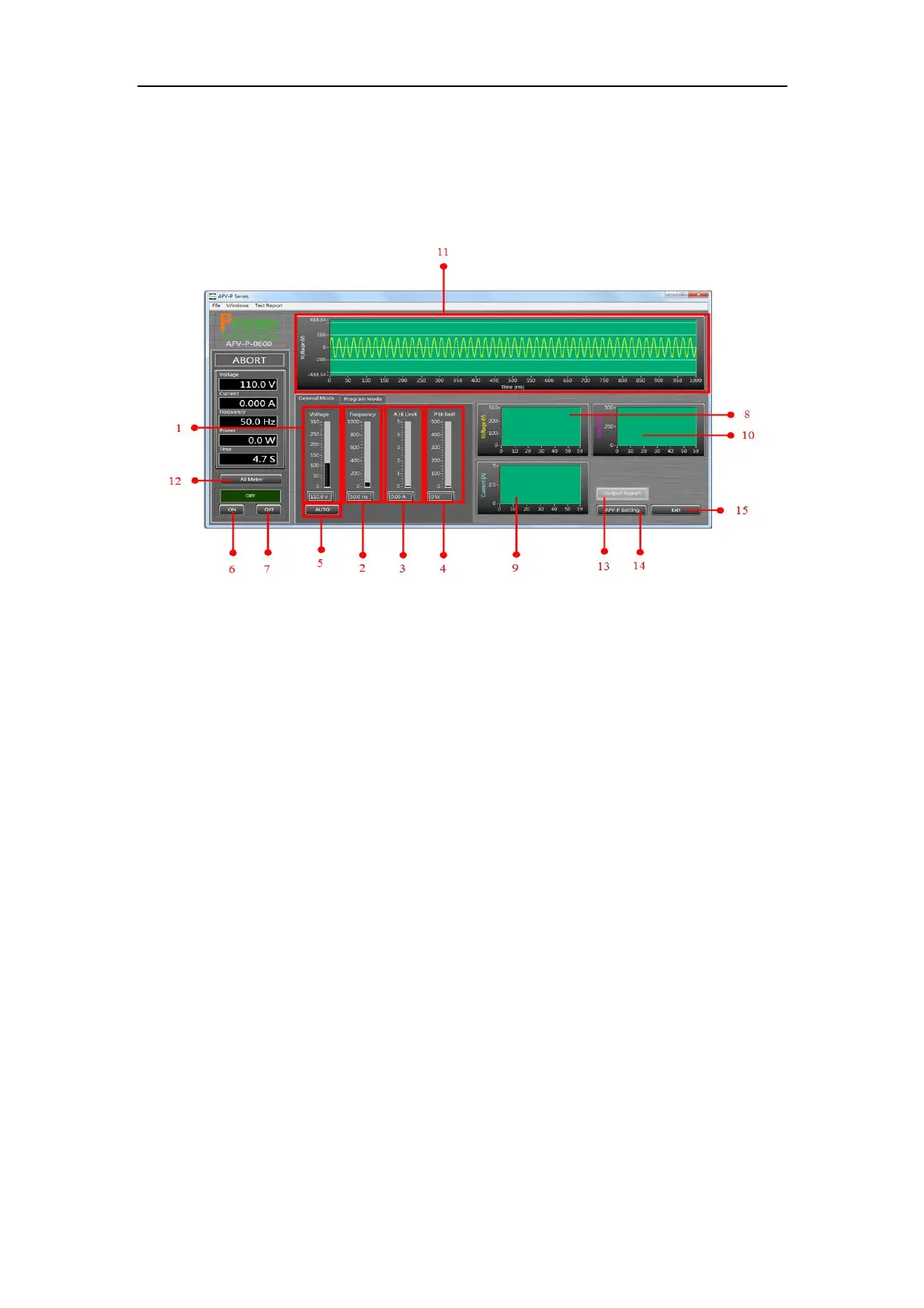
After enabling the remote control software, the general mode of the remote control
software will be shown in advance. Please see the following figure,
Figure 7.3 Remote control software: general mode
The description for the items and the icons at the general mode of the remote con-
trol software are given as follows,
1) Use to set the output voltage.
2) Use to set the output frequency.
3) Use to set the rated current.
4) Use to set the rated power.
5) Click to set the output voltage range.
6) Click to enable the product output.
7) Click to disable the product output.
8) Show the waveform of the output voltage.
9) Show the waveform of the output current.
10) Show the waveform of the output power.
11) Show the pre-simulated waveform of the output voltage.
12) Click to show the measurement readings of the product output (see Figure
7.4).
13) Click to download the product output report in the form of txt file or csv file
(see Figure 7.5).



 To Next Page