AFV-P Series High Performance Programmable AC Power Supply
72
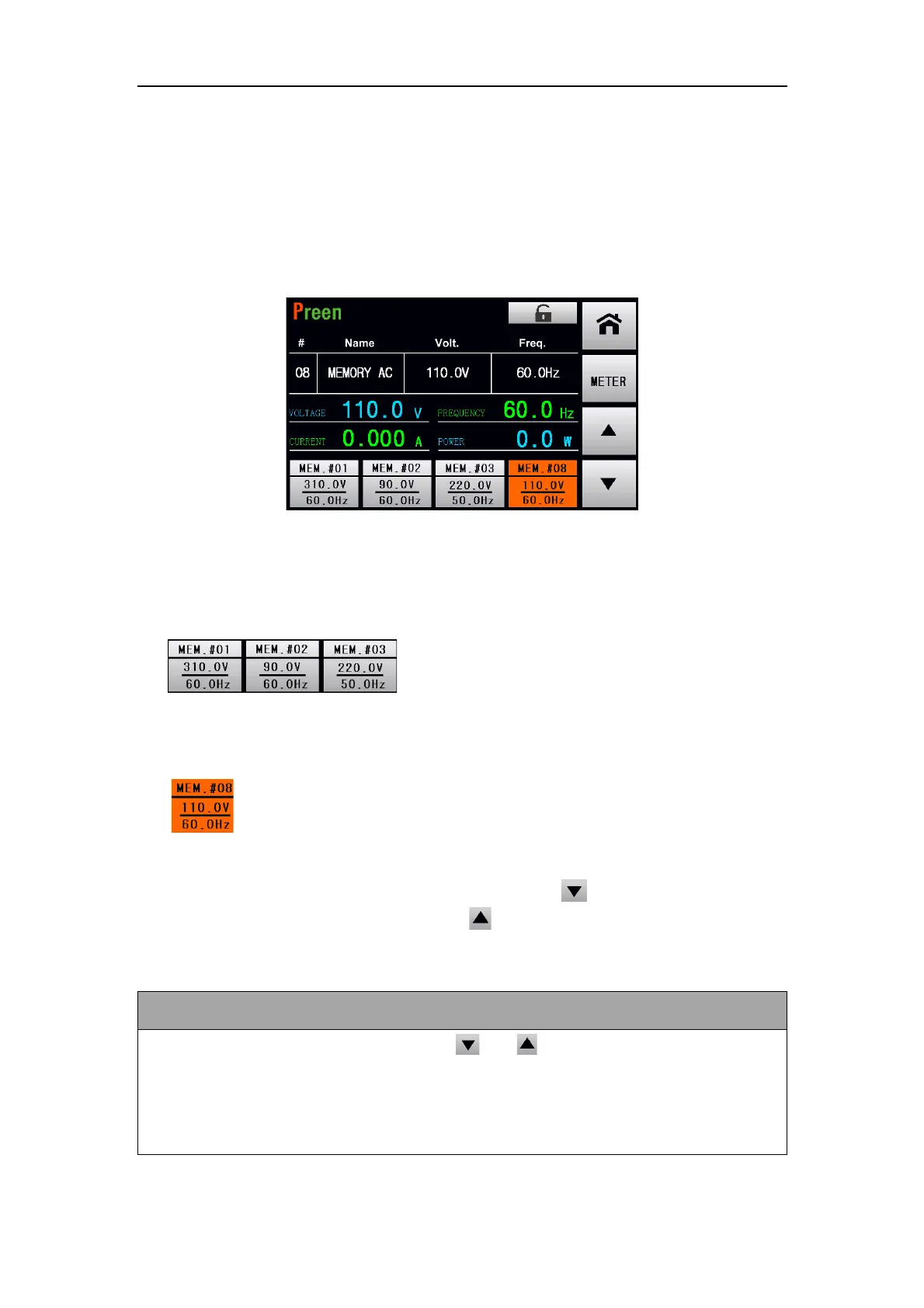
4.2 Output Page of MEMORY Feature
Once the setting is completed, press the output & reset button to start output test-
ing. There are 4 shortcuts of Memory Sets for quick switching at the output page:
three are fixed in the first three Memory Sets; one is assigned by users from the 50
sets. Please follow the figures below:
Figure 4.7 Output page of MEMORY feature
The description for the items and the icons at the output page of MEMORY feature
are given as follows,
1) :These are the fixed shortcuts to the first three
Memory Sets. Users can set the most commonly used voltages and frequencies in
these three sets for quick switching.
2) :The forth shortcut is user-assigned; any of the 50 Memory Sets can be
selected, such as MEM. #08 demonstrated in Figure 4.7. The orange background
indicates that the set is currently outputting. Press to switch to the next
Memory Set, such as MEM. #09; press to the previous Memory Set, such as
MEM. #07.
For safety reason, when users press or to preview the Memory Set
while outputting, the output remains in the original Memory Set; once the de-
sired set is confirmed, user has to press the selected Memory set to enable the
output switching.



 To Next Page