OTHER FEATURES
Button allows you to program a second
starting time:
Press button
which de-activates starting time
1, then proceed as with
.
The activation of the second starting time is
indicated by the symbol 2.
To Check (or activate) Start Time
Press button
or briefly. The display shows
the programmed starting time for 20 seconds.
This also programs the timer to start the heater
at the time shown.
To Cancel Heating Start Time
Press button
or briefly. The appropriate
number in the display goes out, together with the
yellow light.
Note: Switch on the preheating system briefly
about once a month, even during the warm
season.
Caution: When welding on the vehicle,
disconnect the preheater module connector in
order to protect this system from voltage surges.
Caution: To avoid running down the batteries,
do not turn on the preheating system for more
than one hour before starting the engine.
Warning: The preheating system uses the
same fuel as the engine. Do not operate in a
building or while refueling. Operate only in a
well-ventilated area.
Timer operating instructions (Webasto)
WEBASTO 22191
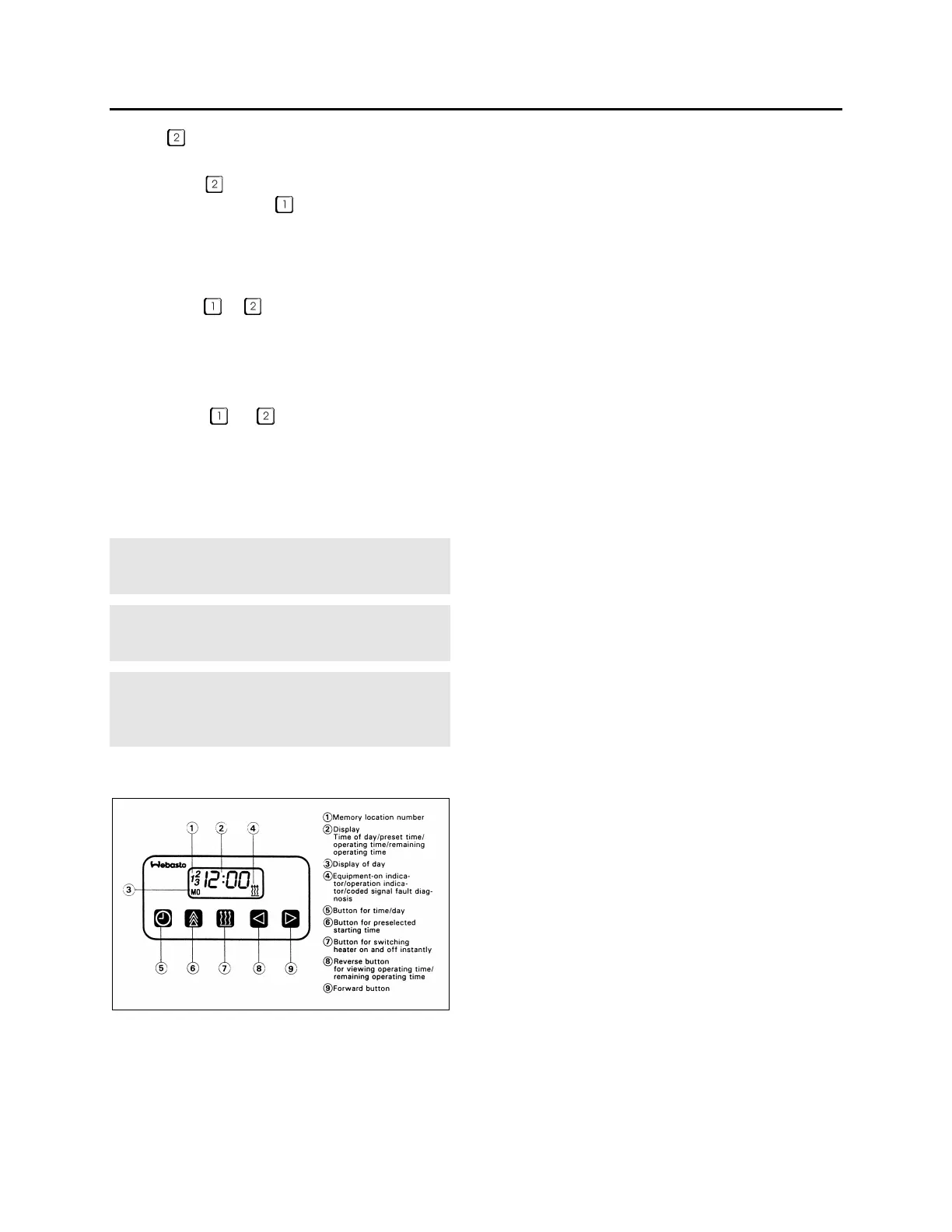
These instructions refer to the Webasto timer
illustrated above.
Remaining Operating Time
The remaining operating time refers to the
period of time the heater still continues to remain
in operation. It may be changed while the heater
is in operation.
Setting the Digital Timer
After the power has been connected, all symbols
on the digital display are flashing. The time of
the day and the day of the week must be set.
All flashing symbols of the timer can be set by
means of the Forward (9) or Reverse (8)
buttons.
When buttons (8) and (9) are pressed for more
than 2 seconds, the quick digit advance mode is
activated.
Setting the Time and Day of the Week
1. Press button (5) for more than 2 seconds
(time display flashes).
2. Press (8) or (9) button to set the time of day.
3. Wait 5 seconds. The time of day is stored
(day of week flashes).
4. Press (8) or (9) button to set the correct day
of week.
5. Wait 5 seconds. The day of week is stored.
Viewing the Time (Ignition ON)
Continuous display of current time and day of the
week.
Viewing the Time (Ignition OFF)
Briefly press button (5) to display current time
and day for 5 seconds.
Switching Heater ON (Instant Heating) With
Ignition ON:
Press button (7). Heater is switched on
(continuous operation) and continues to operate
until button (7) is pressed again or ignition is
switched off.
Note: If the ignition is switched off while heater
is in operation, the remaining operating time of 5
minutes flashes on the display and the heater
will continue to operate for this period of time.
Switching Heater ON (Instant Heating) With
Ignition OFF:
Press button (7). Heater is switched on for
preset operating time (the factory-set heater
operating duration is 60 minutes)
Switching Heater OFF
Press button (7). The heater starts its after-run
cycle and switches off thereafter.
68



 To Next Page