OTHER FEATURES
Start of heating within 24 hours
Set the starting time:
1. Press (2) repeatedly until the desired
memory display (1, 2 or 3) flashes.
2. Briefly press and release either (4) or (5).
The program time flashes.
3. Set the heating start time using (4) or (5)
(Setting is only possible if the program time
is flashing).
To select another memory, press (2).
Start of heating after 24 hours (max. 7 days)
Set the starting time:
1. Press (2) repeatedly until the desired
memory display (1, 2 or 3) flashes.
2. Briefly press and release either (4) or (5).
The program time flashes.
3. Set the heating start time using (4) or (5)
(Setting is only possible if the program time
is flashing).
Set the program day:
4. The program day begins to flash
approximately 5 seconds after the time has
been set.
5. Set the heating day using (4) or (5).
6. The program time and day are stored when
the time display disappears or when the
current time appears.
7. The memory display indicates the activated
memory. The flashing “heat-on” symbol (11)
also indicates that a memorized start time is
activated.
Checking activated memory
The program time of the displayed memory is
displayed for about 5 seconds. The display then
disappears or then switches to current time (if
the ignition is “ON”).
The programmed time (and day) can be
displayed by holding (2) down for five seconds.
Temperature display
If an ambient temperature sensor is connected
(Espar # 25 1482 89 41 00) and the ignition is
activated, the temperature can be permanently
displayed by pressing (1) briefly. If the ignition is
deactivated, the time temperature is displayed
for 15 seconds when (1) is pressed twice.
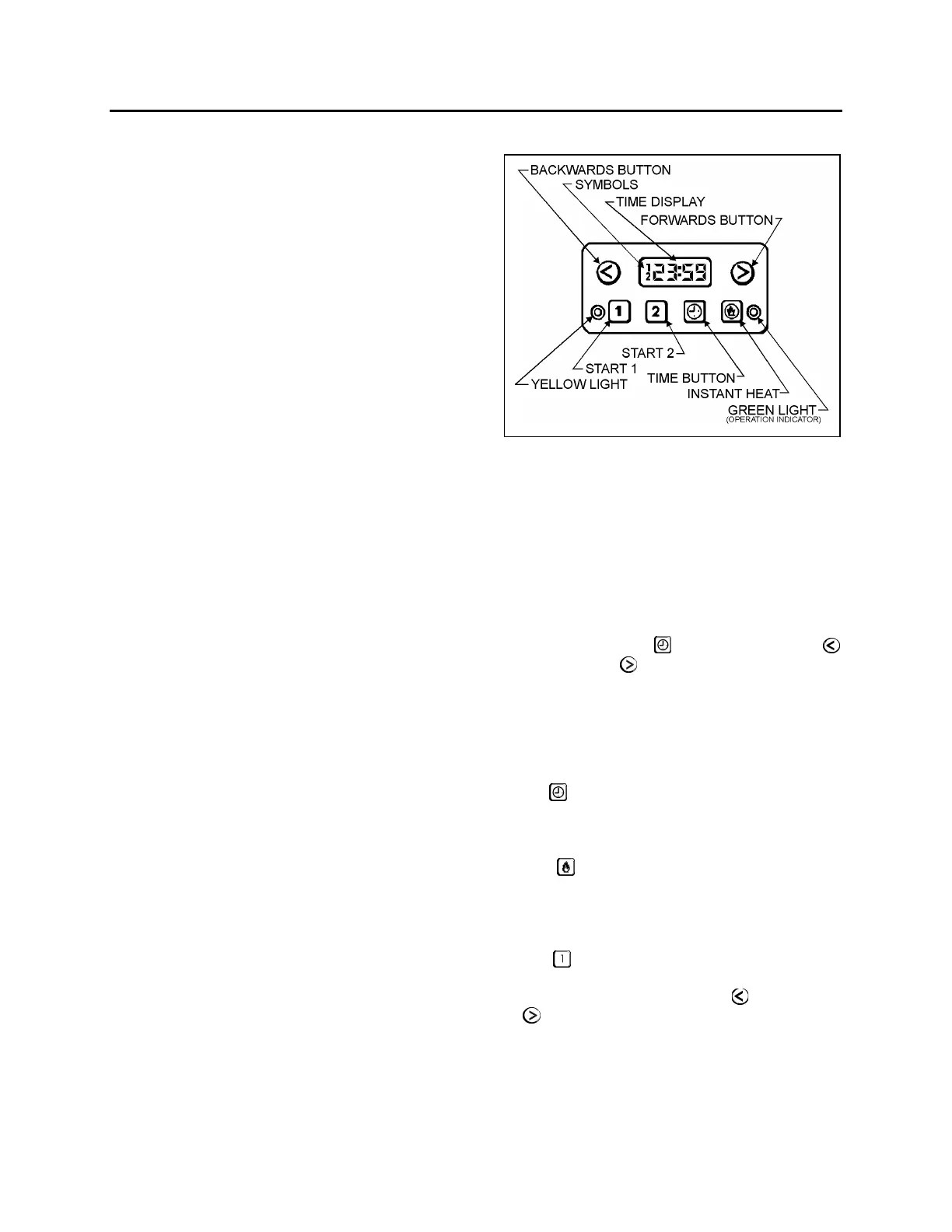
Timer Operating Instructions (Webasto)
WEBASTO 22145
These instructions refer to the Webasto timer
illustrated above
Note: Heater timer control pad may differ from
the one described. Refer to your manufacturer's
instruction booklet for detailed operating
instructions.
To Set the Clock
If the time display e.g. 18:33 is wrong, or if it
flashes 8:88, hold
and press either
(backwards) or
(forwards). The longer you
hold the button down, the quicker the display
changes. The last few minutes are set accurately
by quick pushes. Adjust to get exact time, e.g.
23:59. The display fades after 20 seconds.
Present Time Display
Press
at any time. Present time appears on
the screen.
Manual Heating Start-Up
Press
to switch the heater on or off
immediately. The green light illuminates when
the heater is on.
Programming Heating Start Time
Press
and the display shows the time at
which the heater will start. You can alter the
starting time by pressing either
(backwards)
or
(forwards) button. The longer you hold the
button down, the faster the display changes.
The last few minutes are set accurately by quick
pushes. The display fades after 20 seconds.
Start time 1 remains on the display, and the
yellow light stays on. Starting time #1 is now
activated.
67



 To Next Page