Controls and Instruments 4-59
PA-1628Operator's ManualH3-45 COACH
There are two configurations of vehicle tires to be
supported. One configuration (the most common)
consists of 8 tires total: two tires on the front axle, 4
tires on the drive axle and 2 tires on tag axle. All
screen figures shown in this document relates to this
vehicle configuration. The second tire configuration
consist of 6 tires total: 2 tires on the front axle, 2 tires
on the drive axle (super single tires) and 2 tires on the
tag axle. The vehicle tire configuration is selected
with a parameter (Refer to "TIRE PRESSURE
MONITORING SYSTEM" on page6 in Section 7
Safety Features and Equipment for more
information). When the display is configured for 6
tires, the drive axle tires appears as one large tire on
both side instead of twin tires as illustrated in this
document and there is one reading appearing on
each side instead of two as illustrated in this
document.
Start-up
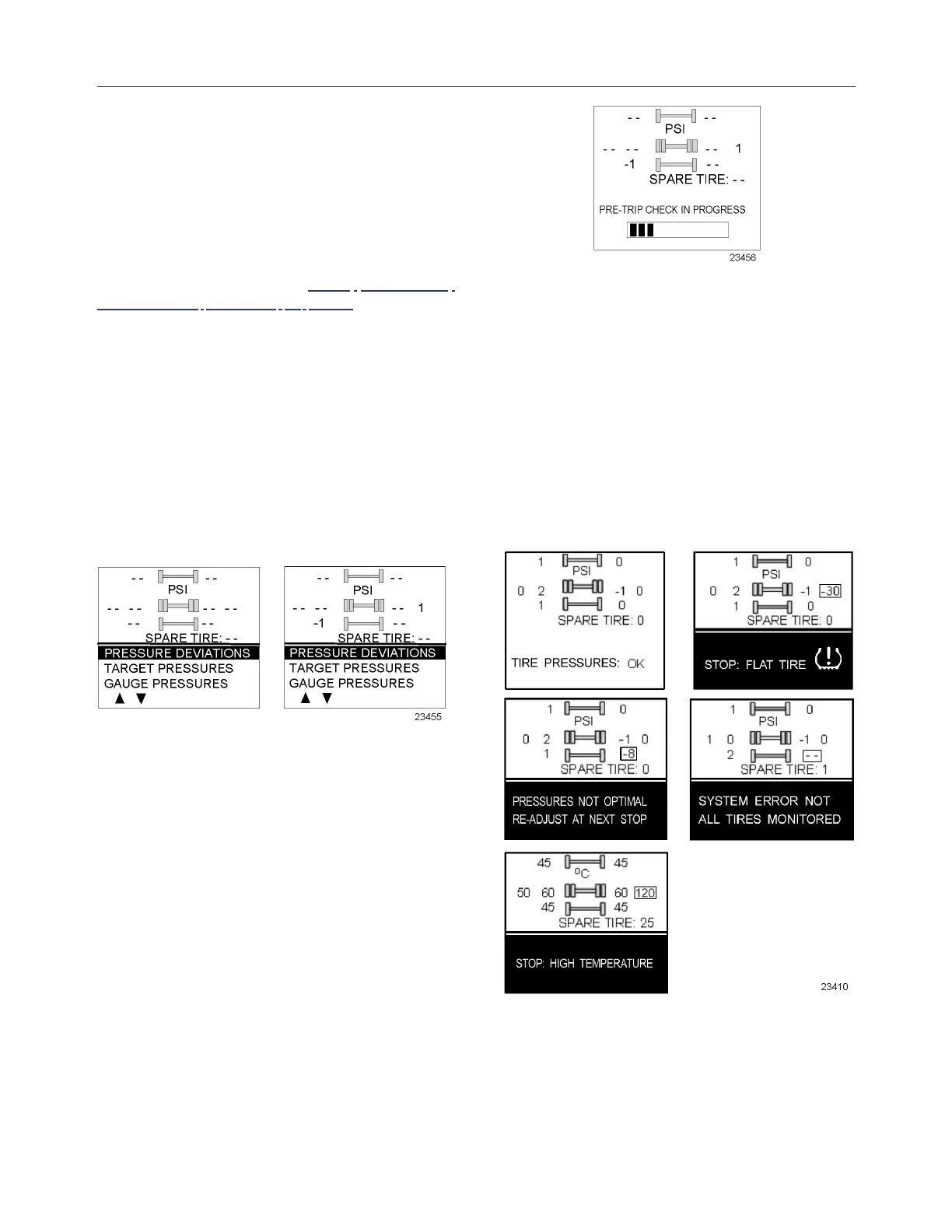
When the ignition switch is turned to ON, the
following screen appears on the TPMS Display.
Dash lines are displayed meaning that no pressure
data have been received by the display.
As illustrated, the pressure readings will appear
replacing the dash lines as the TPMS display starts
to receive pressure data from the TPMS receiver. It
can take 1 minute to get all pressure readings
updated since the sensors transmit at a one-minute
interval.The user can flip through the menus.
Pre-Trip Check
When one of the preconditions defined to start the
pre-trip check is met, the TPM display enters into a
pre-trip check routine and the screen shown below
appears. The preconditions to initiate the pre-trip are:
Park brake removed Or No activity on the display
menu keys for a defined time (Key pressed timeout).
After a pre-trip, the display is in a “drive” mode with
bottom menu replaced by the alarm status. The
display remains in this mode until one of the
following occurs: A menu key is touched while the
park brake is applied, or the park brake does a
transition from released to park brake applied.
During the pre-trip check, the pressure readings for
the different wheels become all available.
The pre-trip check ends, either when: the pressure
readings have been received for all running wheels or
the pre-trip check maximum time has elapsed. It was
selected to provide sufficient time for all wheel
sensors to wake-up and send a first reading.
The pre-trip check is aborted and the bottom menu
reappears if the park brake was active and the user
press one of the menu keys.
Upon completion of the pre-trip check, the TPMS
display will come up with one of the following
screens:
A rectangle around each pressure and temperature
reading of the tires that have an issue is blinking to
draw the attention to the defective tires.
In the case of multiple errors at the same time, the
highest priority error is displayed at the bottom. “Flat
Tire” has the highest priority followed by “High








 To Next Page