4-22 Controls and Instruments
PA-1628Operator's ManualH3-45 COACH
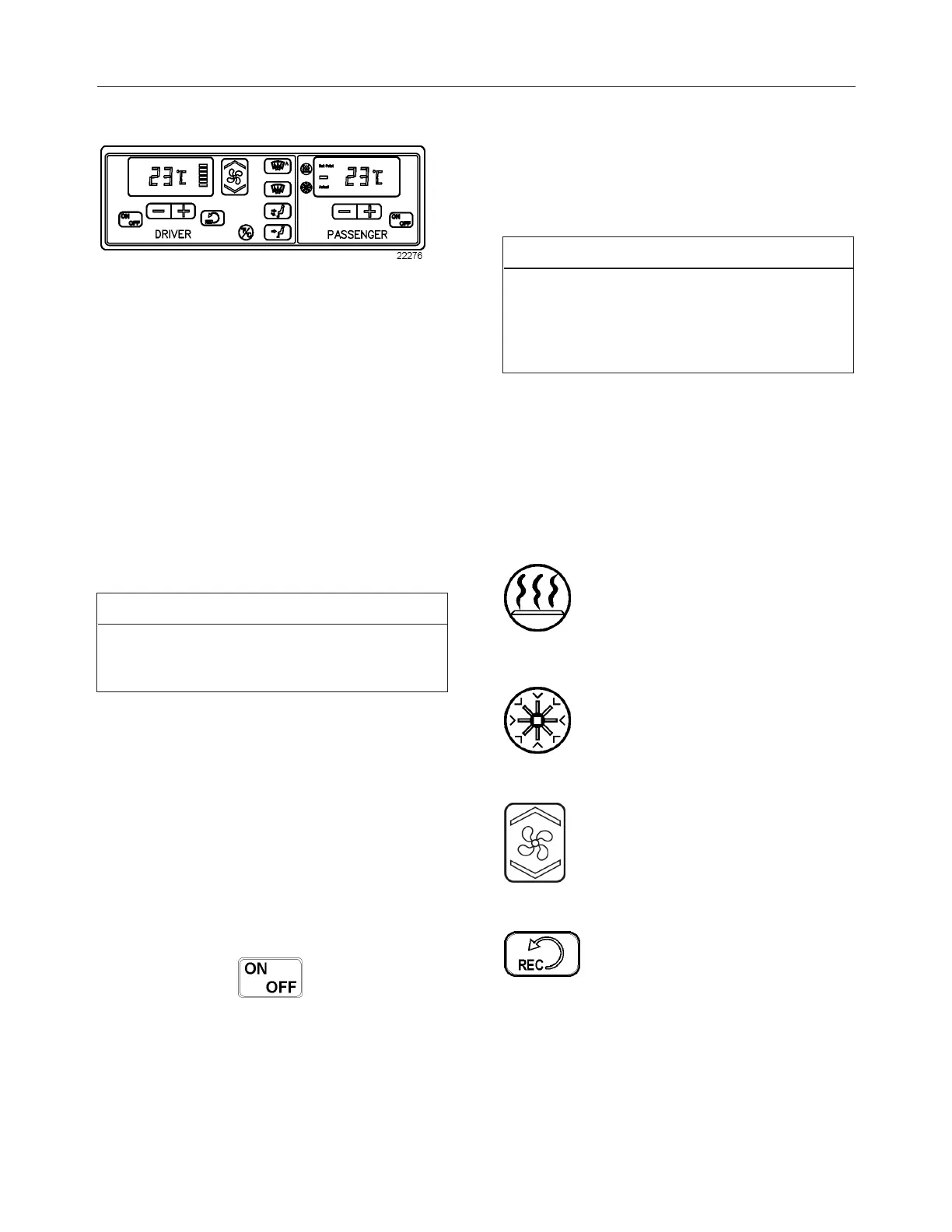
HVAC CONTROL UNIT
CONTROL UNIT FOR HIGH CAPACITY CENTRAL HVAC
SYSTEM
The temperature control in the driver’s area is
provided directly by the driver section of the HVAC
control unit.
Using the Up/Down type switch sets the fan speed.
The set speed appears on the display.
The vehicle is slightly pressurized by the HVAC
system to prevent dust and moisture from entering.
On high capacity central systems, airflow and
controls divide the vehicle into two areas: driver’s
area with defroster and passengers’ area. Fresh air is
fed in each area and has a separate return air and
discharge air duct.
NOTE
To operate the air conditioning system when
stationary, run the engine at fast idle. When the
system is running, keep windows and door closed.
To prevent battery run-down, the central A/C and
heating systems will not operate if the charging
system is not working properly.
When the A/C system is running, park at least 4 feet
(1,5 m) from other vehicles or buildings to allow
sufficient air flow through the condenser core.
Separate driver and passenger heating, ventilation
and air- conditioning controls are located on this
panel. To operate, the vehicle’s engine must be
running.
The units may be turned on by pressing the following
button:
Also, the driver's HVAC section turns on
automatically at engine start and uses the settings
that were kept in memory before turning off of the
system.
The A/C compressor starts automatically when the
two following conditions are satisfied:
1. The outside temperature is above 32°F (0°C).
2. The passenger's area temperature has
reached 7°F (4°C) under the set point.
NOTE
Upon starting if the outside temperature is above
32°F (0°C) and then drops below 32°F (0°C), the
compressor will keep running up to a temperature
of 15°F (- 9°C) to prevent condensation from
forming on the windows.
All parameters set before turning the system Off will
be kept in memory for the next power On.
The HVAC module performs a self-diagnosis every
time it is turned ON. Codes are shown on displays or
flashed on control buttons. Refer to "Maintenance
Manual" for more information on the diagnostic
codes
Heating Mode Indicator
This red LED illuminates when the
system is heating.
Cooling Mode Indicator
This green LED illuminates when the
system is cooling (when the compressor
clutch is engaged).
Fan Speed
The driver’s fan has six speeds. Increase
speed by pressing on the upper portion of
the button, decrease by pressing on the
lower portion.
Recirculate
Closes or opens both the driver's and
passenger's section fresh air damper.
A red LED in the top right corner of the button
illuminates when air is recirculated. Use for faster
driver’s section heating.
This feature is automatically canceled when
defogging is activated.







 To Next Page