4-26 Controls and Instruments
PA-1628Operator's ManualH3-45 COACH
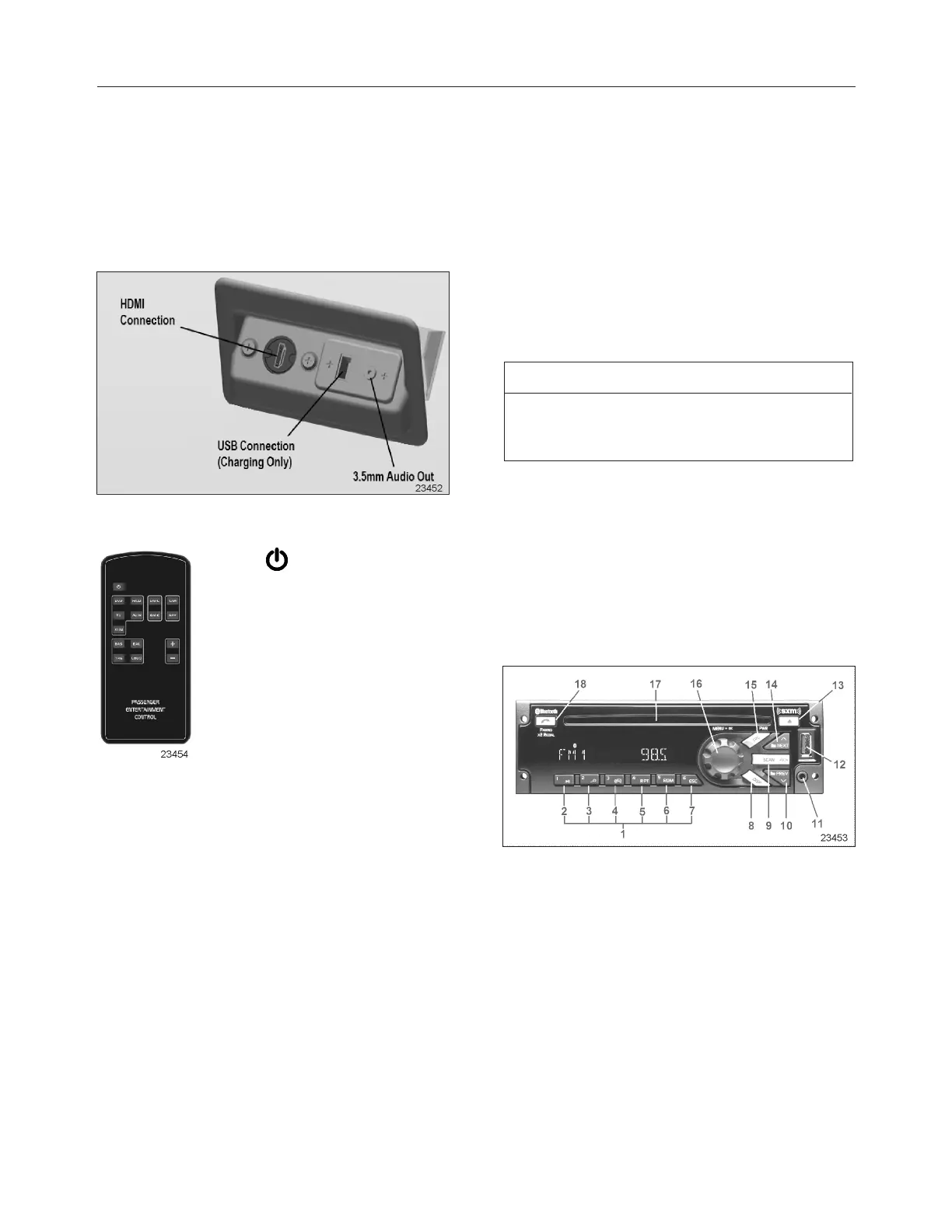
To do so, connect the laptop to the modesty HDMI
connector, select Video IN on the Video and Sound
Selector and turn on the laptop presentation mode.
Devices using 3.5mm audio connectors (MP3
players) can also be used by connecting them to the
3.5 modesty connectors and selecting the Audio IN
mode. A USB connection is also available to
recharge battery operated devices.
Using The Vss-05 Remote Control
1.
Press this button to turn on the
unit. Press this button again to turn
off the unit.
2. R/CD, AU IN, DVD, TV,
VI IN
Press one of these buttons to
select the relevant audio or
audio/video source.
3. DMIC
Press dmic button to turn on the driver microphone.
Press dmic button again to turn off the driver
microphone.
4. GMIC
Press gmic button to turn on the guide microphone.
Press gmic button again to turn off the guide
microphone.
5. CAM
Press cam button to select the optional panoramic
view camera signal.
Press cam button again to turn off the panoramic
view camera.
6. NAV
Press nav button to display the optional GPS
navigation system guidance screen (not applicable).
7. BAS, BAL, TRE, LOUD
Press one of these buttons to select BASS,
BALANCE, TREBLE and LOUDNESS mode.
8. +, -
Press these buttons to increase or decrease the
value for BASS, BALANCE, TREBLE and
LOUDNESS mode.
NOTE
Point the remote control in direction of the VSS-05.
Remote control battery replacement. Use CR2025
lithium battery.
DASHBOARD RADIO/MP3/IPOD/CD PLAYER
Select from several sources of entertainment for the
driver’s area such as AM, FM, WX weather band,
Satellite radio services and Bluetooth (phone calls).
Play a CD inserted in the radio’s CD slot or listen to
a MP3 device or iPod through this unit. The complete
radio operating instructions manual is included in
Technical Publication box.
1. Storing Radio Station Presets
l Tune the desire frequency, and then long
press any of the Preset (1-6) buttons until the
radio produces a beep.
2. Tuning Radio Station Presets
l Short press any of the Preset (1-6) buttons.
3. Play/Pause
l Press to pause/unpause Media.







 To Next Page