Controls and Instruments 4-39
PA-1628Operator's ManualH3-45 COACH
DRIVER INFORMATION DISPLAY
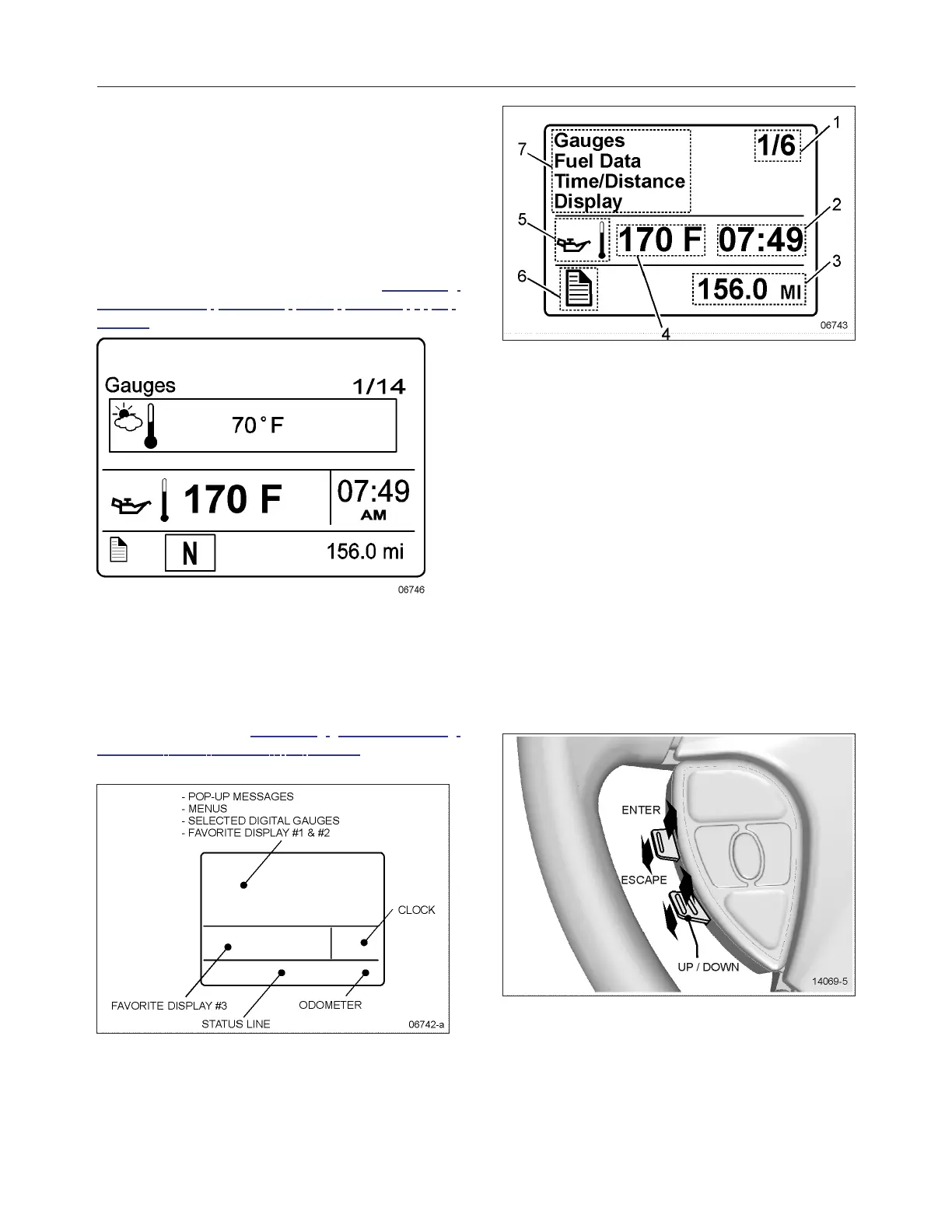
The DID (Driver Information Display) is located in
the center of the instrument cluster. It displays digital
gages, main menus and submenus that provide
necessary and important information to the driver.
The information available to the driver depends on
vehicle configuration, and whether the vehicle is in
operation or parked. For the list of the available
menus and submenus, refer to "DRIVER
INFORMATION DISPLAY (DID) MENUS " on
page11 in Section 5 Other Features.
The outside air temperature, fuel flow and the
odometer (Allison transmission) or the current gear
position (transmission I-Shift) are part of the default
display. You can replace the default display by your
selection of favorite gages using the Driver
Information Display submenu Favorite Display
Setting. Refer to "DRIVER INFORMATION
DISPLAY (DID) MENUS " on page11 in Section 5
Other Features for more information.
1. Indicates first of six available menus (varies
by menu)
2. Clock
3. Odometer
4. Value or data (in this example, the engine oil
temperature)
5. Pictogram relevant to the displayed value or
data
6. Status bar active pictogram
7. Messages or available menus
Selecting A Menu
Menus are placed in a cascade arrangement. Use
the steering wheel controls buttons to scroll through
them.
To select a menu:
1. Press the ENTER or ESCAPE button to
display the list of available menus.








 To Next Page