4-24 Controls and Instruments
PA-1628Operator's ManualH3-45 COACH
AUDIO-VIDEO SELECTOR PANEL FOR THE
PASSENGER’S AREA
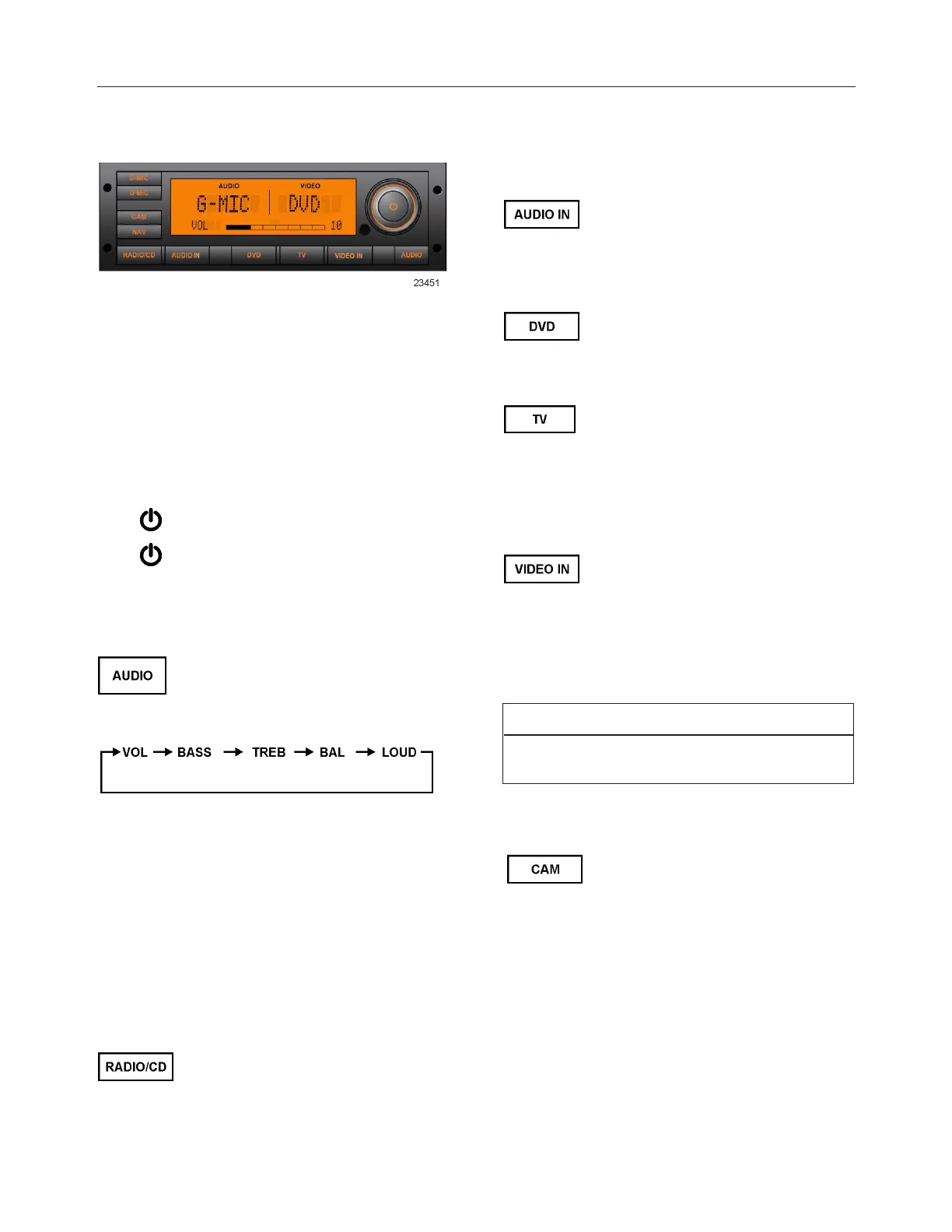
The VSS-05 Video and Sound Selector enables the
driver to select audio, audio/video and video sources
with settings of volume level, bass, treble, etc. for
the passenger’s area only. The DVD player, media
player, microphones and auxiliary audio or video
sources are controlled with this unit.
Turning Power On And Off
Press button to turn on the unit.
Press button again to turn off the unit.
Setting Of Volume/ Bass/ Treble/ Balance/ Loud-
ness
Press AUDIO button repeatedly to
choose the desired mode. Each
press changes the modes as
follows:
Turn volume knob until the desired sound is obtained
in each mode. The final setting will apply to all audio
sources for the passenger’s area. If no button is
pressed within 8 seconds after selecting BASS,
TREB, BAL and LOUD modes, the unit
automatically sets in the VOL mode. The volume
value adjust from 0 (complete mute) to 40
(maximum).
Audio Or Audio/Video Source Selection
Press RADIO/CD button to select
the dashboard radio as current
audio source for the passenger’s
area. Pressing this button will also
permit to listen to the CD inserted in
the dashboard radio.
Press AUDIO IN button to select
the auxiliary 3.5mm connection in
the modesty panel as current audio
source.
Press DVD button to select DVD
Player as current audio/video
source.
Press TV button to select the
female HDMI cable connection
coming from the back of the parcel
rack HDMI switch as current
audio/video source (standard on H3
Series, optional on X3 Series).
Press VIDEO IN button to select an
auxiliary video input as current
audio/video source.
Press VIDEO IN button to select
the optional modesty panel HDMI
connection as current audio/video
source.
NOTE
If CAM or NAV is already activated, DVD, TV or
VIDEO IN cannot be selected and displayed.
Operation Of The Panoramic View Camera
1. Press CAM button to select the
optional panoramic view camera
signal. The VIDEO section of
the VSS- 05 LCD panel will
show “CAM”. The video
monitors turn on automatically.
2. Press CAM button again to turn
off the panoramic view camera
and return to previous
audio/video source.







 To Next Page