5-32 Other Features
PA-1628Operator's ManualH3-45 COACH
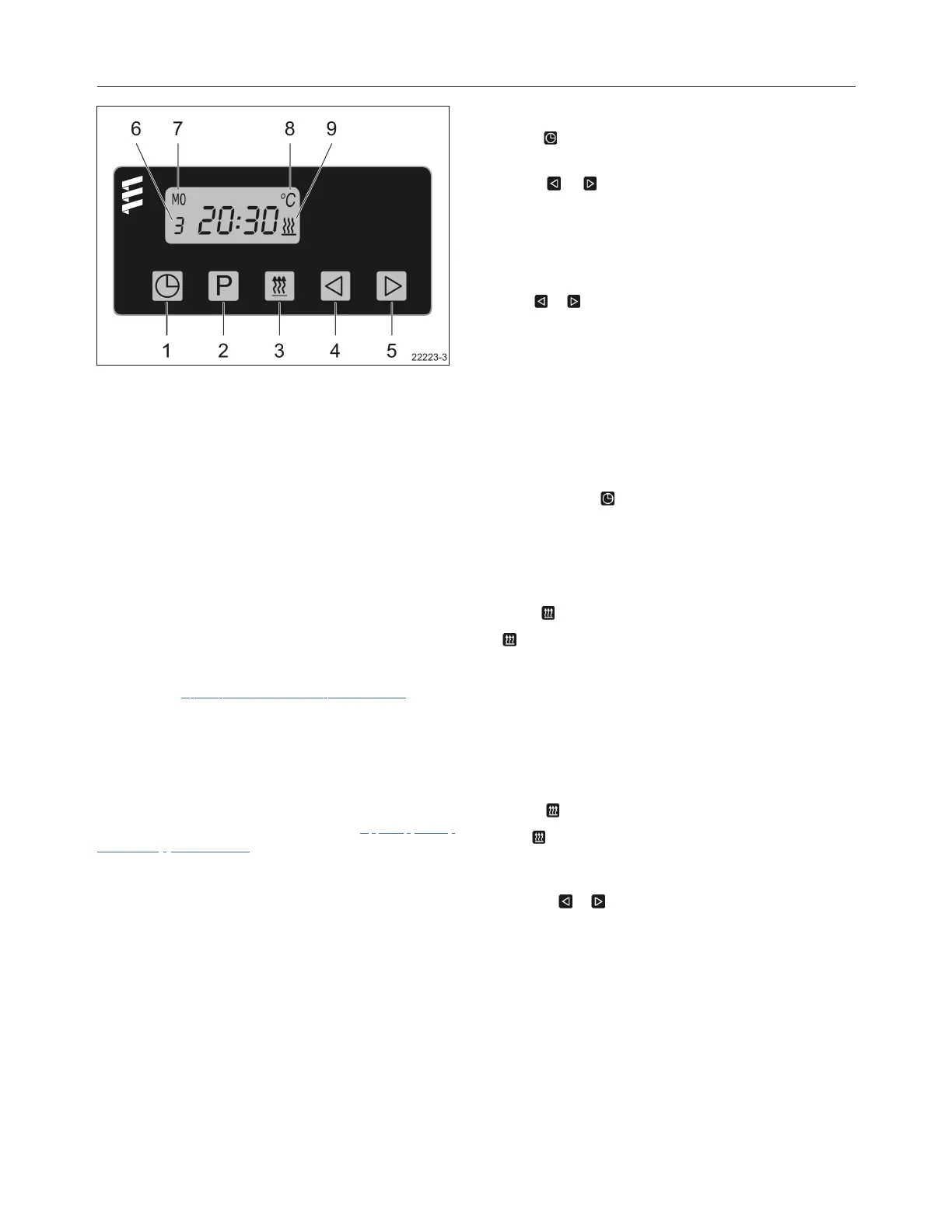
FIGURE 1: PREHEATER TIMER
1. Time set
2. Preheat time set
3. Heater "On"
4. Backward scan
5. Forward scan
6. Memory location
7. Time and day display
8. Air temperature display
9. Heater "On" symbol
Refer to the 7 day timer operating instructions found
on your Technical Publications USB flash drive, and
on the Technical Publications Website for additional
information.
TIMER OPERATION
The most common timer operations are described.
For additional details, refer to the 7 day timer
operating instructions found on your Technical
Publications USB flash drive, and on the Technical
Publications Website.
Set Time And Day
Push button once. 12:00 will begin to flash (this
will occur upon initial hook up to power).
Using or , set the present time of day (24 hour
clock).
When the time stops flashing the time has been
stored.
The weekday will now begin to flash.
Use or to set the present weekday.
When the weekday stops flashing the weekday has
been stored.
When the vehicle ignition is turned “on” the time
display will appear.
When the vehicle ignition is turned “off” the timer
display will go off after 15 seconds.
Changing Time And Day
Push and hold button until the time display begins
to flash. Continue to set the time as listed in setting
time and weekday.
Using The Timer With The Vehicle Ignition
“Off”
Push button.
will appear on the display as well as the operation
countdown timer.
The running time is factory set to a maximum of 120
minutes. This
running time can be reset once or permanently as
desired.
Adjusting Preheat Time Once
Press button.
The will appear in the display and the preselected
run time will appear in the display (maximum time of
120 minutes).
Use the or to adjust the desired run time.








 To Next Page