Appendix B Form Saver Mode
252
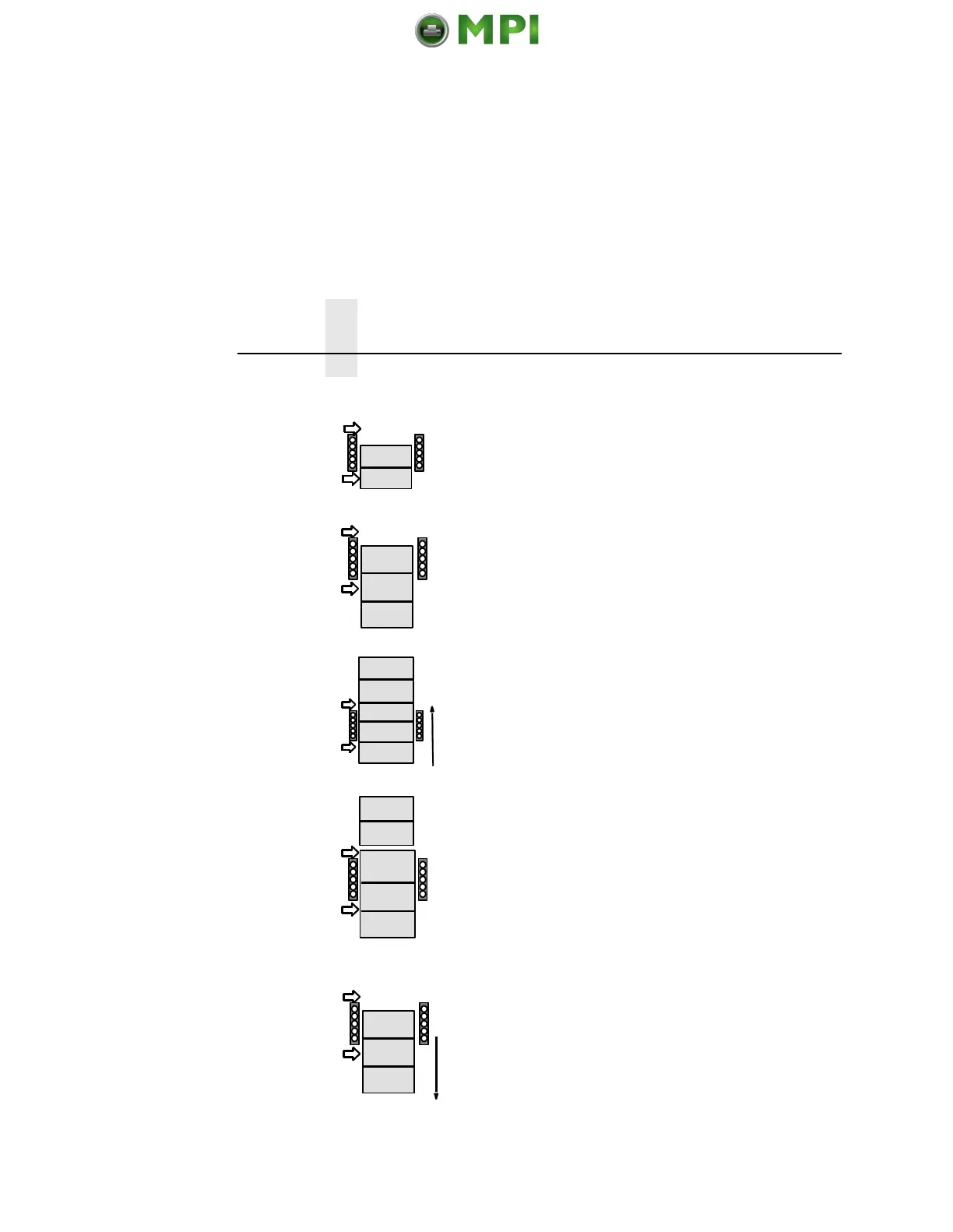
Figure 17. Form Saver Mode, Short Form Example
Page 1
Page 2
Tear Position
Print Position
Page 1
Page 2
Page 3
Print Line
Tear Position
Print Position
Page 1
Page 3
Page 4
Page 5
Page 2
Tear Position
Print Position
Slew
Page 1
Page 2
Page 3
Page 4
Page 5
Tear Position
Print Position
Page 3
Page 4
Page 5
Tear Position
Print Position
Print Line
Print Line
The user loads paper and sets Top of
Form.
Print forms.
Press the VIEW/EJECT key and the
printer slews the bottom of the last
printed page to the tear position. The
printer knows the distance. The display
indicates:
Ready for tear
Eject to return
Tear off form.
Press VIEW/EJECT and the printer
positions the paper to be ready to print
at the top of the first form available.
Mantenimiento Periféricos Informáticos SL C/Canteras, 15 28860 Paracuellos de Jarama Tel: 00 34 917481604 WEB: https://mpi.com.es













 To Next Page