Beforesettingup“WorldPay”,itisrequiredthatthehotspotownershaveavalidWorldPay“MerchantAccount”fromitsofficial
website:RBSWorldPay:MerchantServices&PaymentProcessing,go ingtorbsworldpay.com>>
supportcenter>>accountlogin.
STEP1.LogintotheMerchantInterface.
> Loginurl:www.rbsworldpay.com/support/index.php?page=login&c=WW
> SelectBusinessGateway‐ FormerlyWorldPay
> ClickMerchantInterface
> Username:user2009
> Password:user2009
STEP2.SelectInstallationsfromthelefthandnavigation
STEP3.ChooseaninstallationandselecttheIntegrationSetupbuttonforthespecificenvironment.
> InstallationID:239xxx
STEP4.CheckEnablePaymentResponsecheck box.
STEP5.EnterthePaymentResponseURL.
> URL:<wpdisplayitem=MC _callback>
STEP6.CheckEnableth
eSho
pperResponse.
STEP7.SelecttheSaveChangesbutton
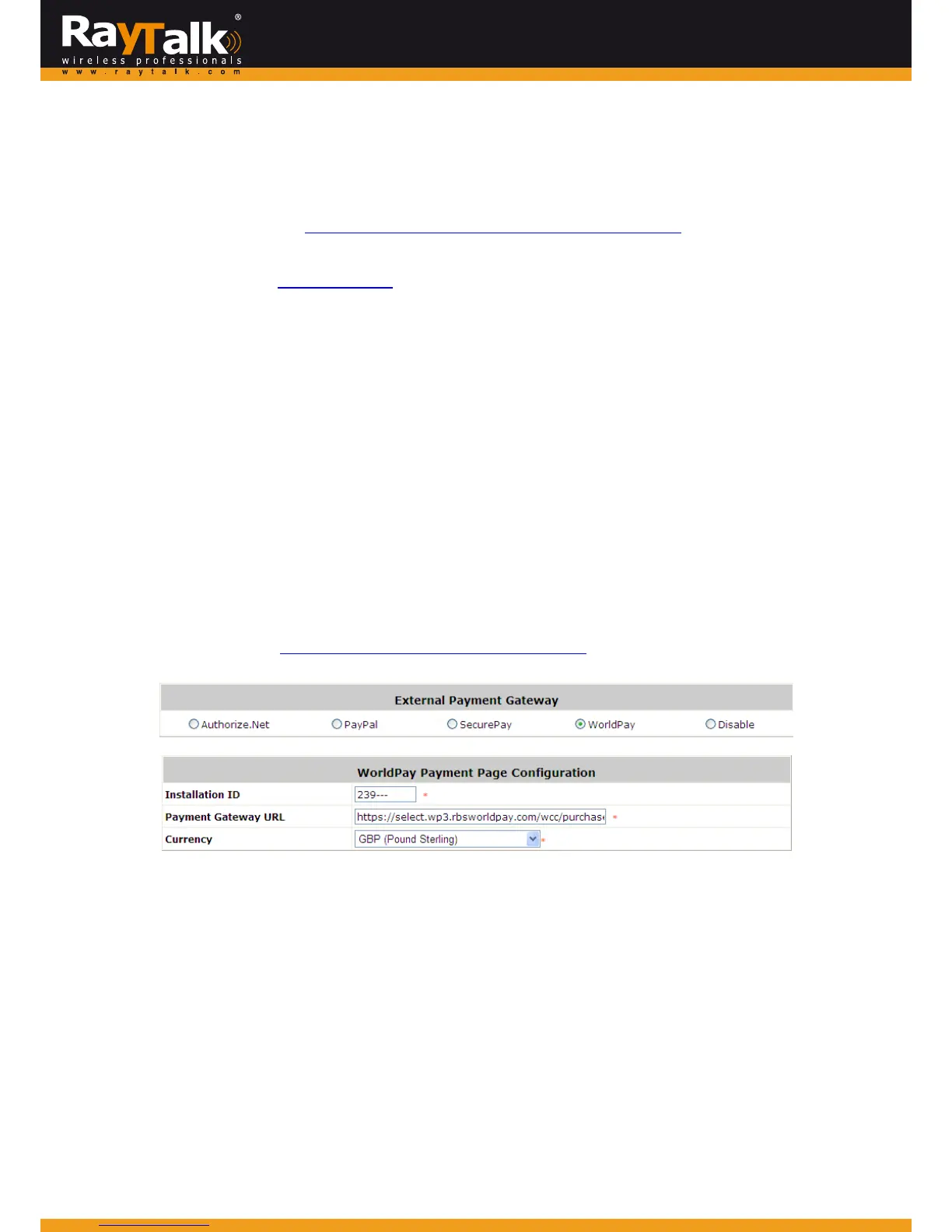
STEP8.InputInstallationIDandPaymentGatewayURLingatewayUI.
> InstallationID:2009test
> URL:https://select.wp3.rbs worldpay.com/wcc/purchase
Note:TheWANIPofgatewaymustbearealIP.



 To Next Page