6
RestraintheUsers
6.1
Black
L
i
s
t
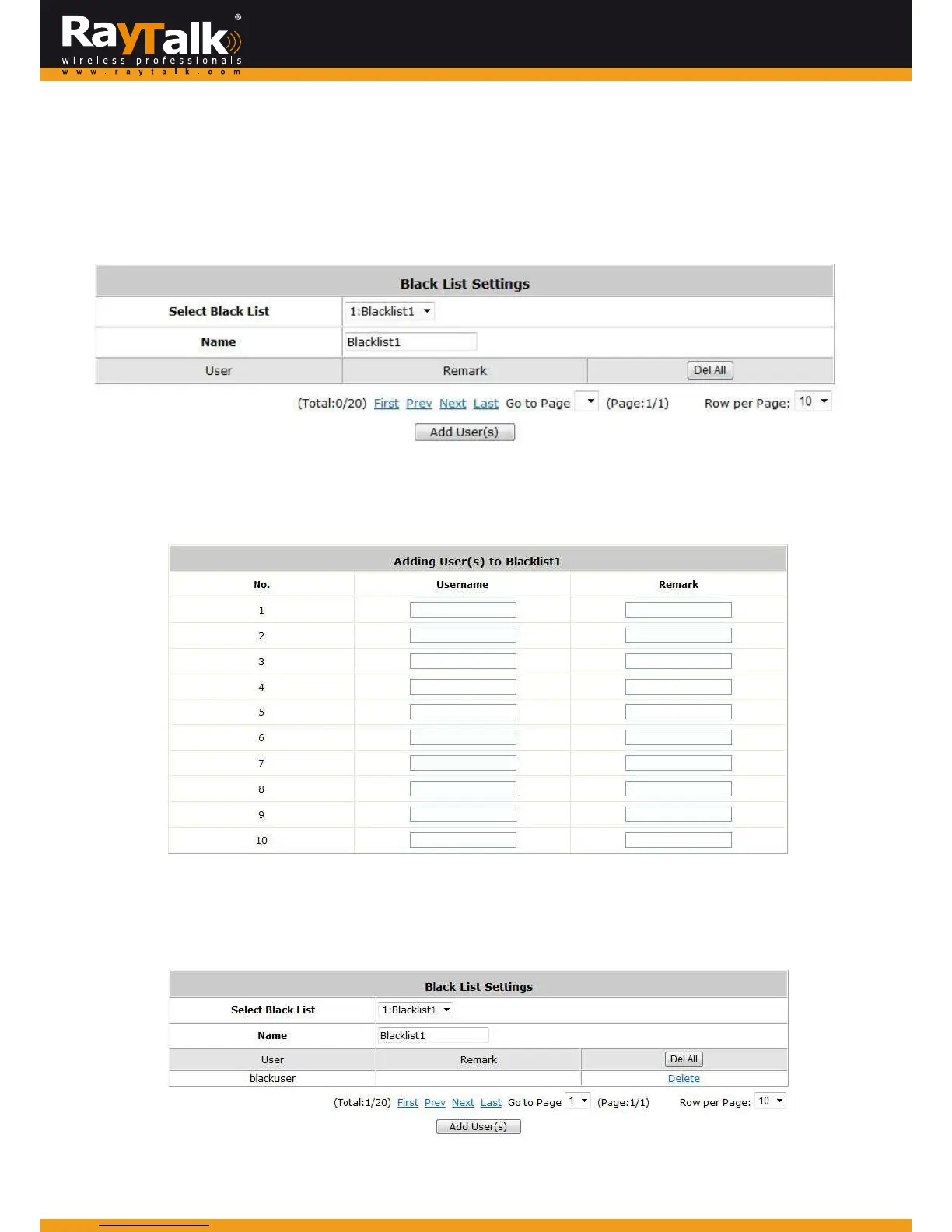
ToconfigureBlackList,goto:Users>>BlackList.
Theadministratorcanadd,delete,oredittheblacklistforuseraccesscontrol.Useraccountsthatappearontheblacklistwillbe
deniedofnetworkaccess.Theadministratorcanusethepull‐downmenutoselectthedesiredblacklist.
SelectBlackList:Thereare5blacklistprofilesavailableforutilization.
Name:Settheblacklistnameanditwillshowonthepull‐downmenuabove.
AddUser(s):ClicktheAddUser(s)buttontoadduserstotheselectedblacklist.
Afterenteringthe usernamesin the“Username”fieldand therelated informationinthe“Remark”blank(notrequired),click
Applytoaddtheusers.If a user needs to be removed from the black list, click the user’s “Delete” button and or use click
Del Allbuttontorem oveallusersfromtheblacklist.
AftertheBlackListeditingiscompleted.You canselecttheBlackListineachAuthenticationServertomakethelisteffective.



 To Next Page