9.2
DynamicDomainNameService(DDNS)
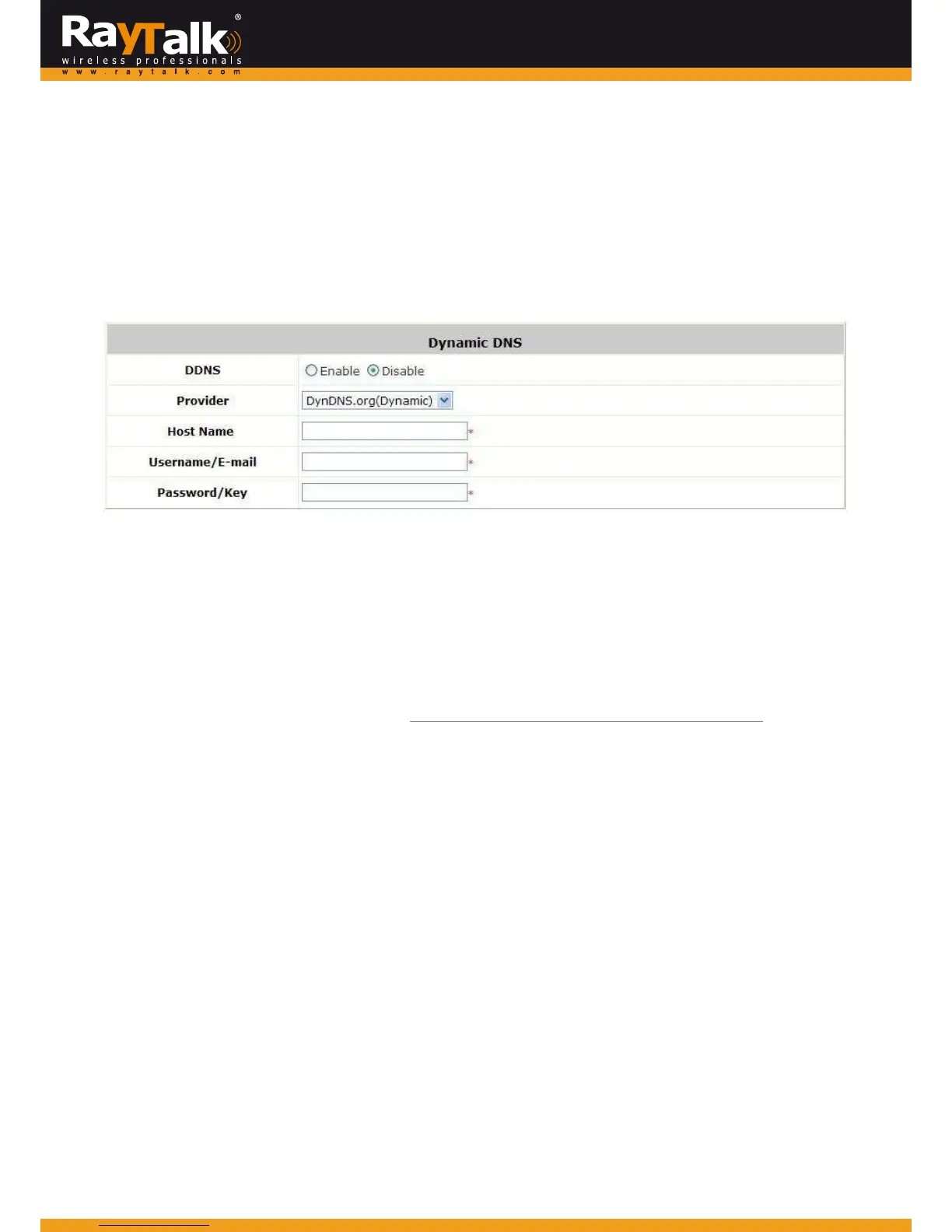
ToconfigureDynamicDomainNameService,goto:Network>>DDNS.
Beforeactivatingthisfunction,youmusthaveyourDynamicDNShostnameregisteredwithaDynamicDNSprovider.
TheMiMoHotSpotAccessPointWi‐FiRayTalkRA‐696supportsDNSfunctiontoaliasthedynamicIPaddressfortheWANportto
astaticdomainname,allowingtheadministratortoeasilyacce sstheMiMoHotSpotAccessPointWi‐FiRayTalkRA‐696’sWAN.
IfthedynamicDHCPisactivatedattheWANport,itwillupdatetheIPaddressoftheDNSserverperiodically.
Thesesettingswillbecome
effectiveimmediatelyafterclickingApply.
DDNS:Enableordisablethisfunction.
Provider:SelecttheDNSprovider.
Hostname:TheIPaddress/domainnam eoftheWANport.
Username/E‐mail:TheregisterID(usernameore‐mail)fortheDNSprovider.
Password/Key:TheregisterpasswordfortheDNSprovider.
Note:
ToapplyforfreeDynamicDNSservice,youmaygotohttp://www.dyndns.com/services/dns/dyndns/howto.html.



 To Next Page