5.1.1
L
o
c
a
l
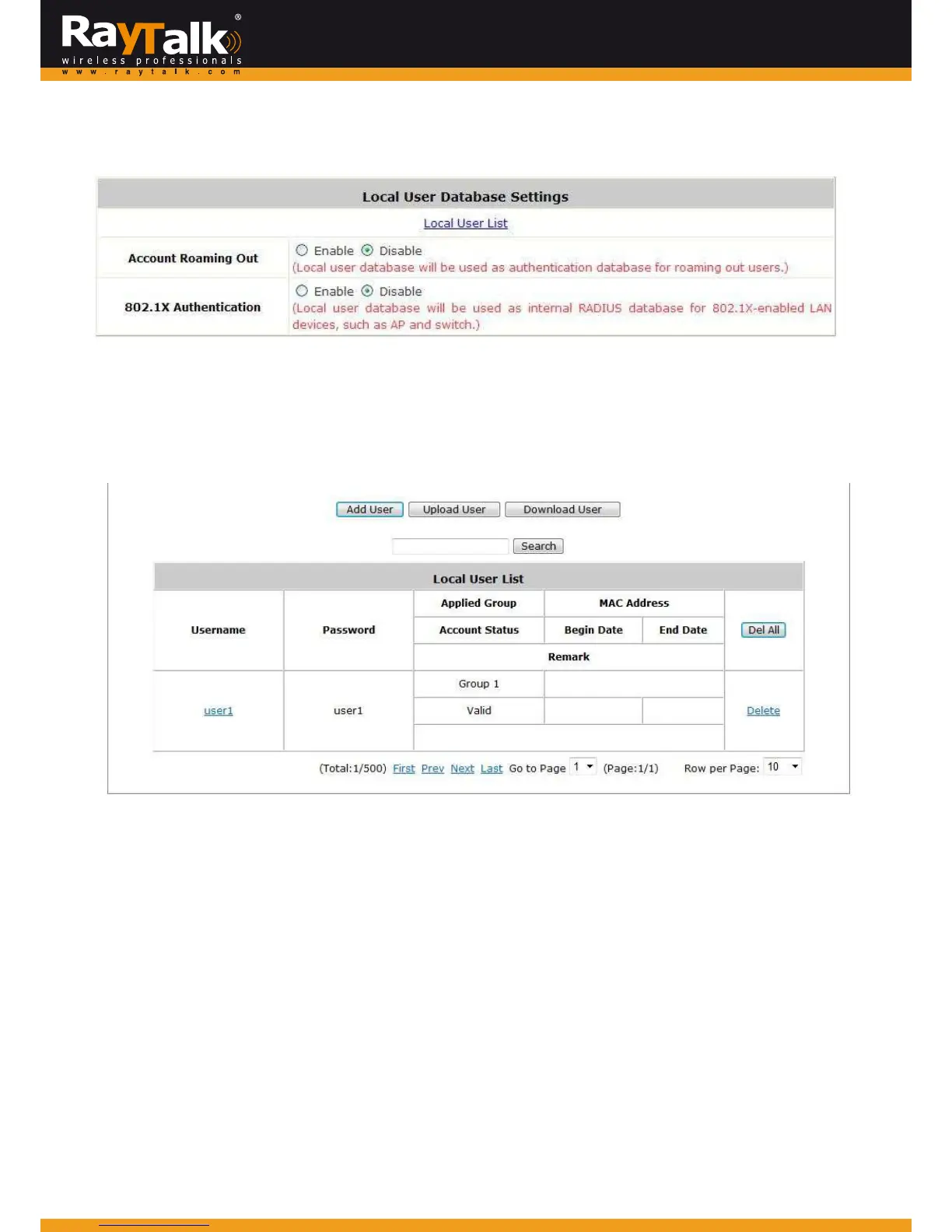
ClickthebuttonConfigureforLocalforfurtherconfiguration.
Local UserList:It allowstheadministratorto view,addordeletelocaluseraccounts.The UploadUser buttonisfor
importingalistofuseraccountsfromatextfile.TheDownloadUserbuttonisforexportingalllocaluseraccountsintoatextfile.
Clickingthehyperlinkofauseraccountleadstoapageforconfiguration.
Add User: Click this button to enter the Adding User(s) to the List interface. Fill in the necessary information such as
“Username”,“Password”,“MACAddress”,“Remark”andlogin“Schedule”.SelectadesiredGrouptoclassifylocalusers.Click
Applytocompleteaddingtheuser(s).
MACaddressofanetworkingde
vicecanbeboundwithalocaluseraswell.
Itmeansthisusermustlogintothesystemwithanetworkingdevice(namelyPC)thathasthecorrespondingMACaddress.
Thatis,thisusercannotloginwithothernetworkingdevices.
Anexpirationtimecanbeenabledfortheus
er.



 To Next Page