3.4
WANBandwidth
C
o
n
t
r
o
l
ToconfigureWANBandwidthControl,goto:System>>WANTraffic.
Thefeaturegivesadm inistratorscontrolovertheentiresystem’strafficontheWANinterface.Theseparameterssethereshould
notexceedtherealbandwidthprovid edbyyourISP.Forexample,ifyourxDSLis8Mbs/640kbs,youmayinputvaluesequaltoor
lessthanthespeedhere.
AvailableBandwidthonWANInter
face:
Uplink:Itspecifiesthemaximumuplinkbandwidththatcanbesharedbyclientsofthesystem.
Downlink:Itspecifiesthemaximumdownlinkbandwidththatcanbesharedbyclientsofthesystem.
3.5
Whatis
Z
o
n
e
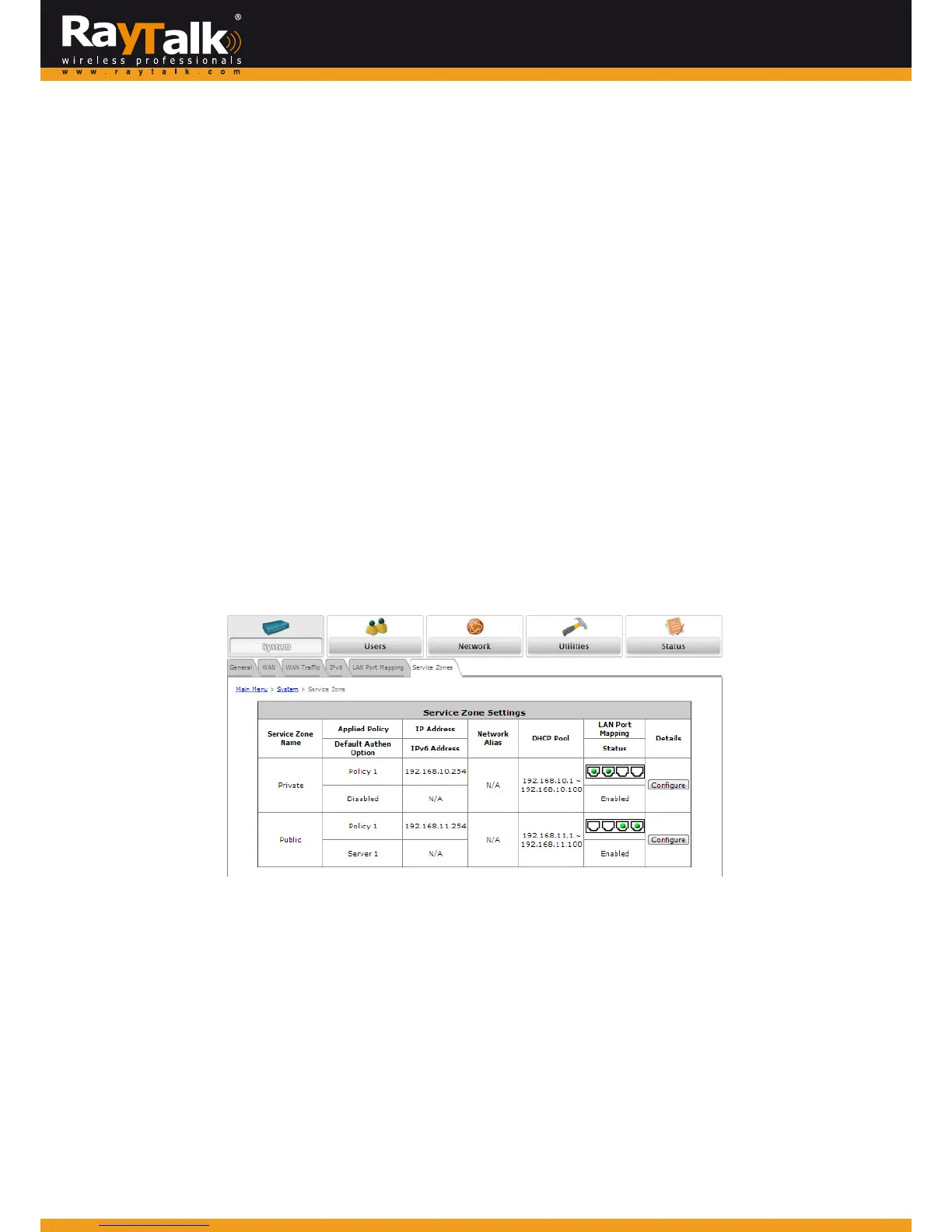
ToconfigureaZone,goto:System>>ServiceZones.
AZoneisalogicalnetworkareathatcoverswiredorwirelessnetworks ,orbothofthem.ByassociatingitwithauniqueESSIDofa
Zone,wirelessnetwork is divided intodifferent logicalzones.Clientsattemptingto accessthe resourceswithin a Zone will be
controlled based on the access control profile of that Zone, such as authentication, security features, wireless encryption
methods,trafficcontrol,etc.
Thereare two Zonesthat canbe utilizedbythe MiMo Hot Spot Access Point Wi‐Fi RayTalk RA‐696– PrivateZone and Pub
lic
Zone,asshowninthe table below.PrivateZonemeans clientsare notrequiredto beauthenticatedbef oreusingthenetwork
service.However,clientsinPublicZonearerequiredtoobtainauthenticationbeforeusingtheservice.
ServiceZoneName:MnemonicnameoftheZone.
AppliedPolicy:CurrentPolicythatisappliedtoZone.
DefaultAuthenOption:Defaultauthenticationmethod/serverthatisusedwithintheZone.
IP/IPv6address:ShowstheLANIPaddress.IPv6issupportandcanbeconfiguredfromtheIPv6tab.
NetworkAlias:ShowstheIPaddressthatbridgestodifferentsubnetsconfiguredintheNetworkAliasList.
DHCPPool:ShowstherangeofLANIPaddresswhichclientsareassignedtogetfromDHCP.
LANPortMapping:EachphysicalLANportcanbesetindividuallytomaptoa specificzone,andcanbeconfiguredfrom
theLANPortMappingtab(referto3.5.1).
Status:ShowsthePrivate/PublicZonemappingstothephysicalLANports.
Details:Configurable,detailedsettingsforeachZone.
ClicktheConfigurebuttontoconfigureeachZone:BasicSettings,AuthenticationSettings,WirelessSettings,andWDSSettings
(PublicZoneonly).



 To Next Page