4
LetYourNetworkBeaWirelessNetwork
4.1
SystemWirelessGeneral
S
e
tt
i
n
g
s
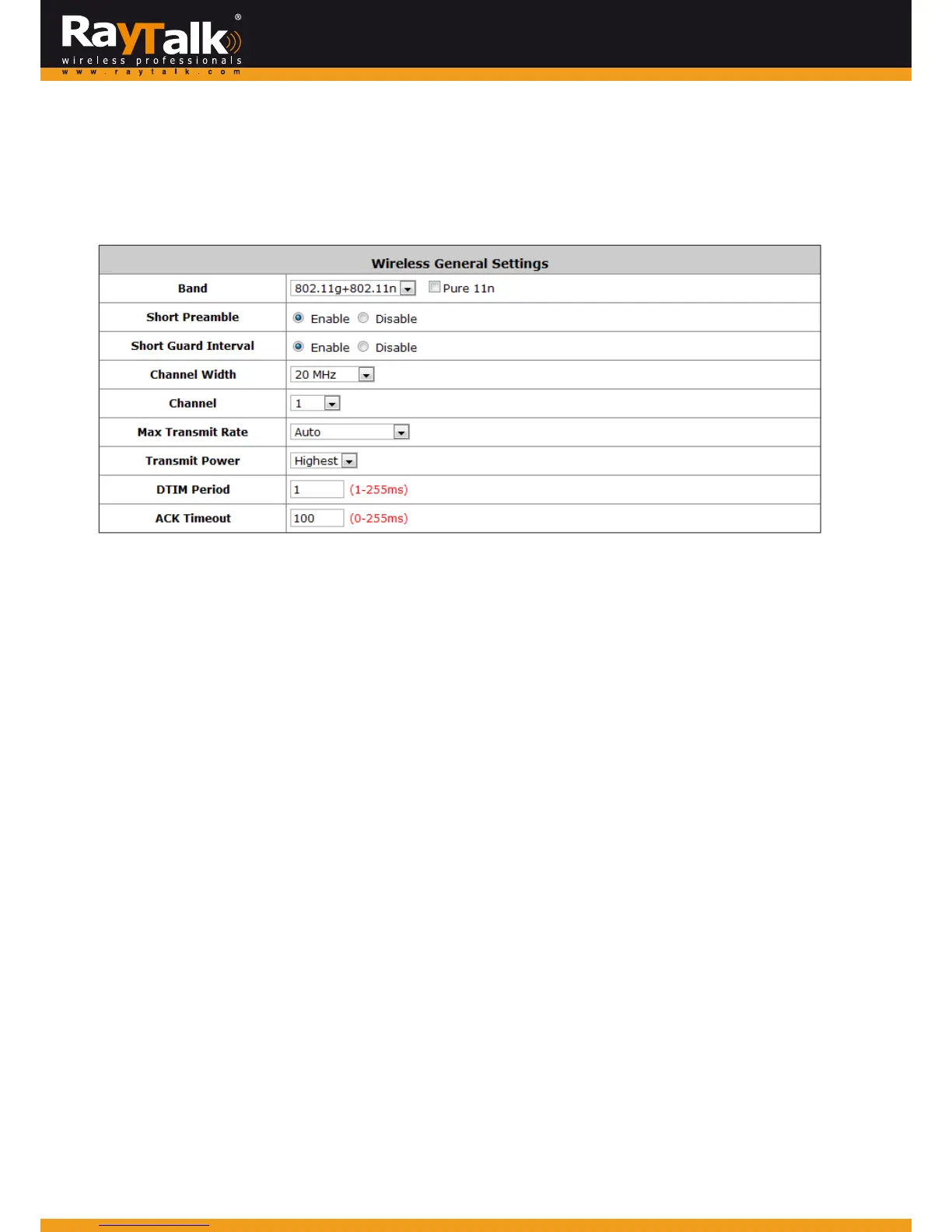
ToconfigureSystem ’sWirelessGeneralSettings,goto:System>>ServiceZones.ClickthebuttonConfigure
forPrivatezoneforfurtherconfiguration.
WirelessGeneralS ettings:
Band: There are 4 modes to select, 802.11b (2.4G, 1~11Mbps), 802.11g (2.4G, 54Mbps), 802.11b+g, and 802.11g+n.
Otherwisetheadm inistratorcouldenablethe‘Pure11n’toonlyutilizethe11nband.
ShortPreamble:The lengthoftheCRC(CyclicRedu ndancyCheck )blockforcommunicationbetween theAccessPoint
androamingwirelessadapters.SelectEnableforShortPreambleorDisableforLongPreamble.
ShortGuardInterval(802.11g+nonly):Theguardintervalisthespacebetweensymbols(characters)beingtransmitted
toeliminateinter‐symbolinterference.With802.11n,shortguardintervalishalf
ofwhat
itisusedtobetoincreasethroughput.
SelectEnabletouseShortGuardIntervalorDisabletousenormalGuardInterval.
Channel Width (802.11g+n only): For 802.11n, doubling channel band width to 40 MHz is supported to enhance
throughput.
Channel: Select the appropriate channel from the drop‐down menu to co
rrespond with your network settings, for
example,Channel1‐11isavailableinNorthAmericanandChannel1‐13inEurope,orchoosethedefaultAuto.
MaxTransmitRate:ThedefaultisAuto.Availablerangeisfrom1to300Mbps.Therateofdatatransmissionshouldbe
setdependingonthespeedofthewirelessnetwork.Selectfromarangeoftransmissionspeedorkeepthedefaultsetting,Auto,
tomaketheAccessPointautomaticallyusethefastestratepossible.
TransmitPower:Keepthedefaultsetting,orselectfromrangetomaketheAccessPointusedifferent transmitpowerasyou wish.
DTIMPeriod:InputtheDTIMIntervalthatisgeneratedwithintheperiodicbeaconataspecifiedfrequency.Higher DTIMwillletthe
wirelesscli entsaveenergy,butthethroughputw illbedecreased/worsened.
ACKTimeo ut:Thetim eintervalforwaitingforthe“acknowledgement(ACK)fr ame”.IftheACKisnotreceivedwithintheintervalthen
thepacketwillbere‐transmitte d.HigherACKTimeout intervalwilldecreasethepacket lost,butthethroughputwillbedecreased/worsened.



 To Next Page