PHONE CALL (3/3)
During a call
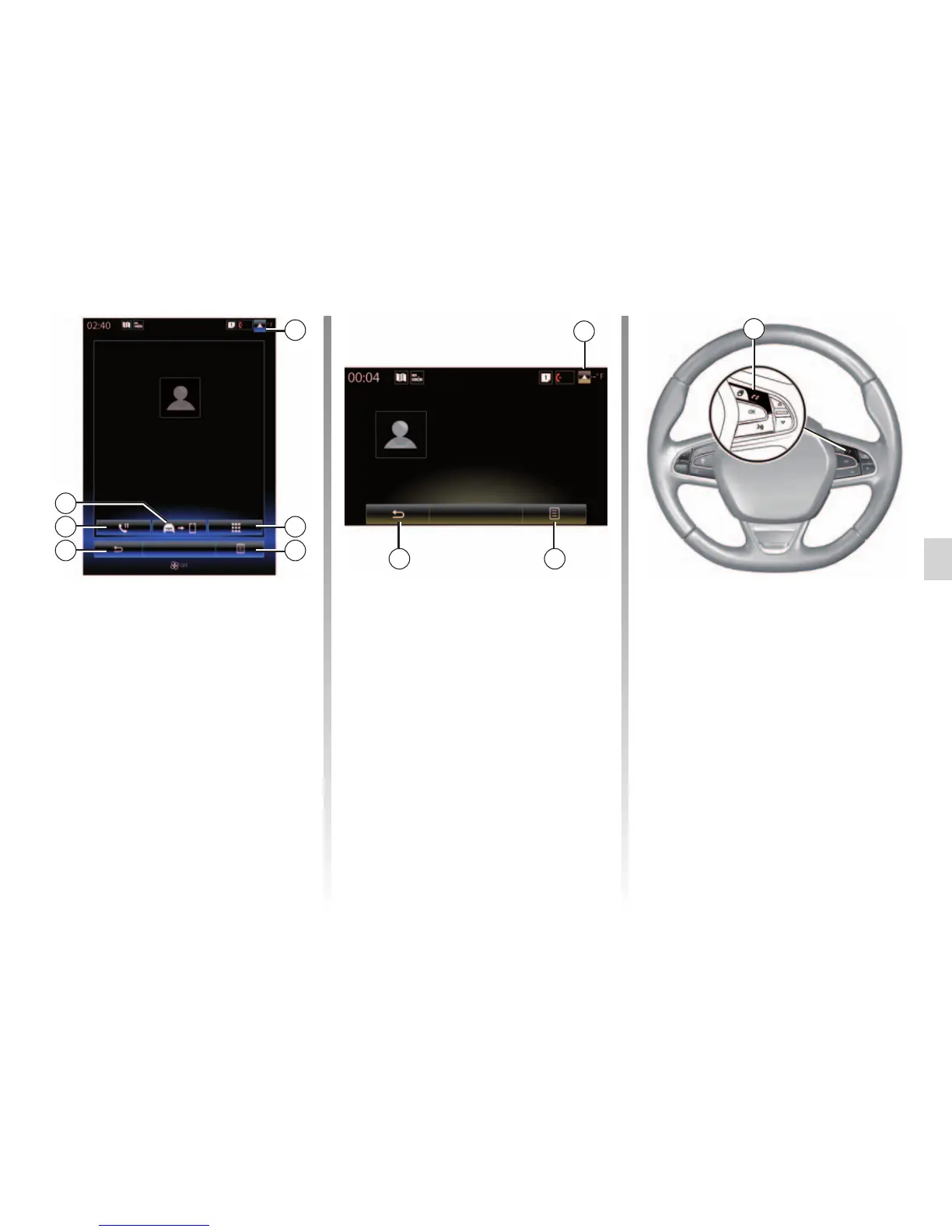
During a call you can:
– adjust the volume by pressing the
control buttons under the steering
wheel of your vehicle or by press-
ing 5 then “Sound settings”;
– end a call by pressing “Hang up”
or by pressing the button 2 on your
steering wheel;
– place a call on hold by pressing
button 7 or by pressing 5 then “Put
on hold”. To pick up a call on hold,
press button 7 or press 5 then
“Retrieve call”;
– transfer the call to the connected
phone by pressing button 8 or by
pressing 5 then "Transfer to phone";
– pick up a second call by pressing the
notification displayed at the bottom
of the screen to indicate a new in-
coming call;
Incoming call
Daisy Wiston
Call duration
Incoming call
Hang up
+33156789012
7
5
– display the numeric keypad by press-
ing button 4.
Note: some telephones may discon-
nect from the multimedia system during
a call transfer.
During a call, you can return to other
multimedia system functions (naviga-
tion etc.) by pressing button 3 or 6.
Incoming call
Daisy Wiston
+3314289632
Incoming call
Call duration
Hang up
56
3
00 : 15
6
4
8
3
00 : 50
2



 To Next Page