Printing Functions
89
3
-Notes
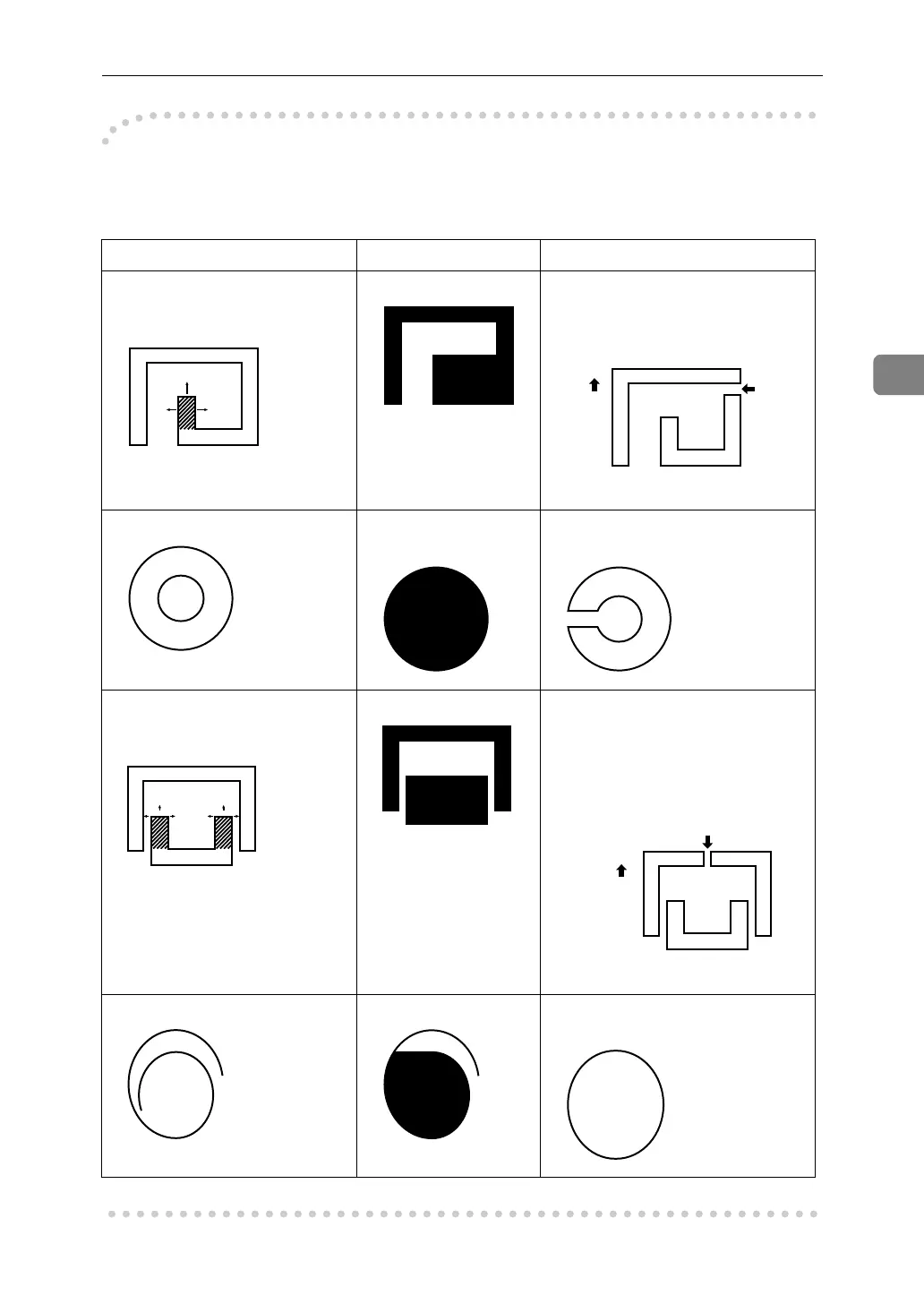
The image might differ depending on how the designated area is drawn, so re-
member the following when making the command sheet.
Designated area Area recognized Preferred designated area
Part of the designated area is
surrounded by 3 sides of the en-
tire area.
Make a space of at least 2mm,
0.08", in front of the area surround-
ed by 3 sides (relative to the feed
direction).
1, 2 = 2mm, 0.08"
Double line pattern. Only the outer line is
recognized.
Make a gap of at least 2mm, 0.08"
in width.
The designated area is sur-
rounded by 3 sides of another
designated area.
Make a space of at least 2mm, 0.08"
in front of the area surrounded by
3 sides (relative to the feeding di-
rection).
1, 2 = 2mm, 0.08"
Non-closed line Designate the area with a closed
line.
12
1
2





 To Next Page