Robotiq Screwdriving Solution - Instruction Manual
On e-SeriesRobots
l
Make sure that the version of your PolyScope software isup-to-
date and that your Universal Robots controller iscompatible with
the Screwdriving Solution URCap package.
l
Go to support.robotiq.com, and select the Universal Robots
brand.
l
Select Robotiq Screwdriving Solution > Software > Robotiq
URCaps.
l
Download the Screwdriving and Copilot zip files.
l
Extract the files at the root of a blank USB stick.
l
Insert the USB stick in the URteach pendant or controller.
l
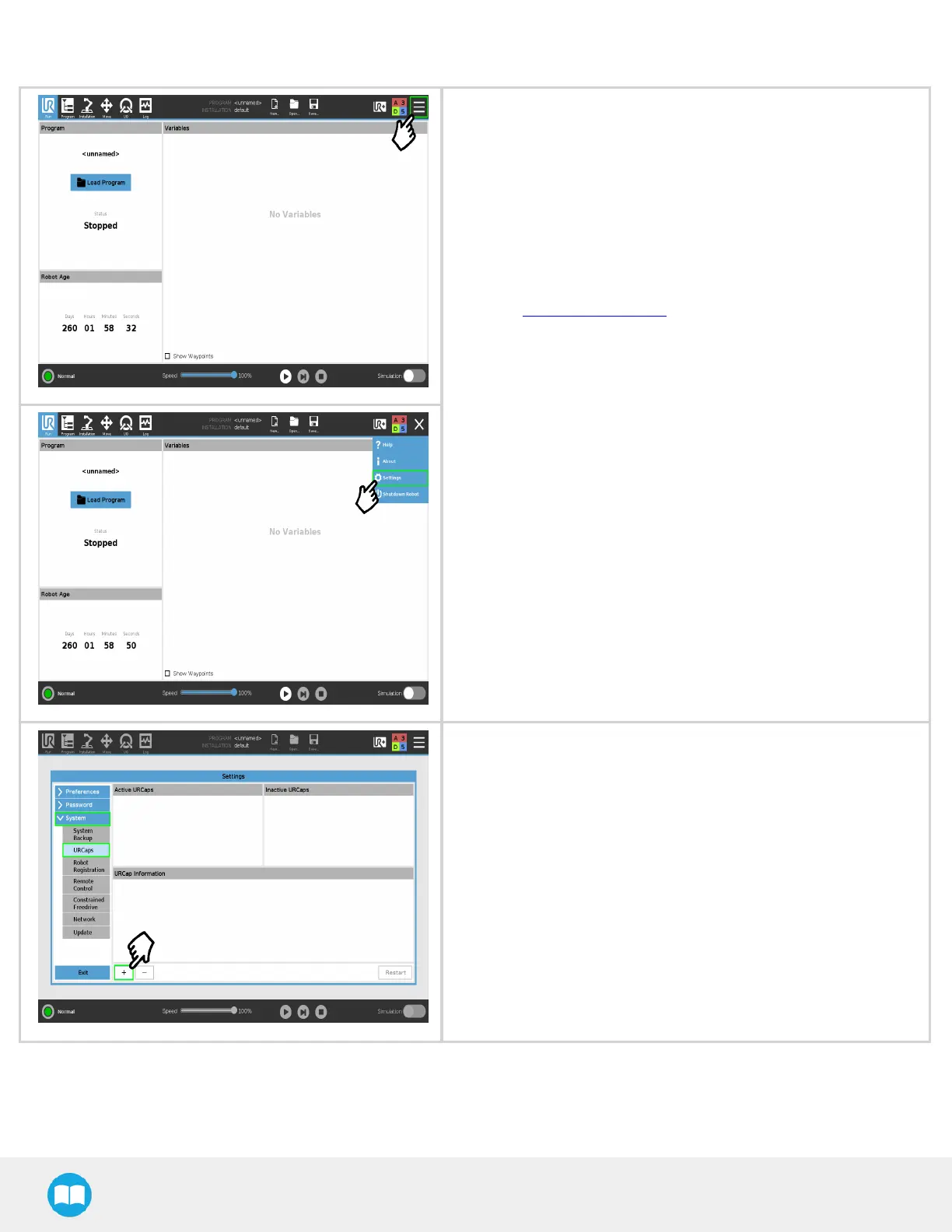
On the teach pendant, tap the triple bariconin the upper right
corner of the screen.
l
Tap on Settings.
l
Tap the System button in the navigation pane on the left.
l
Select the Screwdriving Solution URCap (UCT-X.X.X) to install it
on the robot controller.
l
Tap the plus(+)button to locate the .urcap filesin the available
drives.
l
Select the Copilot URCap (UCS-X.X.X)to install it on the robot
controller.
l
Tap the plus(+)button to locate the .urcap filesin the available
drives.
29



 To Next Page