23
Settings
X-Axis o
Z-Axis o
LED2
LED3
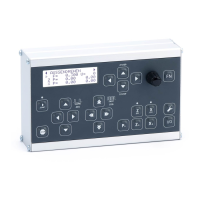
KEY FUNCTIONS
START Start of a cycle. The LED above lights up when a cycle is active. Most
cycles do not start until the spindle is already turning!
STOP Stops a running cycle.
P0 Sets the selected input value to 0, e.g. feed rate, ZP or XP.
Z0 Sets the current Z position to 0, zeros the axis.
X0 Sets the current X-position to 0, zeros the axis.
Zo Disables the motor of the Z-axis (if the hardware allows it).
Xo Disables the motor of the X-axis (if the hardware allows it).
I/O Switching the control on and o (press >2 sec. to switch o)
SETTINGS Calls up the settings
FN Function key for special functions.
Knob Used to enter values. By turning and simultaneously pressing the knob
(push-button function) or turning and simultaneously pressing the but-
ton (push-button function).
The input resolution can be reduced by pressing the FN key.
This allows you to enter values in steps of 1, 0.1 or 0.01. In some cycles,
the step-by-step is sensibly adjusted to 0.1, 0.01 and 0.001.
LEFT Switches the cycles to the left
RIGHT Switches the cycles to the right
UP/
ZSTEP
Moves the input cursor up on the display.
Pressing the knob for a longer time switches the Z-axis to step mode
where the axis can be moved step by step with the rotary knob.
DOWN/
XSTEP
Moves the input cursor down on the display.
Pressing the knob for a longer time switches the X-axis to step mode
where the axis can be moved step by step with the rotary knob.
SLOW JOG Four buttons to move the X- and Z-axis slowly.
FAST JOG Four buttons to quickly move the X and Z axes.


 To Next Page