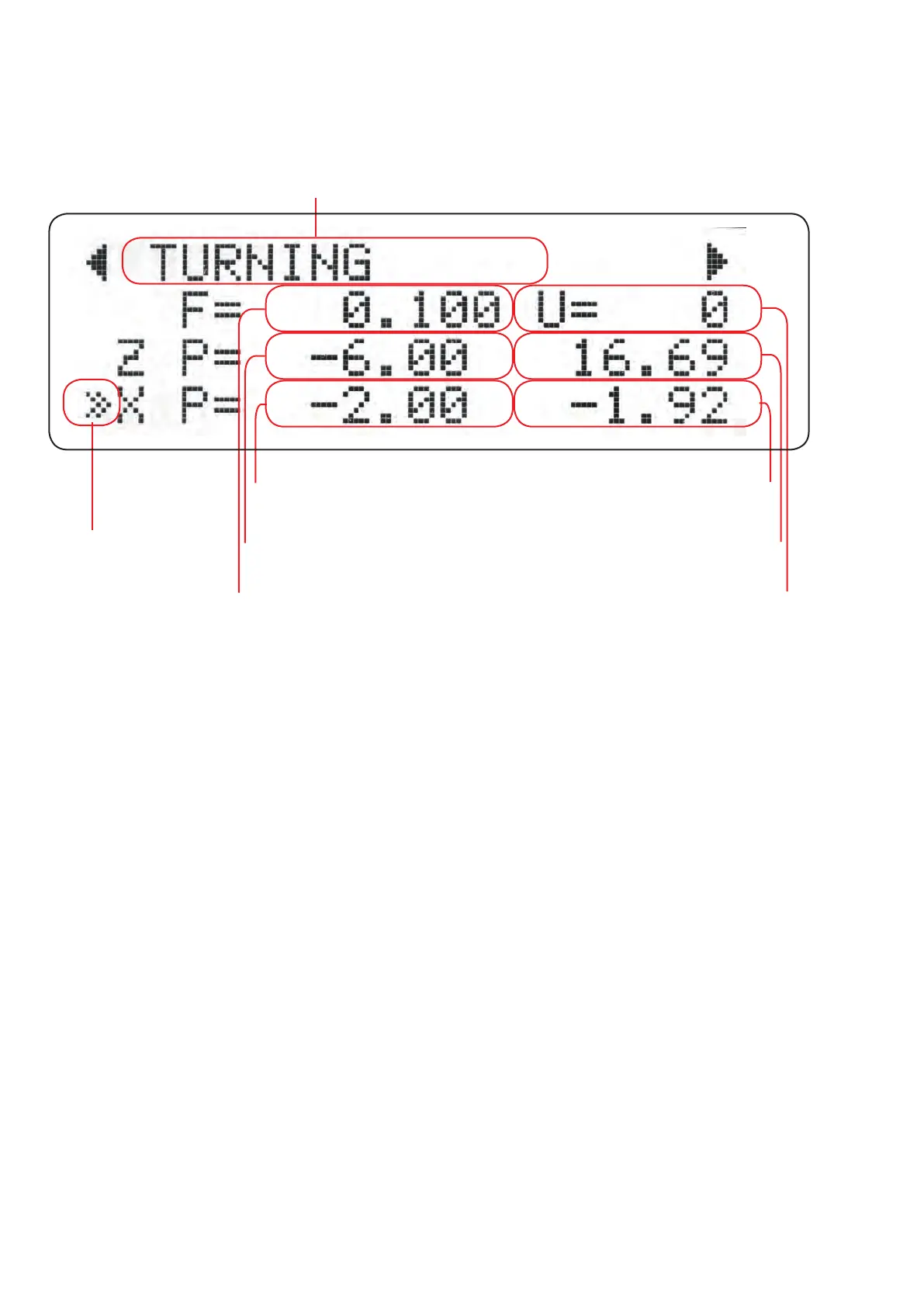
CURSOR
Selected mode
F= FEED in mm/U
ZP= Z ENDPOSITION
XP= X ENDPOSITION
SPINDLE SPEED
in RPM
CURRENT Z POSITION
CURRENT X POSITION
24
DISPLAY-ELEMENTS
The LCD display shows the data on 4 lines. The standard display before the start of a cycle
shows the basic data. The display changes depending on the mode.
LIGHT EMITTING DIODED (LED)
3 red LEDs are integrated in the keyboard foil:
LED1 indicates a running cycle
LED2 lights up when the Z axis was switched o with ZOFF.
LED3 lights up if the X axis was switched o with XOFF.
LED1 ashes during a software update.
If the update fails, LED2 lights up after the update process.
The cursor shows the current value that can be changed with the rotary knob. It corresponds
to the „cursor“ on the computer screen. The cursor can be moved with the up and down keys.
Move it to e.g. the rst line to change the feed rate.
Tip: Move the cursor further than the last line with the DOWN key to enter the parameter
menu, where you will nd special setting options for the individual cycles. With LEFT or RIGHT
you leave the parameter menu.


 To Next Page