Effectivity 914 Series
Edition 1 / Rev. 0
76-00-00
page 29
May 01/2007
d02626
BRP-Rotax
Maintenance Manual
3.1.1.6) Checking the throttle valve position
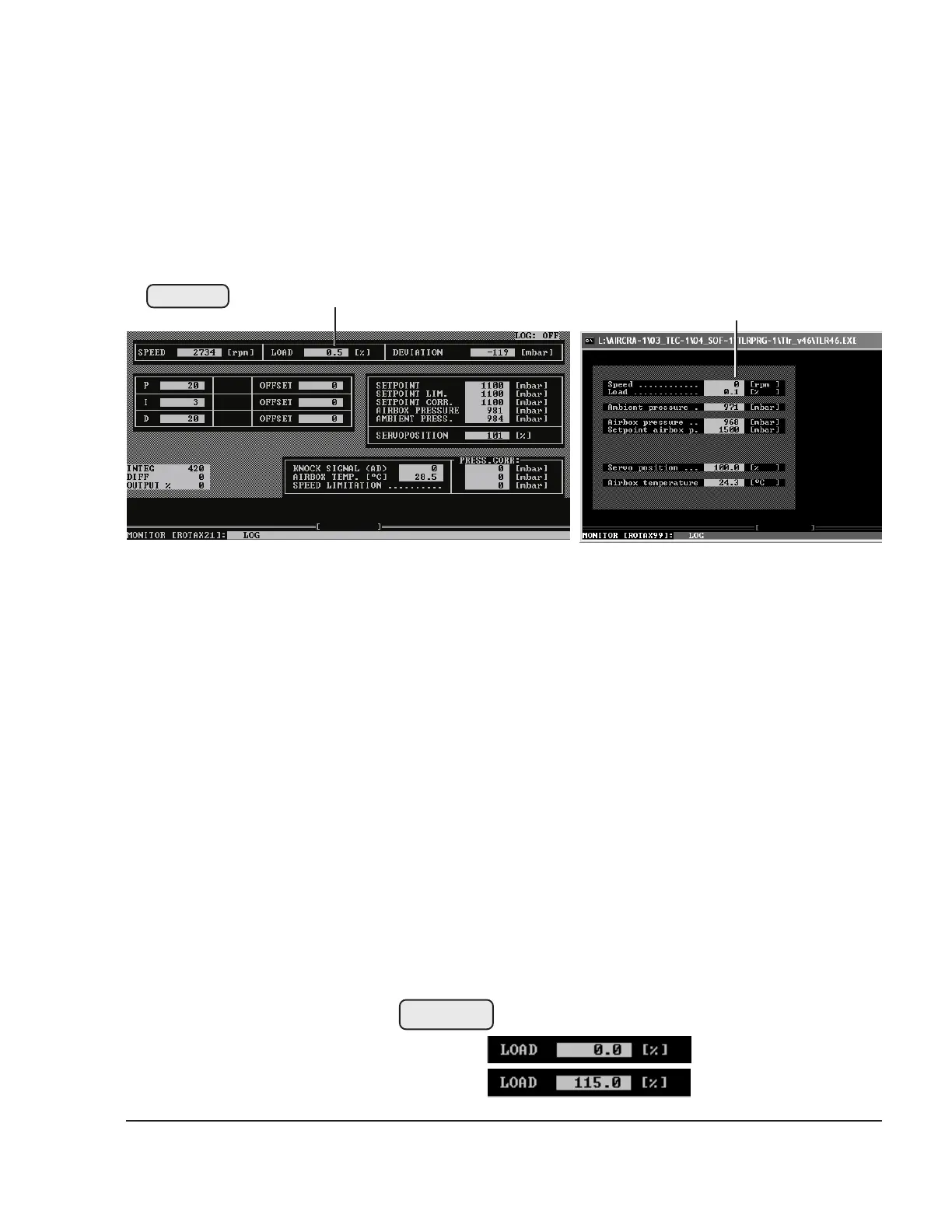
See Figs. 76-24 and 76-25.
- Start-up of the subprogram MONITOR.
At the top in the center (1) is the position display for the throttle
valve (carburetor 2/4)
0 % throttle valve completely closed
115 % throttle valve completely open
- Visually check whether both throttle valves can be fully
opened and closed. If necessary, correct the installation/
setting.
- Check the display with throttle valve completely closed:
nominal: 0° max. deviation +3%
- Check the display with throttle valve completely open:
nominal: 115 % max. deviation -2%
■ CAUTION: Check whether indication is linear over the
complete range from 0% to 115% i.e. the
115% position is not indicated before throttle
valve is fully open.
Fig. 76-25
00445
03066
Program version TLR V4.3A Program version TLR V4.6A
1 1
Fig. 76-25
00214
00215
1
1



 To Next Page
 Loading...