A4US
US
A4
US A4
US
A4
A4 US
US
A4
US
A4
A4 US
IQ3 Full Configuration Manual – Section: Settings 15
Settings
Limits
Indication
Control
ESD
Security
Defaults
Control
Local
Remote
Interrupter Timer
Local Control
Vandal Disabled
Setting Tool Yes No
Maintained Yes No
Delay Control Yes No
Loss Of HMI Stayput Remote
Remote Hand Station
Enabled On Off
1/6
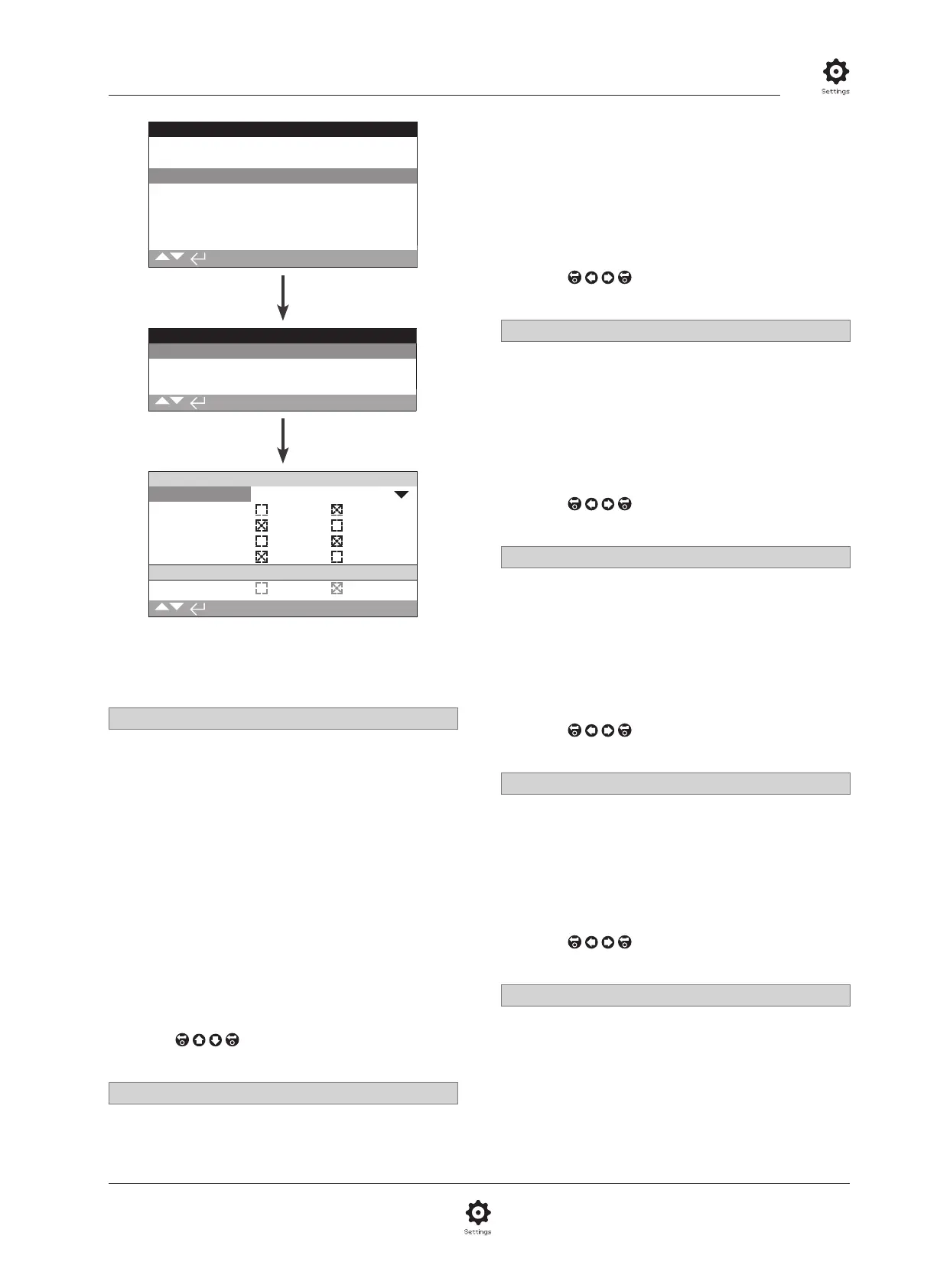
The local control configuration page is shown with the
default settings.
1/6 Vandal
Actuators built as vandal resistant type 1 do not have the black
and red control selectors fitted. Selection of Local control (using
the Setting Tool open, close and stop keys) and Remote control is
made using the vandal setting:
Disabled (default) – Actuator is not vandal resistant build and
control selectors are present.
Local – Actuator selected for Local control using the Setting Tool
(Bluetooth or infrared), refer to 1.1. Infrared local control has a
range of approximately 0.25 m (10") and must be in direct line of
site. Bluetooth Local control has a range up to approximately 10 m
(30 ft) depending on environment.
Remote – Actuator selected for Remote control. Setting Tool
control keys are inactive and the actuator responds only to
remote control signals.
Switched – This option is available with an external PCB (i.e.
DIO), the actuator uses the input to switch the vandal between
local and remote.
To change,
. The drop down list will close and
the selected control mode will be indicated.
2/6 Setting Tool
With control selectors fitted to the actuator, the Setting Tool
close, open and stop control keys can be used to operate the
actuator:
2.3.1 Control – Local
Yes – Setting Tool control keys active, control is possible only
when the red selector is set to Local, refer to 1.1 – using the
Setting Tool. Infrared local control has a range of approximately
0.25 m (10") and must be in direct line of site. Bluetooth Local
control has a range up to approximately 10 m (30 ft) depending
on environment. The black close/open selector remains active.
No (default) – Setting Tool close, open and stop control keys
disabled. Local control is by close/open/ stop selectors fitted to
the actuator.
To change,
. The checkbox will indicate the
selected Setting Tool control mode.
3/6 Maintained
Sets the action as a response to local open or close control
signals:
Yes (default) – The actuator will self-maintain as a response
to a fleeting local open or close control signal. It will run until it
receives a stop command, it reaches a travel limit or is reversed –
Maintained control.
No – The actuator will run only while an open or close control
signal is applied – Push to run local control.
To change,
. The checkbox will indicate the
selected action.
4/6 Delay Control
If there is a risk of a local close or open control signal being
applied due to the selector moving inadvertently or by being hit
momentarily, a delay can be set to help prevent an unintended
operation:
Yes – A local close or open signal must be held for approximately
2 seconds before the actuator responds.
No (default) – The actuator responds immediately to a local
close or open control signal.
To change,
. The checkbox will indicate the
selected local selector response.
5/6 Loss of HMI
The Human Machine Interface consists of the actuator display
and red and black selectors. If for any reason the HMI stops
responding, the response of the actuator can be set.
Stayput (default) – The actuator will stayput and alarm using
the monitor relay. It will not respond to remote control signals.
Remote – The actuator will alarm using the monitor relay. It will
continue to respond to remote control signals.
To change,
. The checkbox will indicate the
selected HMI failure response.
6/6 Remote Hand Station
When fitted, the Remote Hand Station (RHS) can be enabled by
this setting.
Off (default) – RHS not activated and the sub-menus will be
hidden.
On – RHS enabled and the sub-menus will appear in the main
Control menu. Refer to PUB002-059 for full setup.



 To Next Page