Operation Page 5-
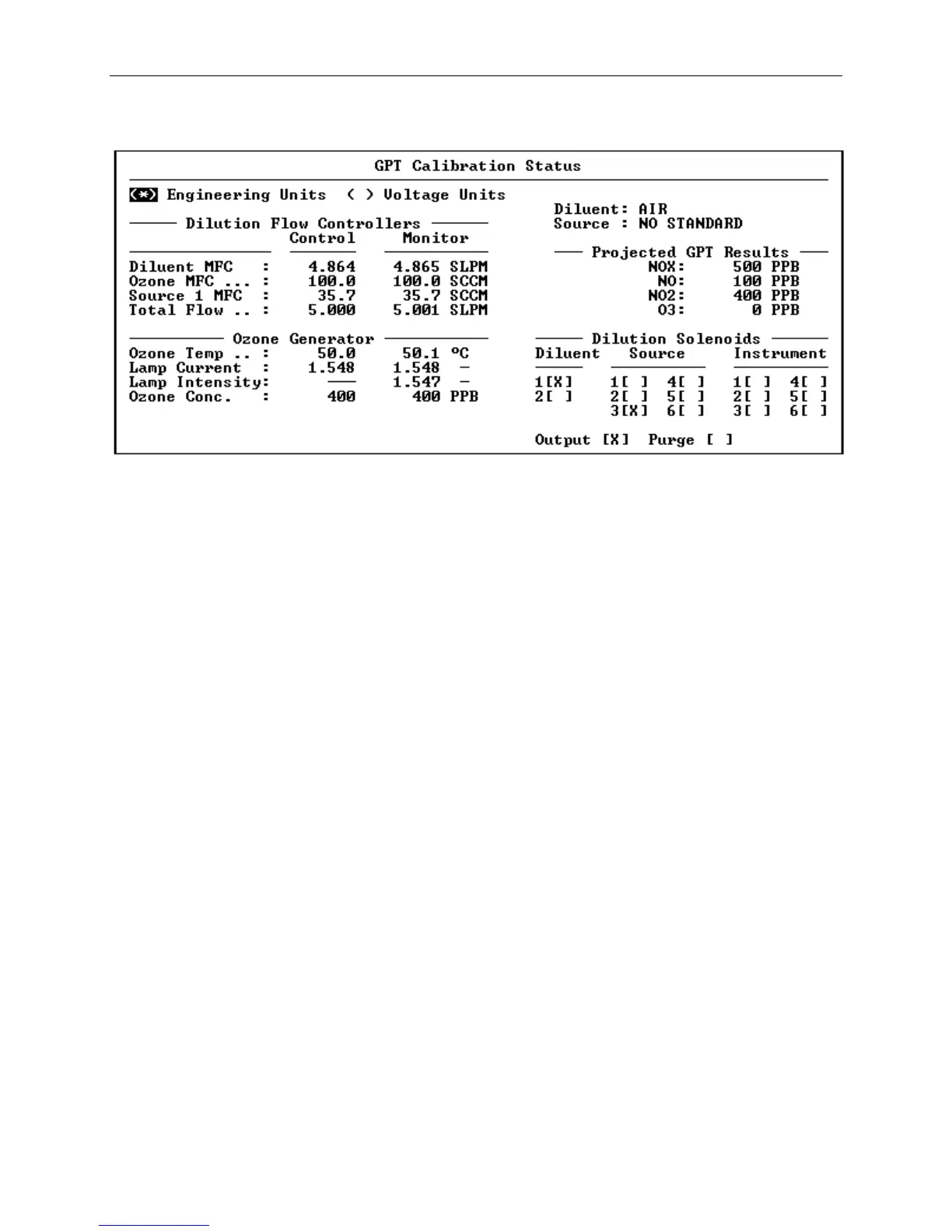
Figure 5-7 The GPT Status Screen
Performing Manual Calibrations using the Status Screen
Normally, when a status screen is displayed, the only item that
can be changed is the engineering or voltage units selector
button, however by entering debug mode, any of the control
values or solenoid valves may be changed. This is a very useful
feature, allowing devices to be tested individually or manual
calibrations to be performed. Debug mode is toggled on or off
by pressing the "Diag." Button on the front panel or F11 on an
external keyboard while the status screen is displayed.
Before performing calibrations using debug mode, it is important
that the user has a good understanding of the pneumatic
operation of the 2010D and the purposes of it's various flow
controllers and solenoid valves. In this mode, it is entirely
up to the user to manually activate the appropriate solenoid
valves, flows rates, ozone generator, etc. for the desired
result. It is also up to the user to calculate the flow rates
needed for the desired gas concentrations.
In the following example, a GPT calibration will be activated
manually using the status screen in debug mode. In the example,
a concentration of 400 PPB of ozone will be mixed with 500 PPB
of NO at a total flow rate of 5.000 SLPM, resulting in 500 PPB
of NOx, 400 PPB of NO2 and 100 PPB of excess NO. The source
cylinder, attached to source inlet 1, contains 50,000 PPB of NO.
The following steps are required to perform this calibration
using the status screen.



 To Next Page