5 - Information / Configuration
F@st™ 2804v2 Reference Manual - 253329475-A
Sagemcom document. Reproduction and disclosure prohibited Page 5-57
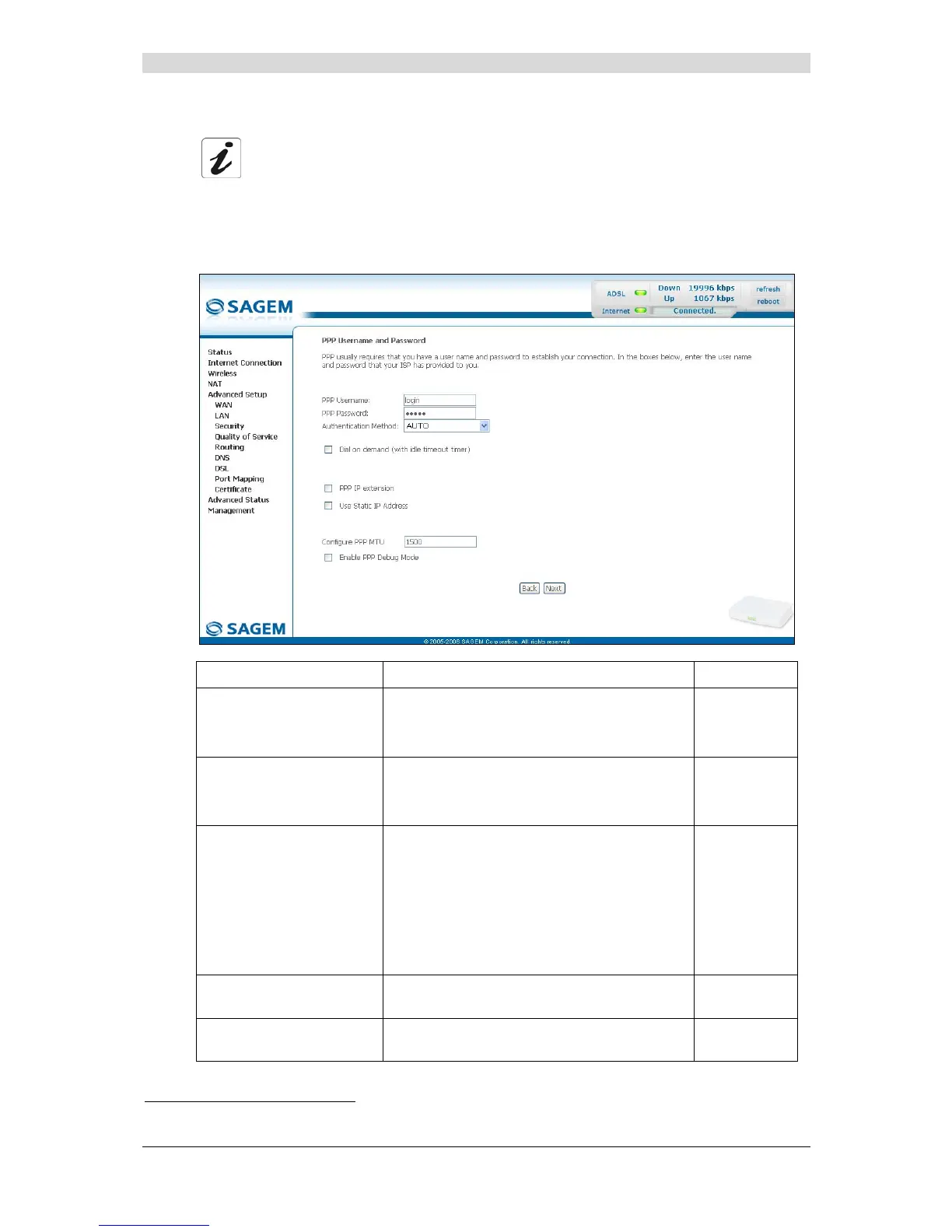
• Click on the Next button to continue configuring the remote network (WAN).
Depending on the type of network protocol (PPPoA, PPPoE, MER, IPoA or Bridging)
selected earlier, the content of the following WAN interface configuration screens
differs.
Therefore, and for more clarity, each type of protocol will be dealt with
separately (screens + associated summary tables) below.
PPP over ATM (PPPoA)
Field Action Default
PPP Username
Enter your connection ID.
This information is provided to you by your
Internet Service Provider (ISP).
Empty
PPP Password
Enter your connection password.
This information is provided to you by your
Internet Service Provider (ISP).
Empty
Authentification Method
Select the authentication method of your
choice from the scroll down list:
• AUTO,
• PAP,
• CHAP,
• MSCHAP.
AUTO
Dial on demand
(with idle timeout timer)
Check the box to connect to Internet only for
"Traffic" on the ADSL line.
Not checked
Inactivity Timeout
(minutes) [1-4320]:
4
Enter a value (in minutes) between 1 and
4320 (i.e. 72 hours).
0
4
This field only appears when the "Dial on demand (with idle timeout timer)" field is activated (box checked).



 To Next Page