Need help?
Do you have a question about the SAJ VM1000 and is the answer not in the manual?
 General
| Brand | SAJ |
|---|---|
| Model | VM1000 |
| Category | Controller |
| Language | English |
Explains DANGER, WARNING, and NOTE symbols used in the manual.
Describes warning indicators present on the product itself.
Defines common technical symbols like PE, GND, SHIELD.
Lists common abbreviations for VFD and related terms.
Lists product trademarks and their owners.
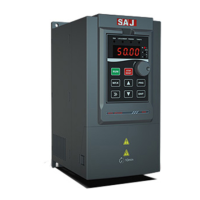
Overview of VM1000 AC drive, its applications, and power range.
Details VFD specifications like frequency, torque, and overload capacity.
Explains the information provided on the product's nameplate.
Details the meaning of each component of the VFD model number.
Provides installation dimensions for various VM1000 models.
Shows dimensions for the operation keyboard and its mounting hole.
Lists VFD models with corresponding power, current, and motor specifications.
Covers routine maintenance, periodic inspection, and component replacement procedures.
Details VM1000 structure, removal steps, and environmental requirements.
Covers electrical operation conditions, safety precautions, and wiring diagrams.
Discusses EMI/EMC precautions and solutions for interference issues.
Explains the VFD's operation panel layout, indicators, and display.
Details the function of each key on the VFD's operation panel.
Guides on navigating and modifying function codes and parameters.
Explains how to view various operational status parameters displayed by the VFD.
Describes how to set and manage user passwords for parameter protection.
Lists checks for electric and mechanic conditions before initial operation.
Covers typical panel operations like start/stop and parameter setting.
Guides on wiring and parameter settings for terminal start/stop control.
Explains multi-step speed and PID control applications and parameters.
Details the procedure for motor auto-tuning in vector control mode for optimal performance.
Essential steps for viewing fault codes and resetting the VFD.
Explains how to restore VFD parameters to their factory default settings.
Lists and describes basic VFD parameters like control mode and command source.
Details parameters related to VFD start, stop, and braking functions.
Lists parameters for configuring motor characteristics for optimal performance.
Describes parameters specific to vector control mode operation.
Details parameters for V/F control mode, including curve settings.
Configuration of digital and analog input terminals for external control signals.
Configuration of digital and analog output terminals for status feedback.
Parameters related to the operation panel, display, and keypad functions.
Parameters for auxiliary functions like jump frequency and simple PLC.
Parameters for configuring the PID control loop for closed-loop systems.
Configuration of various protection functions and fault management.
Parameters for swing frequency, length, and counter functions.
Settings for RS485 communication protocol and parameters.
Parameters for multi-step speed and simple PLC operation.
Settings for user password and fault record display.
Defines the serial communication protocol content and format for data transmission.
Describes how VFD connects to PC/PLC networks via RS485 for control.
Details RS485 interface, transmission mode, and topology for communication.
Explains the master-slave ModBus communication protocol used by the VFD.
Describes the RTU mode frame format and CRC checking for data integrity.
Lists addresses for stop/running parameters essential for programmatic access.
Lists fault codes and provides troubleshooting flowcharts for common faults.
Direct problem-solving guide with common faults, reasons, and solutions.
Illustrates the external electrical connection diagram for the VM1000.
Provides guidance on selecting braking resistors based on power and resistance requirements.
Offers recommendations for selecting electrical components like switches, contactors, and cables.
 To Next Page