50 Print SAM300 Reference Manual v1.0
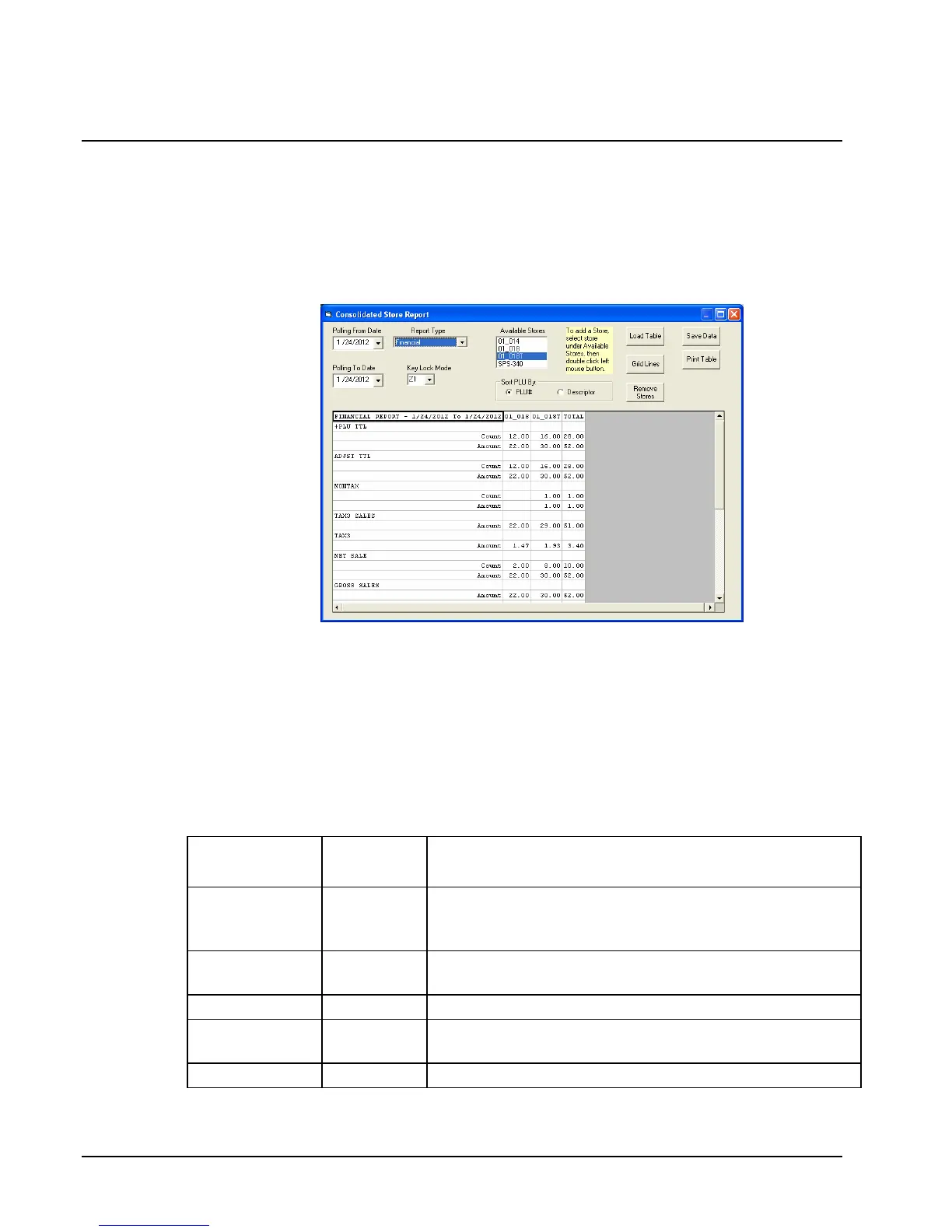
Consolidated Store Report
This program consolidates store reports for multiple stores. This program can be used to
consolidate a range of dates, for example, April 1 to April 30.
1. Choose Consolidated Store Report from the Print menu to display and print out the
consolidated financial, PLU and group reports for all stores. The Consolidated Store
Report dialog box displays.
2. Refer to the table below to make report selections. Double click store from the
“Available Stores” box to add to the consolidated report.
3. Click Load Table to load the consolidated store report.
4. Click Grid Lines to toggle between displaying grid lines on the table and not.
5. Click Save Data to save the report.
6. Click Print Table to print the consolidated store report.
7. Close the window to return to the main menu.
Field Name
Required
/Optional
Description/Instructions
Poling From
Date/Polling
To Date
R
Use calendar to select the date range.
Report Type
R
SELECT: Financial, PLU, Groups, Sales by TP,
Employees
Keylock Mode
R
X1, X2, Z1, Z2
Available
Stores
O
Select stores to consolidate by double clicking the store.
Sort PLU BY
R
Choose PLU# or Descriptor



 To Next Page