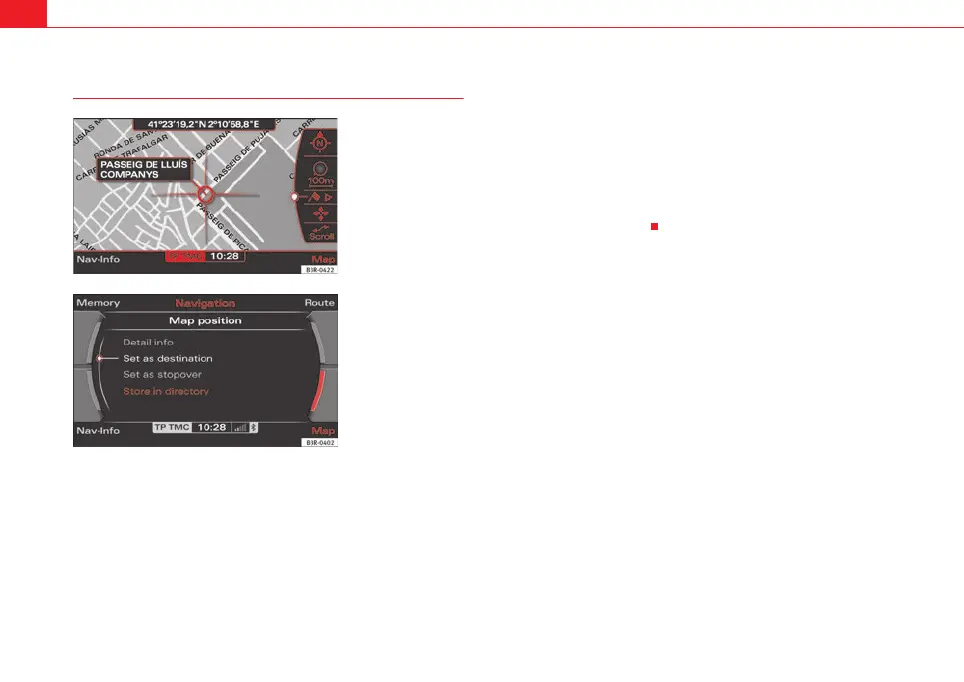
Navigation (NAV)*128
Map position
– Press the Map control button in the navigation menu.
– Press the control knob to switch to the map side menu.
– Rotate the control knob to the third menu item ⇒ fig. 153.
– Press the control knob.
– Select Detail info, Set as destination, Set as stopover or Store in
directory as desired.
You can set the point on the map currently marked with the cursor as a desti-
nation or stopover, or store it to the directory. If additional information is
available for the selected point on the map, you can display it by selecting the
Detail info function.
You can also select a new point on the map by moving the cursor
⇒ page 129. You can then choose between the options Set as destination,
Set as stopover or Store in directory for the new point as desired.
You can use the option Set as stopover if you have selected the “route with
stopover” mode ⇒ page 120.
Fig. 153 Navigation
system: Map position
Fig. 154 Navigation
system: Map position
media_systemE_EN.book Seite 128 Montag, 21. September 2009 1:48 13



 To Next Page