RADIO40
By briefly pressing the control knob you start automatic seek, which stops at
the next receivable frequency. Since a station often broadcasts on different
frequency, the tuning stops at each of the receivable frequencies. This means
that a station can be found several times.
Storing stations
– Press the Tuning control button in the radio menu.
– Using “Manual station search” ⇒ page 39 or “automatic tuning”
⇒ page 39, select the station or frequency to be stored.
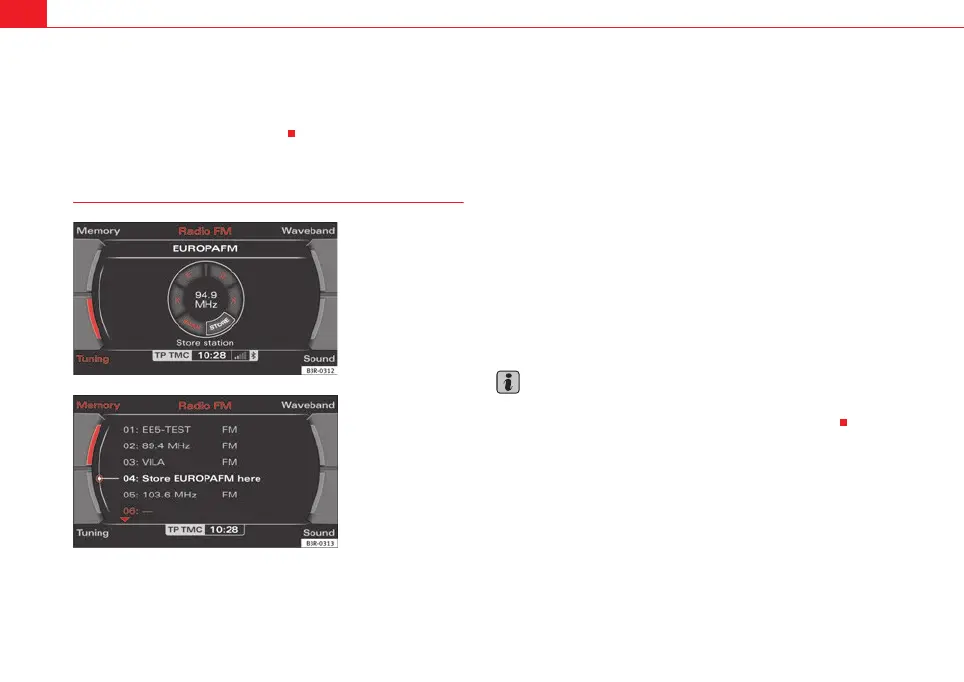
– By rotating and pressing the control knob, select STORE (“store
station”) ⇒ fig. 41.
– Select your desired memory location by rotating the control knob
⇒ fig. 42.
– Press the control knob. The station will be stored to the list
⇒ page 38.
Using the control wheel, you can also save manually-set radio stations
⇒ page 39.
A new station will be stored automatically at a vacant position in the memory
list. Alternatively, you may choose a specific position in the list to store the
station.
Note
For more information about storing radio stations, please refer to ⇒ page 38.
You can delete radio stations stored in the memory list ⇒ page 47.
Fig. 41 Radio: Store
station
Fig. 42 Radio: Storing a
station in the memory list
media_systemE_EN.book Seite 40 Montag, 21. September 2009 1:48 13



 To Next Page