Mobile phone system*88
Speech control system: switching on and off
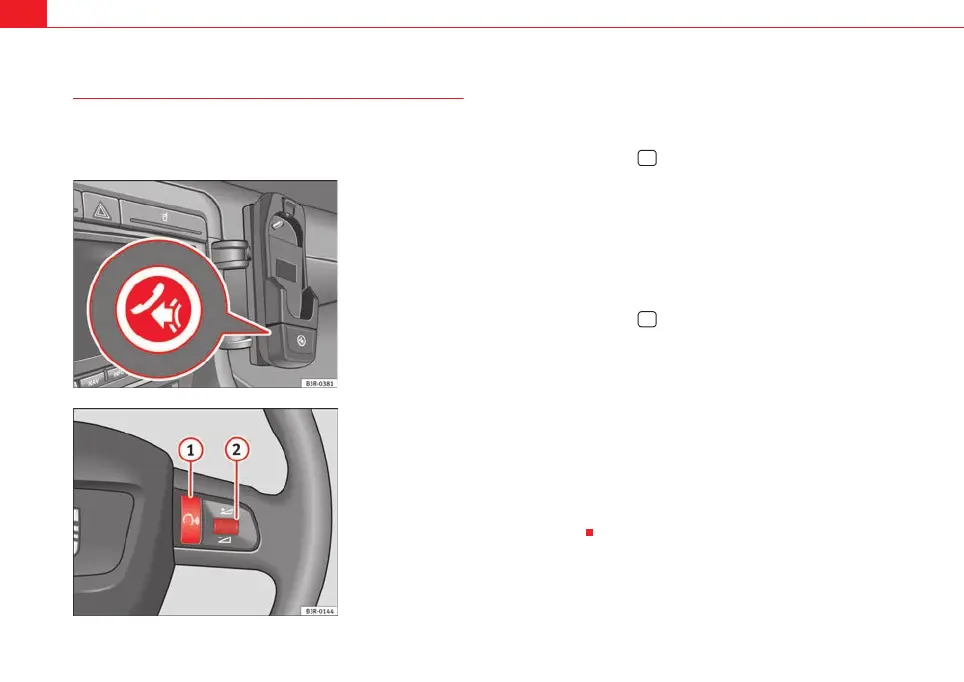
The speech control system can be activated via the talk button
on the mobile phone adapter* or the talk button on the multi-
function steering wheel.
Important: the ignition must be switched on and no phone calls
must be active.
Switching on the speech control system
– Press the talk button on the mobile phone adapter
⇒ fig. 107 or
– Press the talk button on the multi-function steering wheel*
⇒ fig. 108. A signal tone will indicate that the speech control
system is ready.
Switching off the speech control system
–Say the command CANCEL, or
– Press the talk button on the mobile phone adapter
⇒ fig. 107 or
– Press and hold down the talk button on the multi-function
steering wheel* ⇒ fig. 108 until you hear Cancel.
Volume adjustment
– With the speech control system switched on, scroll the right
thumbwheel of the multi-function steering wheel ⇒ fig. 108
up
or down , or
– With the speech control system switched on, turn the on/off
button on the navigation system ⇒ page 9 to increase or reduce
the volume.
Fig. 107 Phone adapter
with talk button
Fig. 108 Talk button and
right thumbwheel on the
multi-function steering
wheel
A
1
1
A
2
media_systemE_EN.book Seite 88 Montag, 21. September 2009 1:48 13



 To Next Page