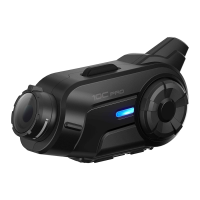
10C
26
6.3.1 A2DP Stereo Music Only
1. Turn on the headset and press the Phone Button for 5 seconds
until the LED ashes red and blue alternately and you hear
multiple beeps.
2. Within 2 seconds, tap the Jog Dial again, then the LED ashes red
and you hear “Media selective pairing”.
3. Search for Bluetooth devices on your smartphone. Select the
Sena 10C in the list of devices detected on your phone.
4. Enter 0000 for the PIN. Some mobile phones may not ask for PIN.
6.3.2 HFP for Phone Call Only
1. Turn on the headset and press the Phone Button for 5 seconds
until the LED ashes red and blue alternately and you hear
multiple beeps.
2. Within 2 seconds, tap the Phone Button again, then the LED
ashes blue and you hear “Phone selective pairing”.
3. Search for Bluetooth devices on your smartphone. Select the
Sena 10C in the list of devices detected on your phone.
4. Enter 0000 for the PIN. Some mobile phones may not ask for PIN.
6.4 Intercom Pairing
6.4.1 Pairing with Other 10C Headsets for Intercom
Conversation
The 10C can be paired with up to three other headsets for Bluetooth
intercom conversation.
1. Turn on the two 10C headsets (A and B) that you would like to pair
with each other.
2. Press and hold the Jog Dial of the headset A and B for 5 seconds
until red LEDs of the both units start to ash rapidly. You will hear
a voice prompt, “Intercom pairing”.



 To Next Page