10C
54
15.2 Camera Conguration Setting
You can enter into camera conguration of the 10C by following the
steps below. The camera must be on to enter this setting.
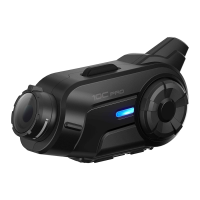
1. To enter into camera conguration menu, press and hold the
Camera Button for 8 seconds until you hear a voice prompt,
“Camera setup”.
2. Rotate the Jog Dial clockwise or counter clockwise to navigate
between the menus. You will hear voice prompts for each menu
item as below.
3. You can enable or disable a feature, or execute a command by
tapping the Phone Button.
4. If you do not press any buttons for 10 seconds, the 10C will exit
the conguration and go back to camera mode.
5. If you want to exit the camera conguration, tap the Jog Dial once.
The voice prompt for each menu item is as below:
(1) Photo mode setting (7) Video microphone gain setting
(2) Video mode setting (8) Date caption
(3) Video resolution setting (9) Speaker sound recording
(4) Timelapse interval setting (10) Auto camera sleep
(5) Video tagging interval setting (11) Format SD card
(6) Loop recording interval setting
VideomodesettingAutocamerasleep
VideoresolutionsettingSpeakersoundrecording
TimelapseintervalsettingDatecaption
VideotaggingintervalsettingVideomicrophonegainsetting
FormatSDcard Photomodesetting
Looprecordingintervalsetting



 To Next Page