Operator control
8.1 Device interface
SENTRON PAC4200
126 System Manual, 09/2009, A5E02316180B-02
8.1.5 Display of the device settings
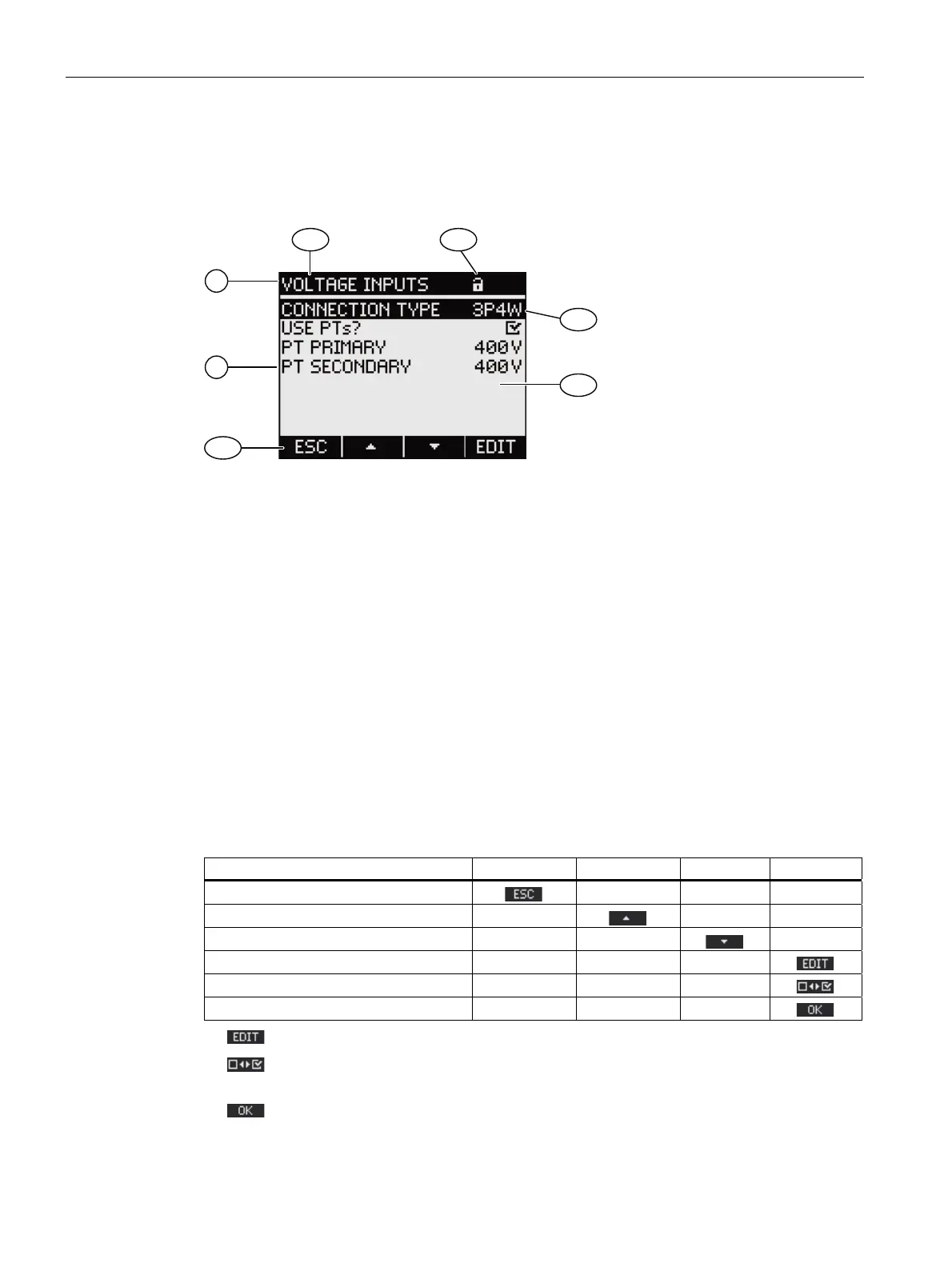
Related device settings are listed under the display title. The currently valid settings are
visible.
D
E
D
D
E
(1) Display title
a) Designation of the selected group of device settings
b) Device protection symbol
(2) List of device settings
a) Selection bar
b) Current setting
(3) Function keys
a) Key labeling
Figure 8-11 Display of the device settings
Display title
Specifies which group of device settings is currently selected.
Function keys
Table 8- 3 Assignments of the function keys in the device settings display
Key function F1 F2 F3 F4
Return to the menu selection
Scroll up in the selection list
Scroll down in the selection list
Change to edit mode
Switch the setting ON/OFF
Return to the menu selection
F4 switches edit mode on. The device settings can be changed in edit mode.
F4
is an ON/OFF switch. The change takes effect immediately. Calling edit mode is no
longer applicable.
F4
is available when the device setting is displayed but cannot be edited. Like F1, F4
returns to the "SETTINGS" menu from this display.



 To Next Page