Operator control
8.2 Operator input steps
SENTRON PAC4200
128 System Manual, 09/2009, A5E02316180B-02
Function keys
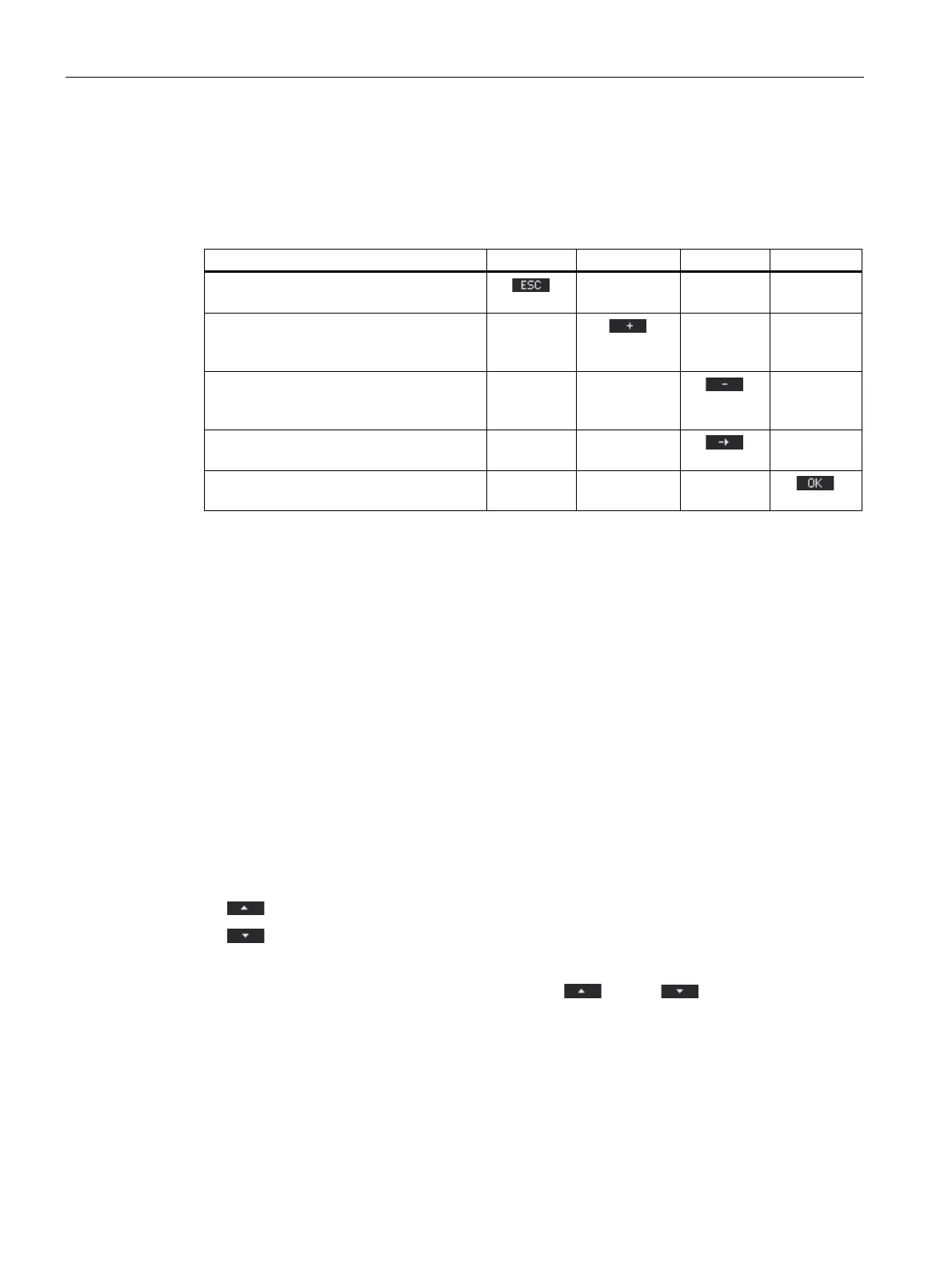
Table 8- 4 Assignments of the function keys in edit mode of the device settings
Key function F1 F2 F3 F4
Reject the changes and return to display
mode
Increment the numerical value by "1"
or
show the next selectable setting
Decrement the numerical value by "1"
or
show the previous selectable setting
Go to the next digit to the right in the multi-
digit numerical value
Save the changes and return to display
mode
See also
Operator input steps in edit mode of the device settings (Page 132)
Display of the device settings (Page 126)
8.2 Operator input steps
8.2.1 Operator input steps in the measured variable display
Selecting the measured variable
When displaying the instantaneous value, it is possible to switch to other measured
variables.
F2
switches to the previous measured variable.
F3
switches to the next measured variable.
The order of the measured variables corresponds to the order in the main menu.
If the maximum or minimum value is displayed, F2
and F3 are not available. In
this case, switch first to the display of the instantaneous value.
Note: It is also possible to select the measured variable in the main menu.



 To Next Page