Privacy Protection
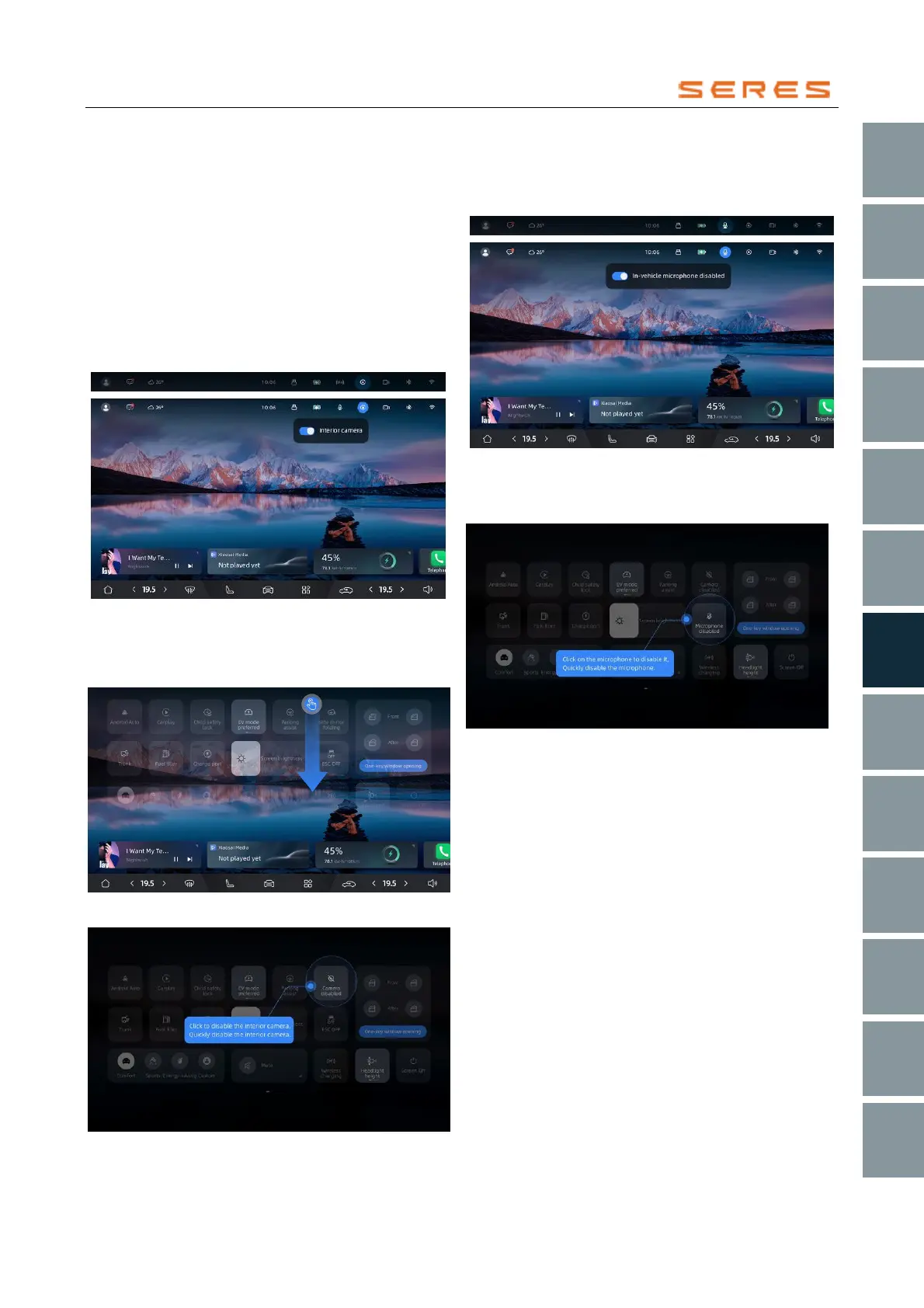
To protect your personal privacy, you have the freedom to
control the activation and deactivation of the in-Vehicle
camera and in-Vehicle microphone. The usage status of
the in-Vehicle camera and in-Vehicle microphone will be
displayed when the vehicle uses them, and you can easily
deactivate them with one touch.
You can deactivate the in-Vehicle camera or in-Vehicle
microphone in the following ways:
● Click on the in-Vehicle camera icon displayed in the
homepage status bar to choose to deactivate the
camera or related camera functions.
* The image is for reference only; please refer to the actual
product
● Swipe down from the top edge of the screen, click on
the drop-down menu, and quickly disable the in-
Vehicle camera.
* The image is for reference only; please refer to the actual
product
* The image is for reference only; please refer to the actual
product
● Click on the in-Vehicle microphone icon in the
homepage status bar to choose to disable the in-
Vehicle microphone.
* The image is for reference only; please refer to the actual product
● Swipe down from the top edge of the screen, click on
the drop-down menu, and quickly disable the in-
Vehicle microphone.
* The image is for reference only; please refer to the actual product



 To Next Page