68 丨 Vehicle Controls
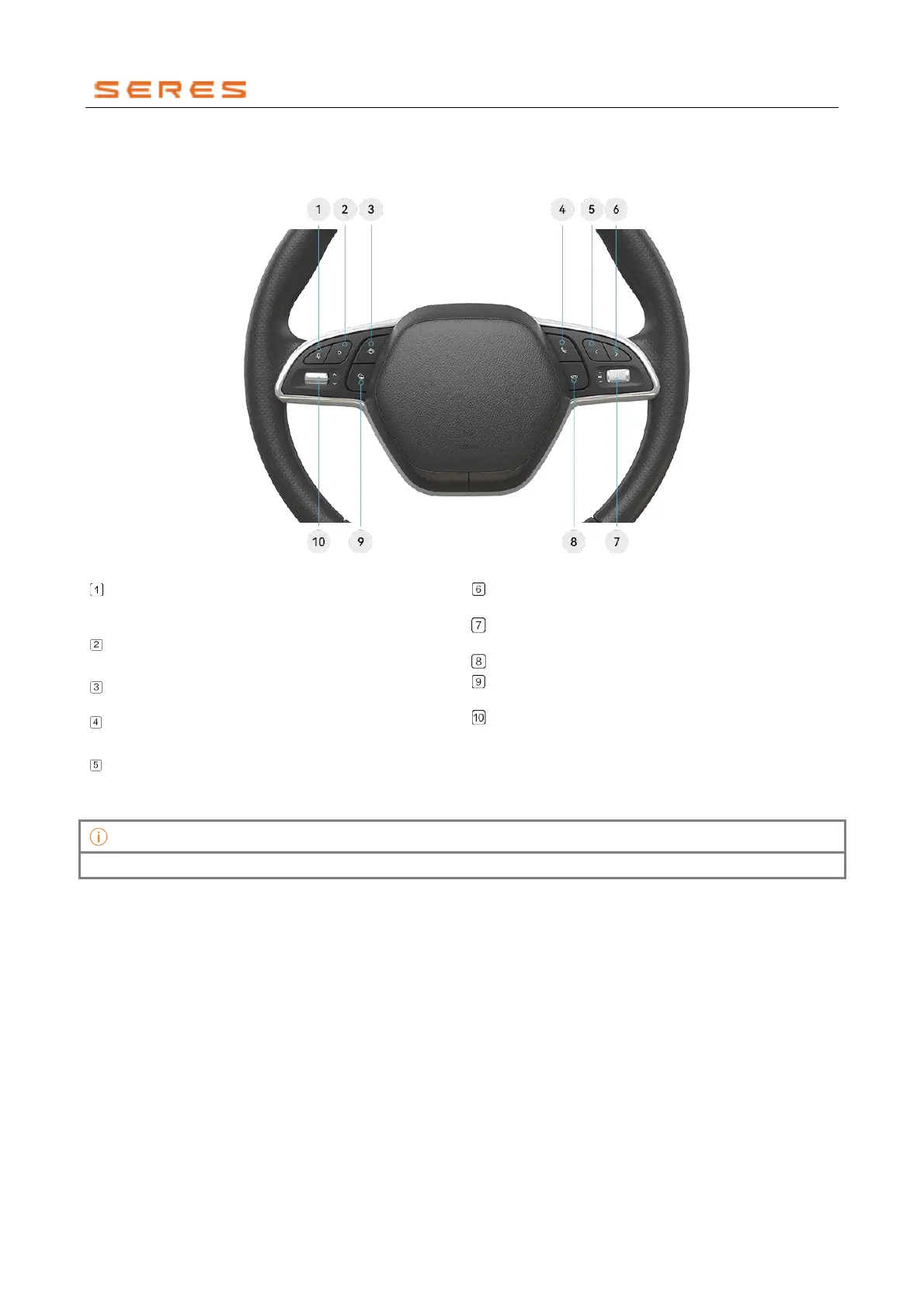
Steering Wheel Buttons
During the driving process, you can use the multifunction steering wheel buttons to control various electronic devices in
the Vehicle, allowing you to focus more on the road and enhance driving safety.
Button Function Introduction
* The image is for reference only; please refer to the actual product
Voice Button:
Short press to mute the microphone in
Bluetooth calls; press again to activate the
microphone.
Custom Button:
Short press to activate custom
function/long press to activate custom settings.
Panoramic Image Button:
Press to activate or
deactivate the panoramic image system.
Answer Button:
Press to answer calls/open call log
interface.
Previous Track Button:
Press to play the previous
music/frequency station.
Next Track Button:
Press to play the next
music/frequency station.
Volume Control Button:
Scroll up/down to
increase/decrease volume; press to play/pause.
Hang Up Button:
Press to hang up the call.
Cruise Button: Short press to activate lane cruise
assistant function.
Switch Button:
Toggle up/down to switch
information in the left information area of the
instrument display screen.
In non-call status, the microphone cannot be turned off.



 To Next Page