MX-M700N SIMULATION 7 – 32
41
41-1
Purpose
Operation test/Check
Function (Purpose)
Used to check the operation of the docu-
ment size sensor and the related circuit.
(The operation of the document size sensor
can be monitored with the LCD display.)
Section
Others
Operation/Procedure
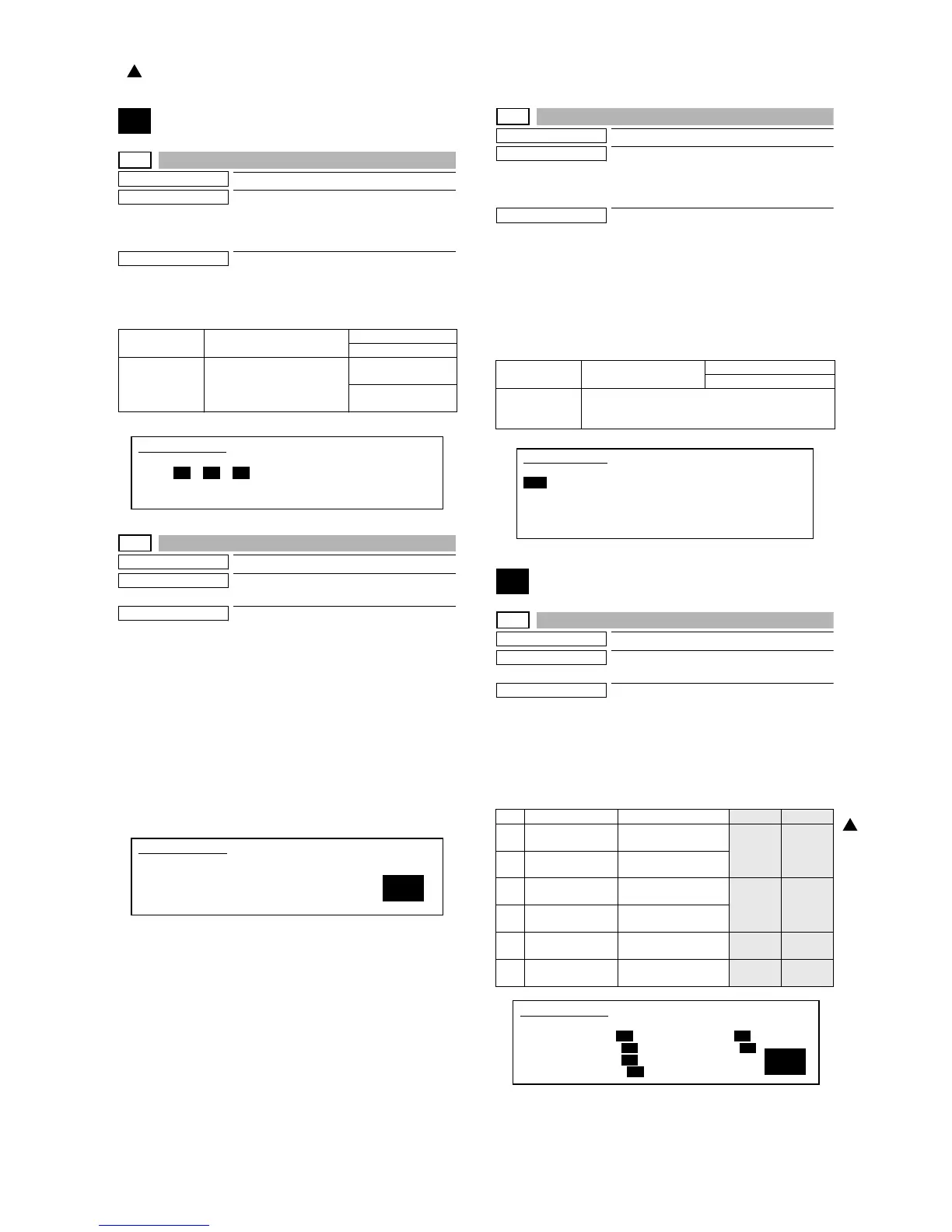
The sensor and detector operation conditions are displayed.
The active sensors and detectors are highlighted.
41-2
Purpose
Adjustment
Function (Purpose)
Used to adjust the document size sensor
sensing level.
Section
Others
Operation/Procedure
1) Open the original cover. With nothing placed on the original
table, select NO ORIGINAL with 10-key.
2) Press the [START] key.
The sensor level is set without document on the document
table.
3) Place an A3 (11x17) document on the document table, and
select A3 ORIGINAL with 10-key.
4) Press the [START] key.
The sensor level is set when detection the document.
If the above procedures are not completed normally, "ERROR"
is displayed. If completed normally, "COMPLETE" is displayed.
41-3
Purpose
Operation test/Check
Function (Purpose)
Used to check the operation of the docu-
ment size sensor and the related circuit.
(The document size sensor output level can
be monitored with the LCD display.)
Section
Others
Operation/Procedure
The detection output level (A/D value) of the document sensors
(PD1 - PD7) is displayed in real time.
* The value in [ ] on the side of each sensor name indicates the
threshold value.
The light receiving value (A/D value) and the threshold value (A/D
value) of PD1 - PD7 are in the range of 1 - 255. The default of
threshold value is 128.
43
43-1
Purpose
Setting
Function (Purpose)
Used to set the fusing temperature in each
operation mode.
Section
Fusing
Operation/Procedure
1) Select the number corresponding to the setting mode with 10-
key.
2) Press the [START] key.
3) Enter the setting value with 10-key.
4) Press the [START] key.
OCSW Document cover status Open: Normal display
Close: Highlighted
PD1 - 7 Document detection sensor
status
No document: Normal
display
Document present:
Highlighted
SIMULATION 41-1
PD SENSOR CHECK..
OCSW PD1 PD2 PD3 PD4 PD5 PD6 PD7
SIMULATION 41-2
PD SENSOR ADJUSTMENT. SELECT1-2, AND PRESS START.
(PLEASE OPEN THE ORIGINAL COVER.)
1. NO ORIGINAL
2. A3 ORIGINAL
1
OCSW Original cover status Open: Normal display
Close: Highlighted
PD1 - 7 PD sensor detection level The value in [ ] indicates the
adjustment threshold value (SIM41-2 adjustment
value).
100V 200V
1 INSIDE NORMAL Fusing roller inside/
normal mode
200 205
2 OUTSIDE
NORMAL
Fusing roller outside/
normal mode
3INSIDE
PREHEAT
Fusing roller inside/
preheat mode
170 170
4 OUTSIDE
PREHEAT
Fusing roller outside/
preheat mode
5 LEFT NORMAL Sub-heat roller/normal
mode
200 205
6 LEFT PREHEAT Sub-heat roller/
preheat mode
170 170
SIMULATION 41-3
PD SENSOR DATA DISPLAY.
OCSW
PD1[128]: 200 PD2[128]: 200
PD3[128]: 50 PD4[128]: 52
PD5[128]: 51 PD6[128]: 50
PD7[128]: 52
1
SIMULATION 43-1
1
FUSER TEMPERATURE SET. SELECT 1-6, AND PRESS START.
1. INSIDE NORMAL 185 5. LEFT NORMAL 185
2. OUTSIDE NORMAL 185 6. LEFT PREHEAT 140
3. INSIDE PREHEAT 140
4. OUTSIDE PREHEAT 140
: '07 Feb 15
1



 To Next Page