Key
notations
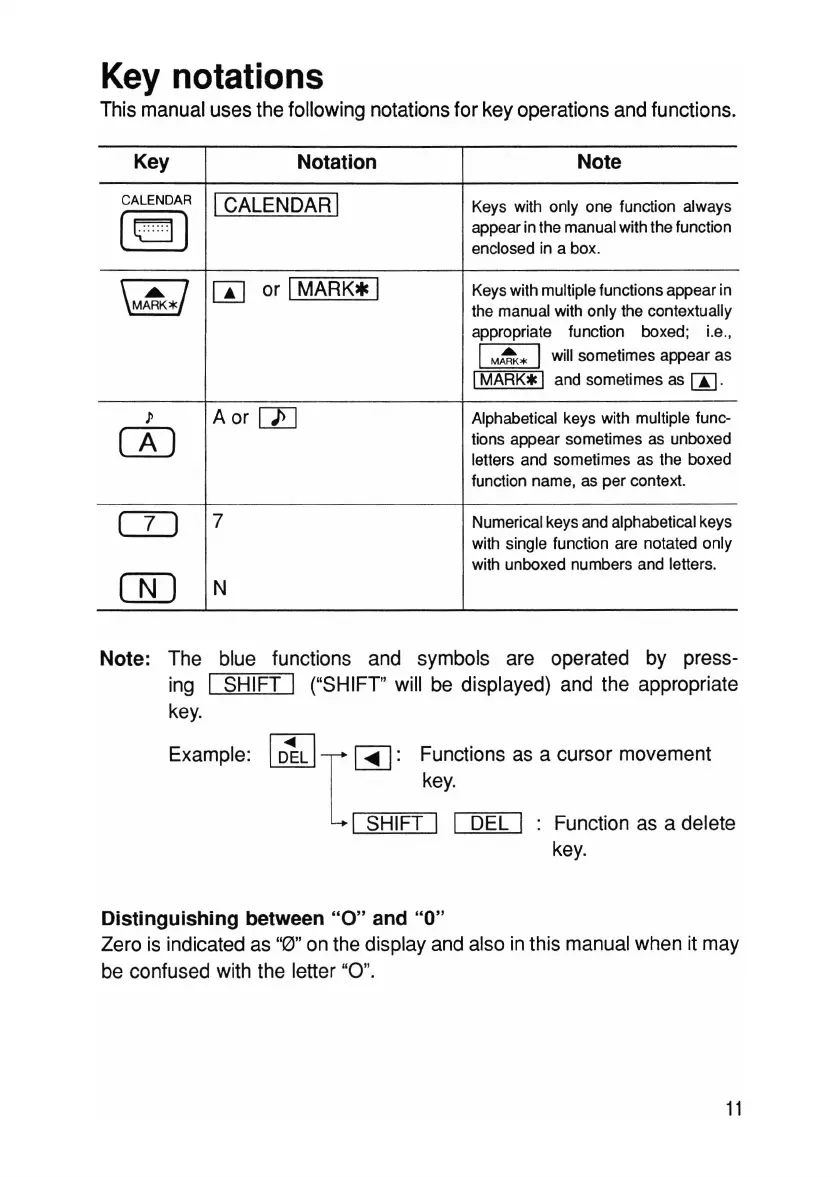
This manual uses the following notations for key operations and functions.
Key
Notation
Note
CALENDAR
ICALENDAR I
Keys with only one function always
[lCJ]
appear in the manual with the function
enclosed in a box.
\
M~
*/
W
or I
MARK*
I
Keys with multiple functions appear in
the manual with only the contextually
appropriate
function boxed;
i.e.,
I
M
~*
Iwill sometimes appear as
I
MARK*
I and sometimes as
[i]
.
l' A or
[1]
Alphabetical keys with multiple func-
rn
tions appear sometimes as unboxed
letters and sometimes as the boxed
function name, as per context.
CD
7
Numerical keys and alphabetical keys
with single function are notated only
with unboxed numbers and letters.
CID
N
Note: The blue functions and symbols are operated by press-
ing I SHIFT I ("SHIFT" will be displayed) and the appropriate
key.
Example:
I
D~L
II
~:
Functions as a cursor movement
key.
I SHIFT I I DEL I Function as a delete
key.
Distinguishing between
"0"
and
"0"
Zero is indicated as "0" on the display and also in this manual when it may
be confused with the letter "
0"
.
11



 To Next Page