Press I TEL I
I
when not, small letters are entered. Pressing ICAPS I alternates
between capital and small letters.
Entering listings
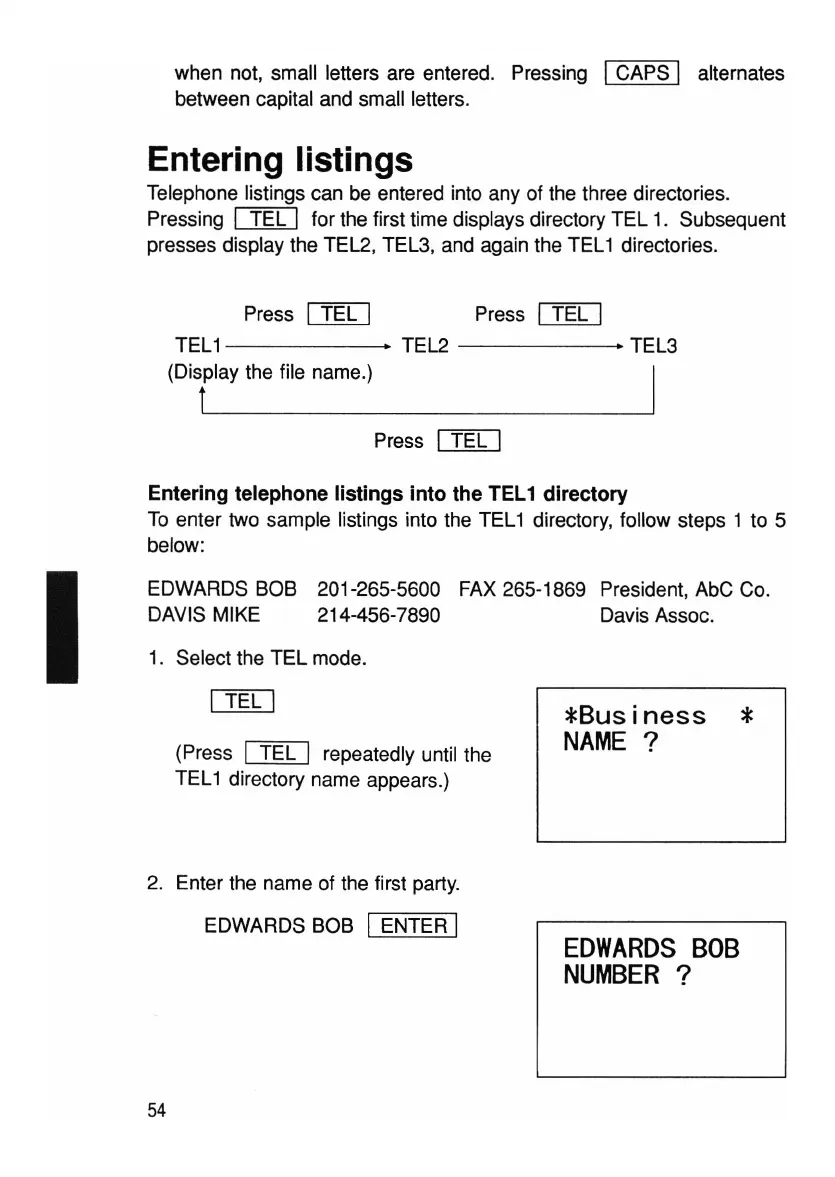
Telephone listings can be entered into any of the three directories.
Pressing
I TEL I for the first time displays directory TEL 1. Subsequent
presses display the TEL2, TEL3, and again the TEL1 directories.
Press
I TEL I
TEL1 • TEL2
------..
TEL3
(Display the file name.)
t __
Press I TEL I
Entering telephone listings into the
lEL
1 directory
To enter two sample listings into the TEL1 directory, follow steps 1 to 5
below:
EDWARDS BOB 201-265-5600 FAX 265-1869 President, AbC Co.
DAVIS MIKE 214-456-7890 Davis Assoc.
1. Select the TEL mode.
(Press
~
repeatedly until the
TEL1 directory name appears.)
2. Enter the name of the first party.
EDWARDS BOB
IENTER I
54
*Business
*
NAME
?
EDWARDS
BOB
NUMBER
?



 To Next Page