EasyManua.ls Logo

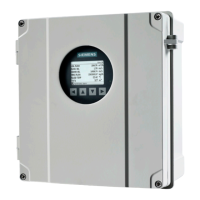
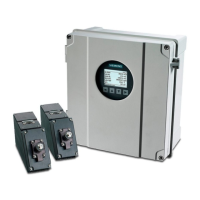
Siemens SITRANS FST030 - User Manual

Siemens SITRANS FST030
356 pages
Print Icon
To Next Page IconTo Next Page
Loading...
SITRANS F
Ultrasonic flowmeters
SITRANS FST030 (Modbus)
Operating Instructions
7ME372 (Modbus)
08/2018
A5E37367739-AD
Introduction
1
Safety notes
2
Description
3
Installing/Mounting
4
Connecting
5
Commissioning
6
Operating
7
Service and maintenance
8
Diagnostics and
troubleshooting
9
Technical data
10
Dimension drawings
11
Modbus communication
A
Certificates and support
B
SIMATIC PDM
C

Table of Contents

Questions and Answers

  • R
    Robert HughesSep 9, 2025
    What to do if Siemens Measuring Instruments display shows no flow and measured sound velocity is 0 m/s with alarm code 34?
    • M
      morganrobinSep 9, 2025
      If your Siemens Measuring Instruments display shows no flow and the measured sound velocity is 0 m/s, accompanied by alarm code 34, it could be due to incorrectly installed sensors or incorrect setup parameterization. Verify the actual pipe dimensions against the entered values, and check the sensor selection, mounting configuration, and spacing. Also, an incorrect expected fluid sound velocity can cause issues, so verify that the entered expected sound velocity is correct for the application. The pipe might also be mostly empty, causing the meter to operate on pipe noise; ensure the pipe is completely filled with liquid or relocate sensors to a section that is normally full, avoiding installation on the top or bottom of horizontal pipes.
  • R
    Roy WardAug 22, 2025
    What does alarm code 28 mean on Siemens Measuring Instruments?
    • C
      Christina BryantAug 23, 2025
      If the display shows active flow on your Siemens Measuring Instruments with Alarm code 28, it could be due to a duplicate assignment of pressure, density, viscosity, or temperature. Check the "inputs and outputs" channels assignment, reassign inputs, or disable unused inputs. It may also be caused by the RTD input conversion indicating an out-of-range temperature. Check the RTD connections, ensure that the selected RTD type matches the resistance of the installed RTD, and verify that the user RTD calibration parameters are set correctly in the RTD setup menu.
  • M
    mendozajacobAug 25, 2025
    What does alarm code 7 mean on Siemens Measuring Instruments?
    • N
      nwheelerAug 25, 2025
      If the display shows active flow on your Siemens Measuring Instruments with Alarm code 7, it could be because the measured transit-time (sound velocity) is outside the allowed range for the entered sensor spacing. If your application involves multiple fluid compositions that may experience a significant variation in sound velocity, ensure that the sensor setup wizard is performed using the nominal fluid sound velocity. Also, optimal performance is achieved when the sensors are spaced correctly based on the actual fluid sound velocity, so perform the sensor setup wizard again using the initially measured sound velocity as the expected sound velocity if possible.
  • M
    martinbaileyAug 26, 2025
    What to do if Siemens Measuring Instruments display shows no flow?
    • A
      Alex ThomasAug 26, 2025
      If the Siemens Measuring Instruments display shows no flow, it could be due to several reasons. First, ensure the pipe is filled with liquid, or at least the sound path is covered. Check that the sensor cable is correctly connected in the transmitter's terminal housing, ensuring the screen and center pin are connected inside the sensor top. Lastly, verify that the sensor window inside the pipe isn't damaged and that no permanent disturbance is present.
  • J
    Jennifer JonesAug 27, 2025
    Why is the flow not stable on my Siemens SITRANS FST030 Measuring Instruments?
    • C
      Christopher StoutAug 27, 2025
      Unstable flow readings on your Siemens Measuring Instruments can occur due to air bubbles or particles disturbing the measurement. Ensure the pipeline is ventilated and the concentration of particles is limited. Also, check that the sensor cables are properly connected at both the transmitter and the sensors, including the cable grounding shield. Verify the connection of the cable grounding shield and that the shield and center pin are connected inside the sensor top. Finally, confirm that the entered path lengths correspond to the measurement report to avoid ultrasonic echoes.
  • C
    Cody MoralesAug 29, 2025
    What to do if Siemens Measuring Instruments device displays negative flow?
    • K
      Kathleen DaltonAug 29, 2025
      If your Siemens Measuring Instruments device displays negative flow, first check that the sensor cables are connected correctly, ensuring 1A connects to 1A, 1B to 1B, 2A to 2A, and 2B to 2B. Also, verify that the setting of menu 3.1.5.1 is set to '+ Direction'.
  • J
    John NortonSep 17, 2025
    Why does zero point adjustment fail on Siemens Measuring Instruments?
    • R
      Raymond MartinSep 17, 2025
      If the zero point adjustment fails on your Siemens Measuring Instruments, verify that the flow is completely stopped before performing the zero point adjustment. Also, confirm that the path(s) being zeroed are installed properly and providing stable flow measurement. Defective sensors with excessive zero offset can also cause this issue; check the sensors (e.g., using a 'Test block').
  • A
    Alexandra WilsonSep 18, 2025
    What to do if Siemens Measuring Instruments flow rate appears frozen?
    • J
      johnsonstephenSep 18, 2025
      If the displayed flow rate appears to be frozen, or the display continuously reads "wait for the sensor connect" after a power cycle on your Siemens Measuring Instruments, check the SSL cable connections between the barrier module and DSL frontend module. Verify that the barrier module is fully plugged into the backplane. The barrier module may also be defective, in which case you should contact Technical Support.
  • S
    Shawn DavisSep 7, 2025
    What to do if Siemens Measuring Instruments display is completely blank, but communication is still possible?
    • I
      imcintyreSep 7, 2025
      If the display on your Siemens Measuring Instruments is completely blank, but communication is still possible on the service channel, check the cable connections between the display and Transmitter module. The HMI module may also be defective, in which case you should contact Technical Support.
  • E
    Elaine NunezSep 4, 2025
    Why is the flow direction wrong on my Siemens Measuring Instruments?
    • K
      Katrina CollinsSep 4, 2025
      If the flow rate appears correct, but the sign (flow direction) is wrong on your Siemens Measuring Instruments, first verify that the upstream sensor is connected to the upstream F-connector on the frontend (labeled A). Also, check the flow direction parameter in Setup > Sensor > Flow direction; it might be set to "negative" flow.

Summary

Introduction

Safety notes

Preconditions for safe use

Outlines conditions to maintain device status and ensure safe operation.

Use in hazardous areas

Details requirements for qualified personnel and special conditions for hazardous area applications.

Installing;Mounting

Installation instructions

Provides instructions for mounting the wall mount housing transmitter.

Connecting

Basic safety notes

Covers essential safety precautions for electrical connections, including grounding.

Commissioning

Commissioning via local display

Guides through the commissioning process using wizards like Quick commissioning and Sensor settings.

Operating

Operating via the local display

Explains operation using the local HMI, including display views and access control.

Service and maintenance

Diagnostics and troubleshooting

Troubleshooting Guide

Provides an overview of potential symptoms, diagnostics, causes, and remedies for common issues.

Technical data

Modbus communication

Modbus holding registers tables

Provides a comprehensive list of Modbus holding registers for parameters and their configurations.

SIMATIC PDM

Commissioning with PDM

Guides on using SIMATIC PDM for commissioning, maintenance, and parameter adjustment.

Siemens SITRANS FST030 Specifications

General IconGeneral
Power supply24 V DC
Enclosure ratingIP67
MaterialStainless Steel
Protection RatingIP67
MediumGases
Nominal diameterDN15 to DN300
Process temperature-40 °C to +150 °C
Operating pressureup to 40 bar
Accuracy±1% of reading
Output signal4-20 mA, pulse
CommunicationHART
Gas typesNatural gas
Process ConnectionFlanged, threaded
Ambient Temperature-20 °C to +60 °C
CertificationsATEX, IECEx

Related product manuals