Functional Description
AP10S
Date: 04.09.2017 Art. No. 87826 Mod. status 269/17 Page 7 of 48
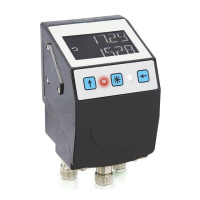
If battery voltage drops to a critical value, the battery symbol on the display will flash. If it
falls below the minimum value, the symbol will glow permanently.
Errors are signified by red characters.
3.2.1 Extended display range
Values up to -999999 can be displayed by means of the control word. If the relevant bit has
been set and the value to be displayed is between -199999 and -999999, then the negative
sign and the digit of the highest order will flash alternately. If the value range drops below -
999999, "" will be displayed.
3.3 LED display
In its basic state (factory setting) the LED display has different meanings depending on the
operating mode (see chapter 4.1: Operating modes).
With the basic function of the LEDs inactivated, every LED can be controlled independently via
the control word (see chapters 6.9.8 to 6.9.10 and 6.9.31: LEDs and chapter 6.3.4: Control
word).
3.4 Keys
Pressing the key enables or disables the incremental measurement function. With the
Auto-ID function, the new ID is adopted by actuating this key (see chapter 6.8: Auto-ID).
Pressing the key starts calibration (see chapter 4.6.2: Calibration) and acknowledges a
pending error (see chapter 4.5.2: Errors).
Pressing the key starts the parameterization mode (see chapter 4.3: Parameterization of
the position indicator).
4 Functional Description
4.1 Operating modes
The following position-dependent operating modes are differentiated: Absolute Position,
Differential Value, Modulo and the position-independent operating mode Alpha-numeric
Display.
Table 1: Display with different operating modes


 To Next Page