2-5
Copying
2
When Tray 2 is selected
-
Tray 2 automatically detects the paper size. For details on papers automatically detected in Tray 2, see P. 1-27
「9. Load papers」.
To change paper type, select [Paper type] on the upper right and choose a paper type.
For details on paper size available for Tray 2, see P. 1-27 「9.1 Load Papers to Tray」.
When MPT is selected
-
MPT cannot automatically detect paper size.
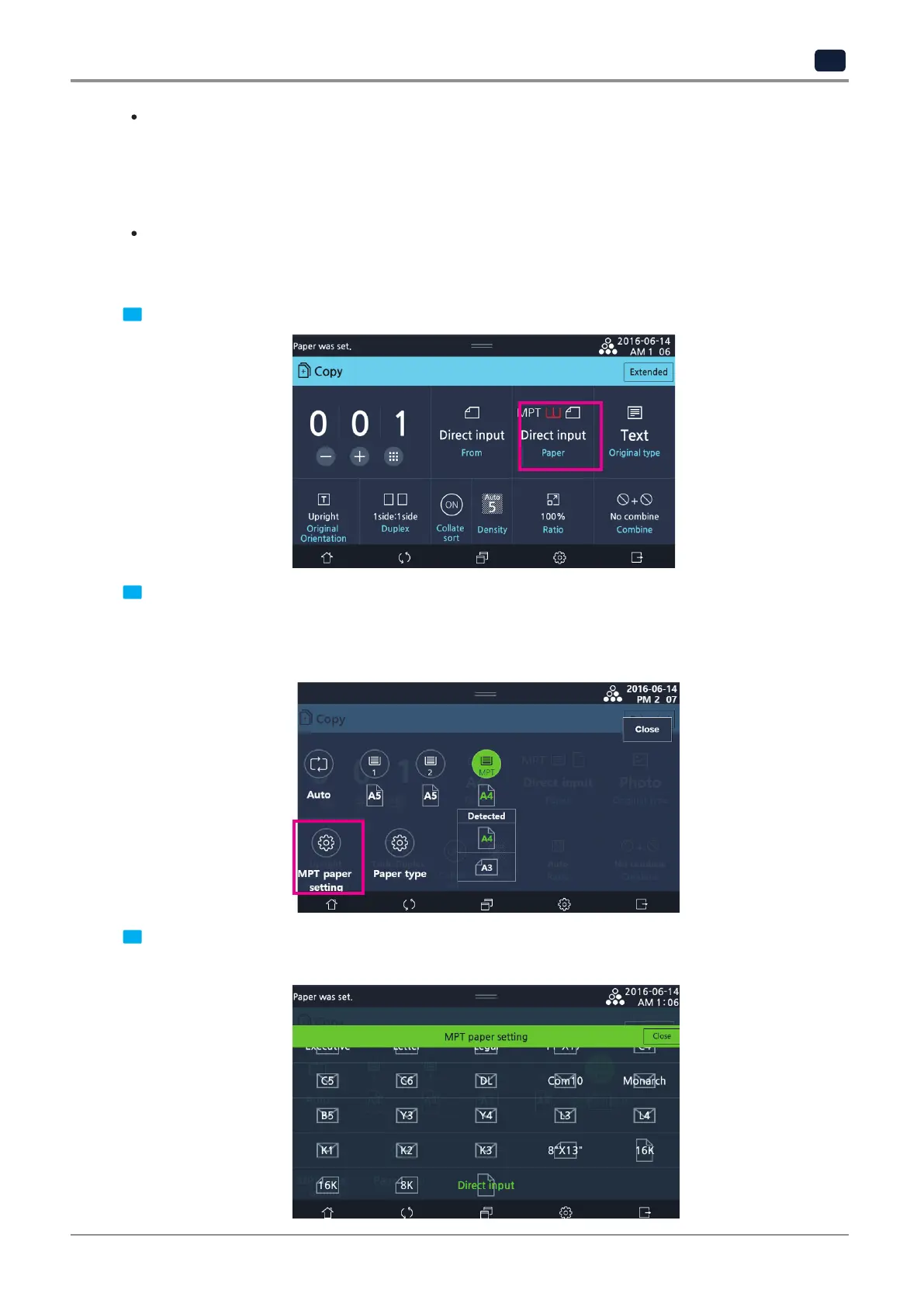
Follow the below procedures to set the paper size and type loaded in MPT.
1 Press [Paper].
2 Load papers. Detect paper size and show it on the screen. Select papers to use.
- Select [Paper type] when loading papers other than regular papers.
- Select [MPT paper setting] when loading non-standardized papers.
- When detected papers and loaded papers are different, select [MPT paper setting] to select papers manually.
3 The below screen appears when [MPT paper setting] is selected. Select papers to use.
If the paper to use is not on the selections, press [Direct input] to enter the paper size.



 To Next Page