4
Getting started
• The DC 12V 3A round jack power adapter is intended to be correctly oriented
in a vertical or oor mount position. The prongs are not designed to hold the
plug in place if it is plugged into a ceiling, under-the-table, or cabinet outlet.
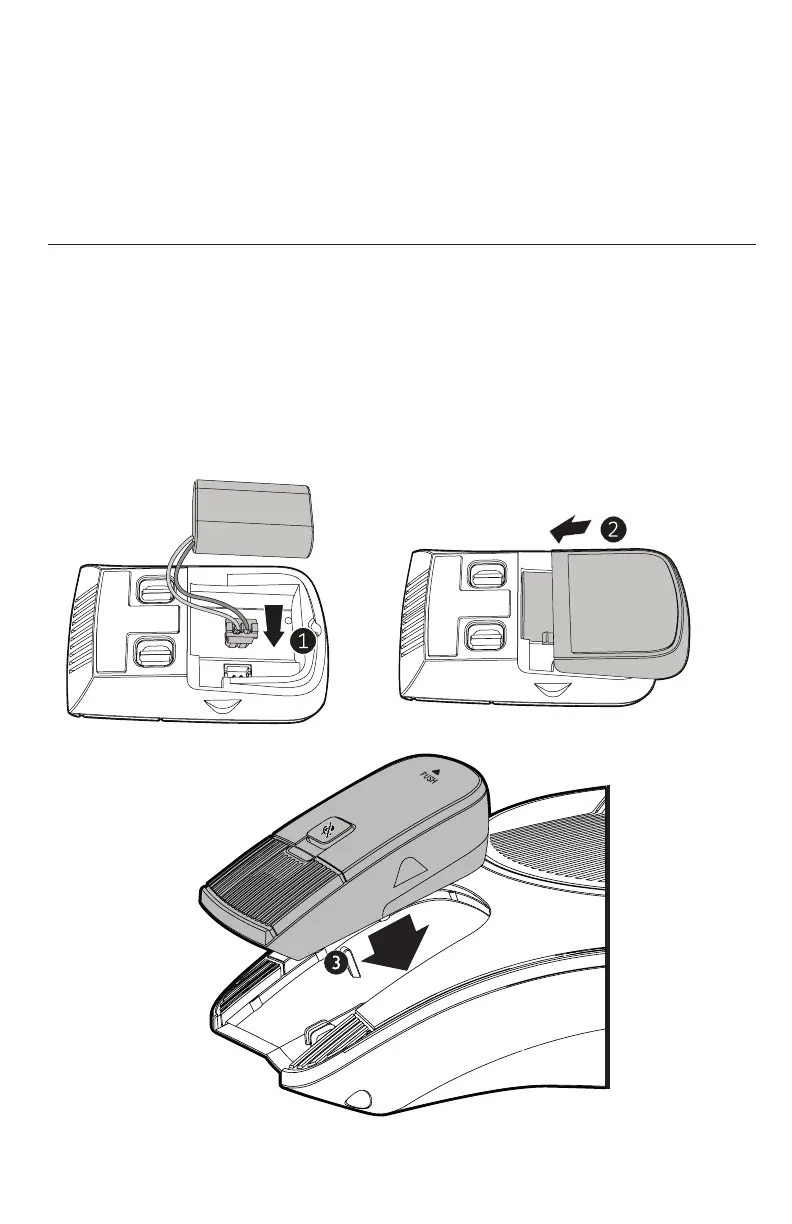
Installing the wireless mic battery
1. Plug the battery connector securely into the socket inside the battery
compartment. Insert the battery (with the label THIS SIDE UP facing up) into
the battery compartment.
2. Slide the battery door until it clicks into place.
3. Place the wireless mics into the charging cradles until they are ush.
NOTE: The status indicator on the wireless mic turns orange when charging,
and turns o when the wireless mic is fully charged.
3
AC power cord
1
2
LAN
VCS752
Wall outlet
Network switch
or router
DC power cable
(with yellow plugs) Ethernet cable
Slots
To Adapter
Adapter
Network switch
or router
Ethernet cable
Slots
Battery X2



 To Next Page