5 6
Getting started
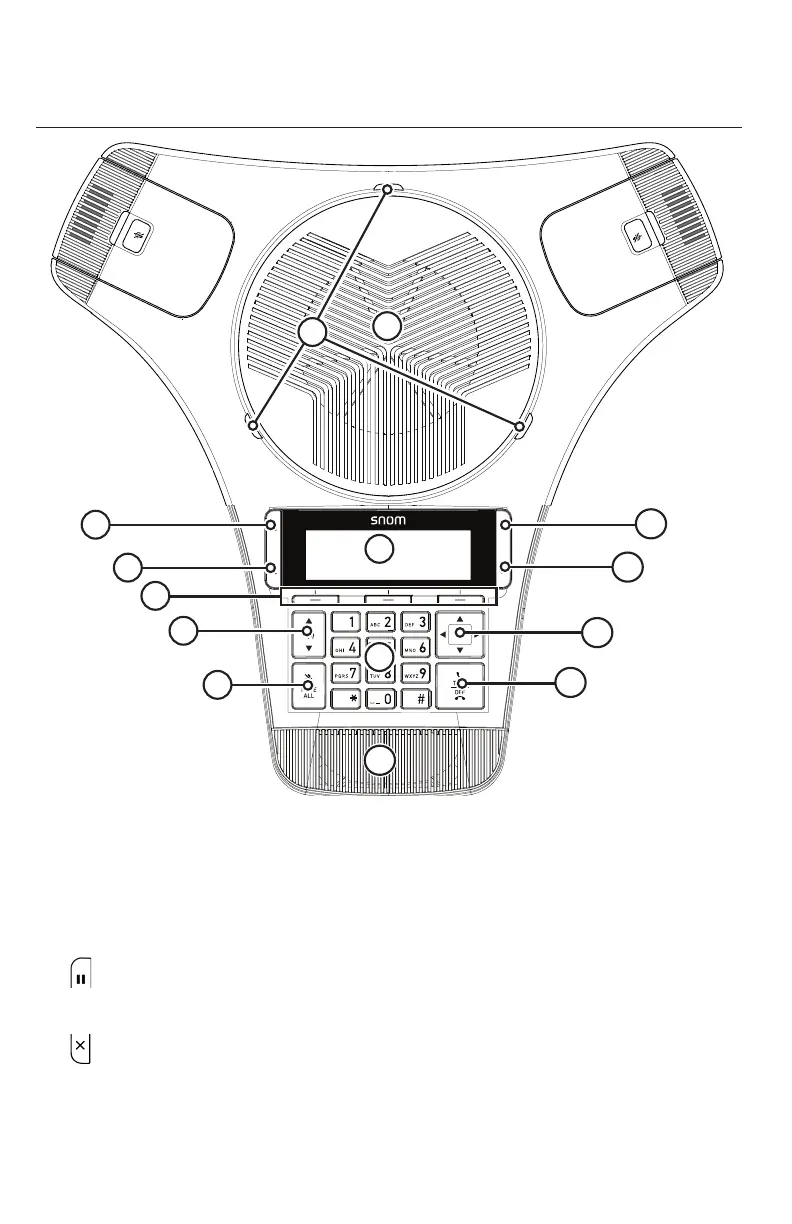
Conference phone overview
0
1
6
MNO
9
WX YZ
3DEF
#
5
JKL
8
TUV
2
AB C
4
GHI
7
PQRS
a » A
Mickey Law | 27.Mar.2019 | Revision 1.5AW | Snom C620 SpeakerBox
illustration scale 100%
3
4
6
11
2
8
5
1
13
14
10
7
9
12
1. Status indicator
• Indicates the system status. See also "Status indicators on the conference
phone / wireless mics" on page 9.
2. Speaker
3. (Hold)
• Press to put a call on hold. See "Putting a call on hold" on page 20.
4. (Cancel)
• Press to cancel an operation
• Press to exit the menu display
• Press to return to the idle screen.



 To Next Page