29
D862 User Manual Getting to Know Your Phone
Main menu Submenus or content
Connection
Status System (phone and peripherals HW and SW info), connection (IP settings,
Wi-Fi, Bluetooth)
System Turn administrator access on, advanced (webserver, update settings, reboot,
factory reset)
Help Shows phone's IP address and URL of Snom Service Hub page for the phone
The default mode of the phone is user mode. There is no default admin password to open the phone's
web interface unless one has been set by your IP provider or system manager. Most of the individual
settings are described elsewhere in this manual.
• Language: See "Language settings of phone and web interface" on page 64.
• Sound.
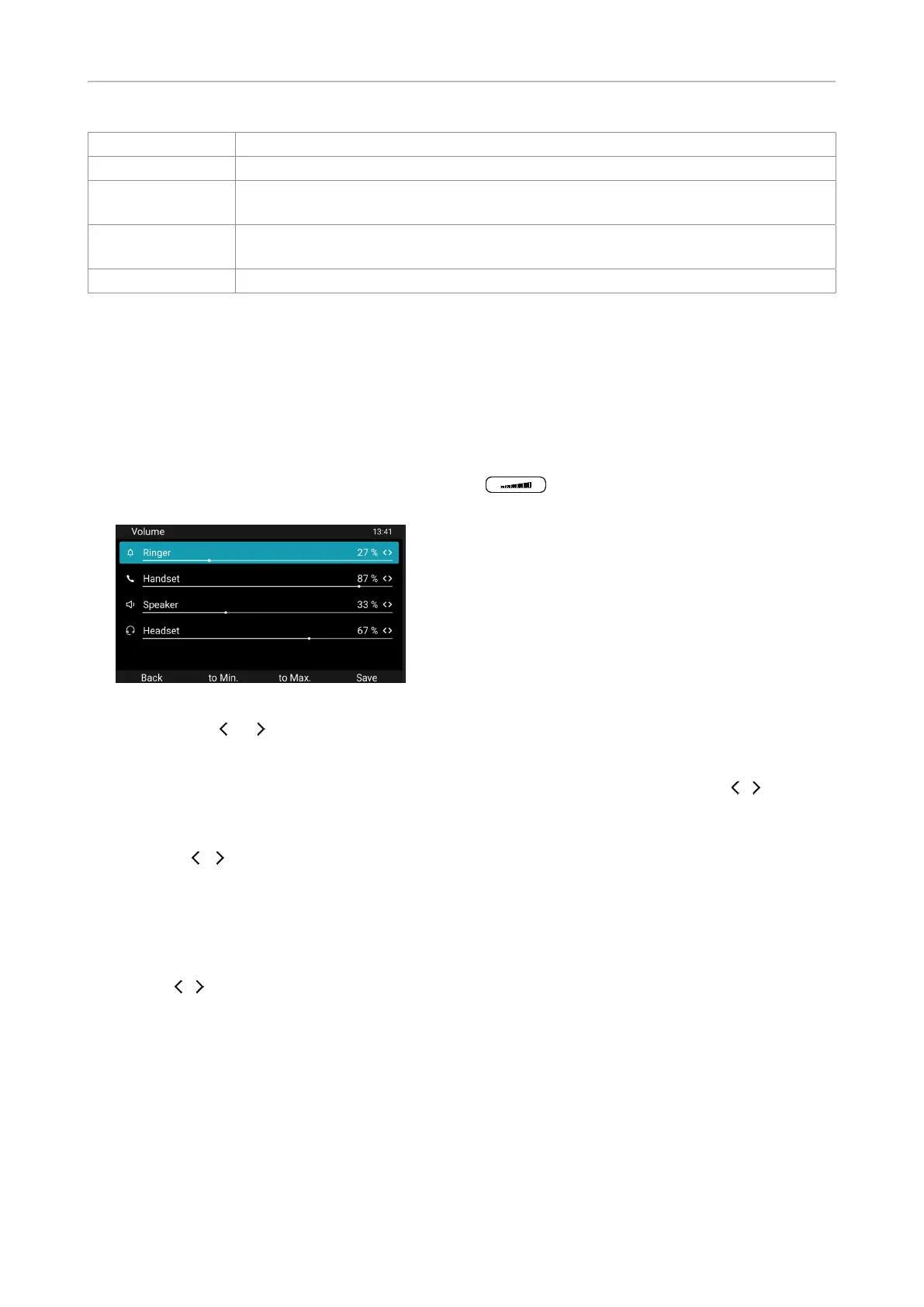
◦ The volume of ringer, handset, speaker, and headset can be adjusted while the phone is
ringing or in a call by pressing the volume key . It can be also be adjusted in the
Phone Manager, Preferences / Audio, and in the phone's Volume submenu.
1. Select the device.
2. Press or to decrease or increase the volume.
3. Press Save.
◦ Preferred audio. The default is handset. Select speakerphone or headset with / and
press Save.
◦ Ringer tone. The phone has 10 built-in tones that can be assigned to individual identities.
Press / to play the next one, press Save to save the selectecd tone for the current identity.
• Display.
◦ Brightness. The backlight is adjustable between 20% and 100% brightness in steps of 10%.
◦ Screen timeout. These two setting allows you to dim the brightness of the display after a
period of inactivity. The defaults are 50% less brightness after 30 seconds of inactivity. Set
wit / and Save.
• Programmable keys. See "Configuring the function keys" on page 52.
• DND. In DND mode incoming calls do not ring; callers hear the busy signal. Turn "do not disturb"
(DND) mode on and o for all identities registered on the phone. If you want to turn on DND for
one or more, but not all of the identities (Fig. 2), use the Identity settings of the phone manager,
features section. In DND mode incoming calls do not ring; callers hear the busy signal.
• Call forwarding. See "Call forwarding" on page 50.
• Applications.
◦ Directories. See "Directories" on page 32.



 To Next Page