81
D862 User Manual Appendix 2
Appendix 2 - Wall mounting
The bracket for wall mounting is available separately. Please, contact your seller or distributor for
more information.Not included in the delivery are the two screws (diameter of head between 6 and 9
mm, diameter of body max. 4.5 mm) and two screw anchors/molly bolts/wall plugs appropriate for
your type of wall.
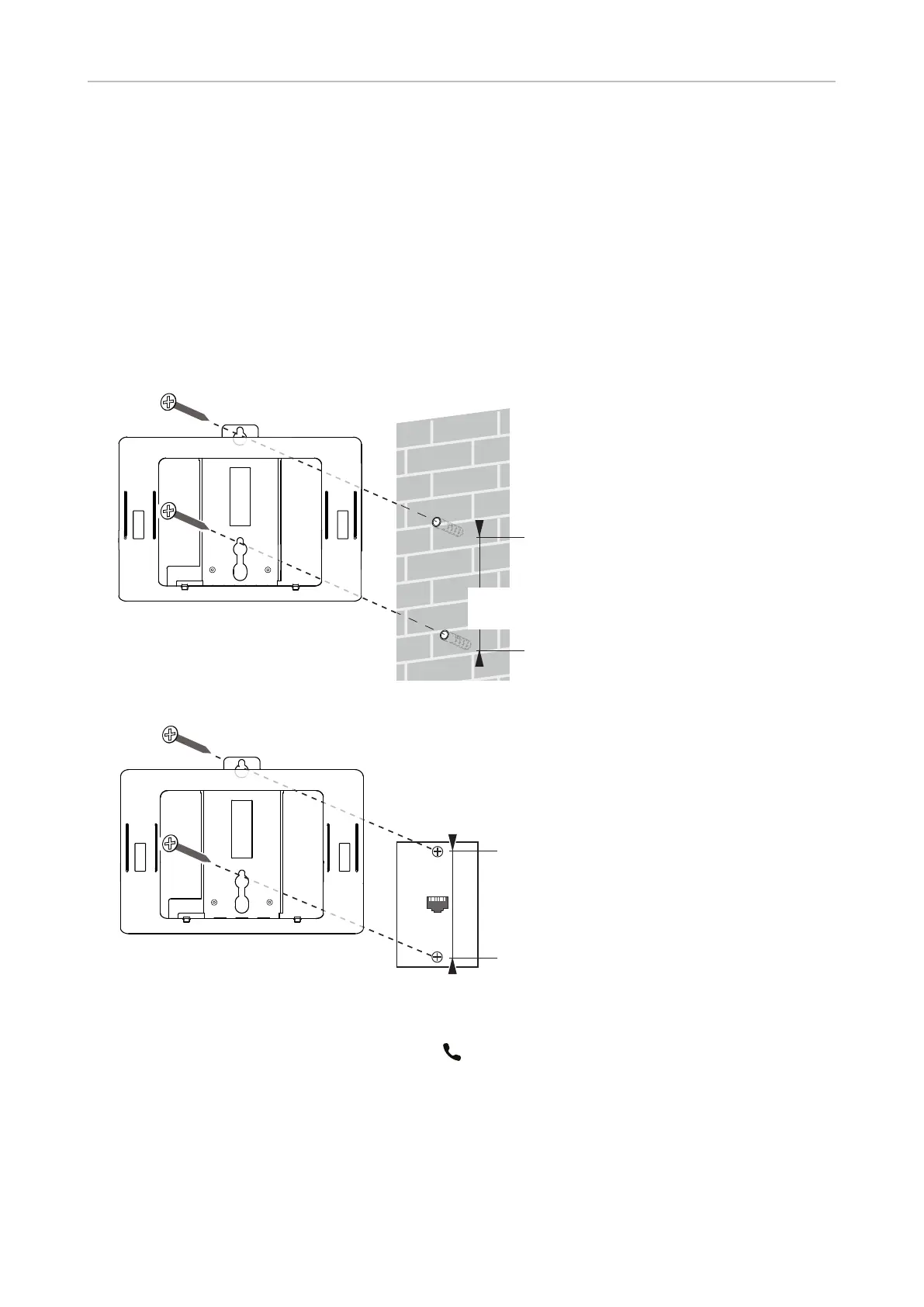
The bracket is suitable for mounting the phone over American standard Ethernet wall plates and for
mounting it on the wall without the wall plate.
• On the wall without wall plate.
Min. 83 mm (3.25")
Max. 100 mm (4")
• Over a standard Ethernet wall plate.
4"
1. Place the anchors for the screws in the wall using the measurements given above.
2. Screw the bracket to the wall without or with the wall plate.
3. Plug the handset cord into the port labelled " " on the back of the phone and place the cord in the
cable guide.
4. Plug the Ethernet cable into the port labelled "NET" on the back of the phone.



 To Next Page