69
D862 User Manual Customizing the Phone Settings
Setting on the phone
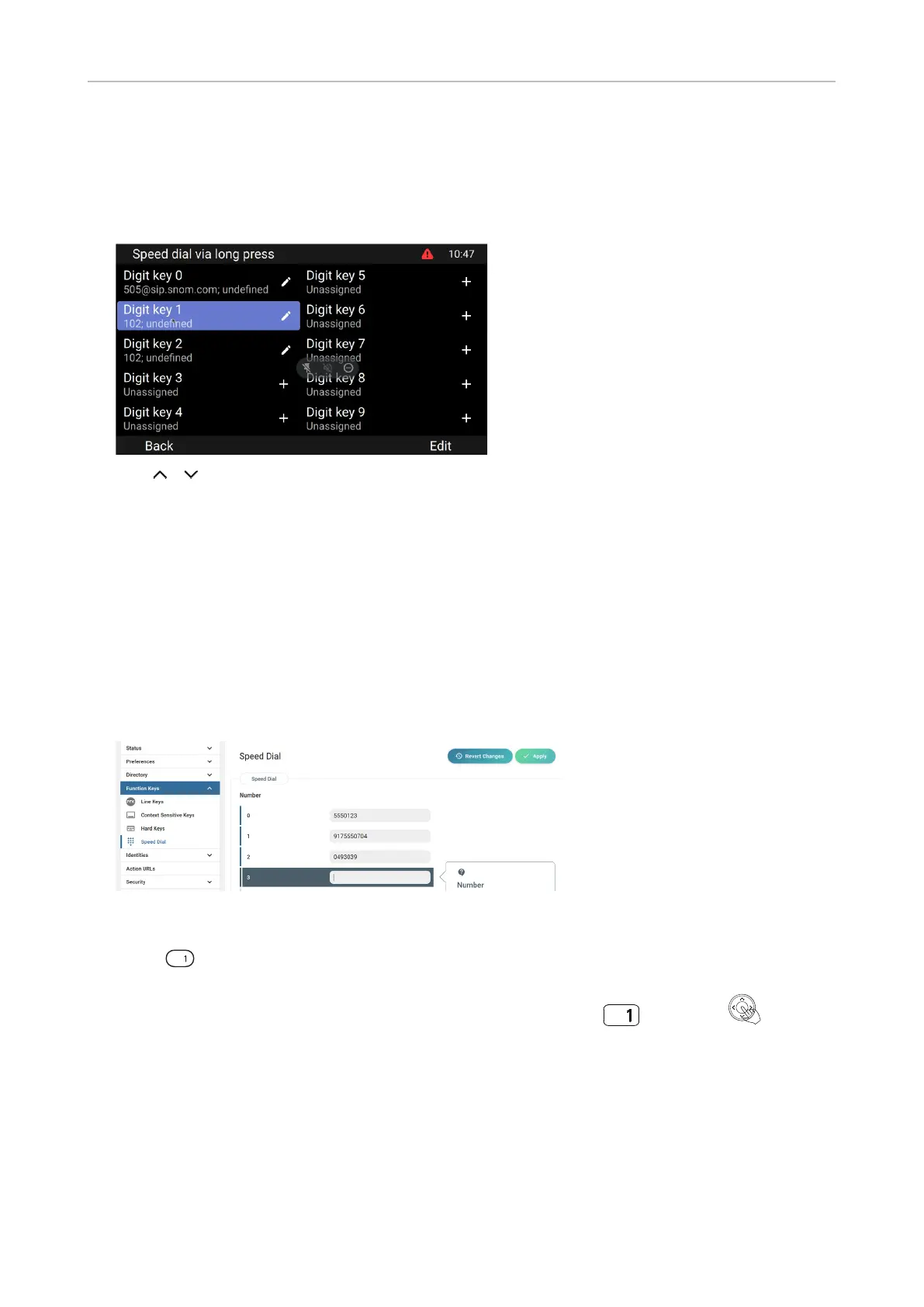
1. Press Menu and select Preferences > Programmable keys > Speed dial. Phone numbers
currently assigned to any speed dial numbers are indicated in the line underneath the respective
speed dial number.
2. Use / to select a key.
3. Press Edit.
4. Type the phone number into the text eld without spaces or punctuation between the digits
5. Press Save to save and to return to the speed dial menu.
Setting on the web interface
1. Click Function keys in the left lateral menu.
2. Click Speed Dial in the Function keys menu.
3. Enter one phone number with any required prexes (area code, country code, operator/auto
attendant, etc.) in the text eld for each respective number or special character in the table.
Type each phone number without spaces or punctuation between the digits.
For example: You want to be able to speed dial phone number 555-0784 in area code 917 by
typing on the keypad. In conventional notation you might write the number down as (917)
555-0784. In the speed dial table, type 9175550784 into the text eld of the number 1.
4. Click Apply. You can now speed dial the number by long-pressing and Dial or on the
phone.
Auto dial
In the default setting, this function is switched o. When it is enabled, the phone will dial the number
on the display when the time span in seconds specied in this setting has elapsed since the last digit
was typed.



 To Next Page