24
D862 User Manual Getting to Know Your Phone
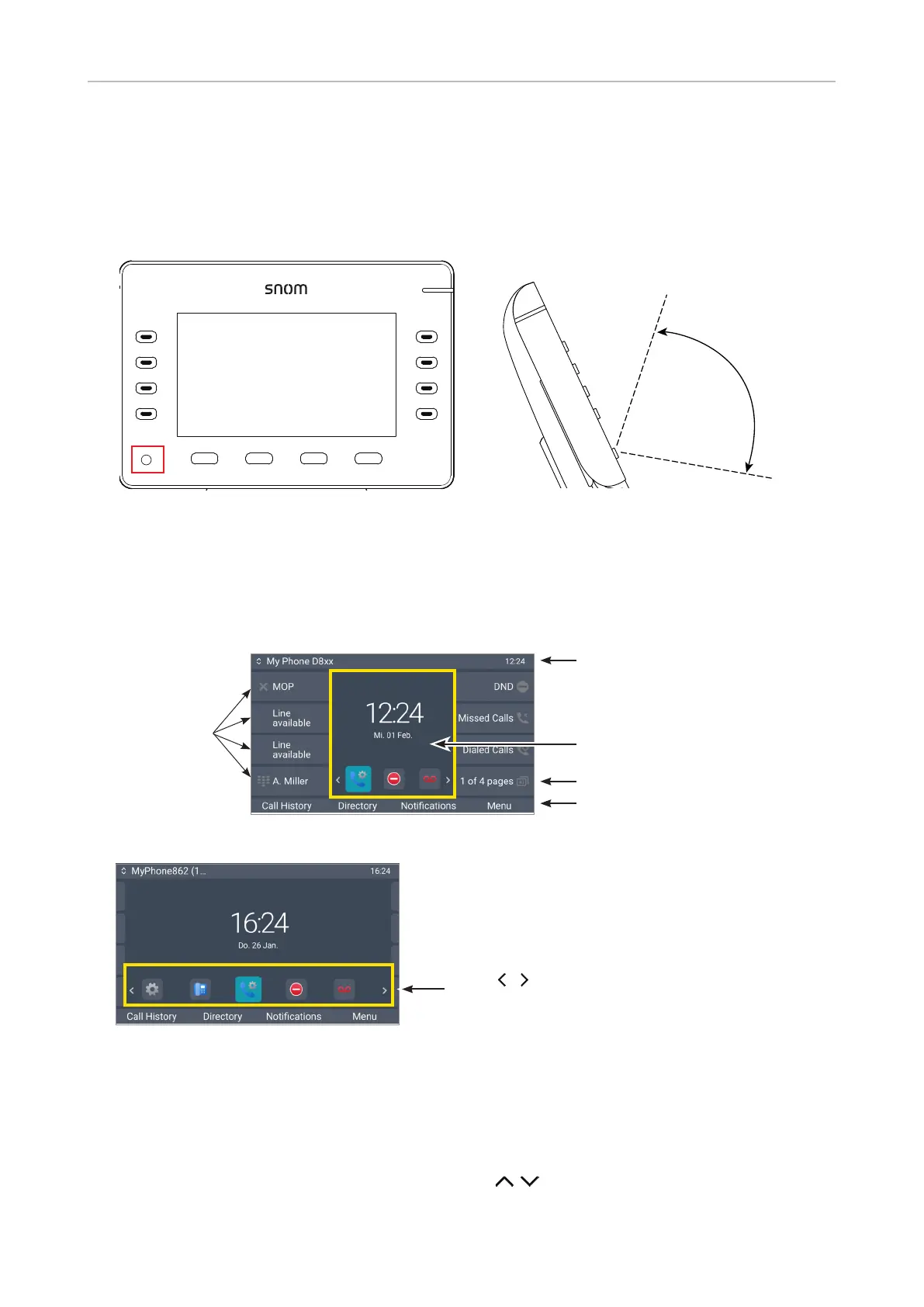
Ambient light sensor
The sensor is located in the lower left corner of the glass covering the display and the surrounding
area (Fig. 1). The sensor adjusts the backlight in accordance with the ambient light within the
sensor's detection area (Fig. 2) when the phone is idle and when it is active.
Detection
area approx.
100 degrees
Fig. 1 Fig. 2
Display layout
In idle mode
Info bar /status line
Context area
Page key
Context-sensitive function key line
Fig.1, idle screen, SmartLabels in full label mode
Fig. 2, idle screen, SmartLabels in short label mode
In idle mode, the display presents the following information:
Info bar/status line
• Left side: shows the current outgoing identity/account. You can select another congured and
active identity by pressing the up and down arrows on the navigation key.
• Right side: Time, audio mode, other info (Bluetooth, VPN, etc.) .
SmartLabels
Favicons - shortcuts to the preferences, system,
and call features menus, DND on/o, and
accessing the mailbox.
Press / to highlight an icon, press
to open or activate.



 To Next Page